Input tab, E “input tab” on – MOTU UltraLite-mk5 USB-C Audio/MIDI Interface User Manual
Page 34
C U E M I X 5
34
INPUT TAB
3
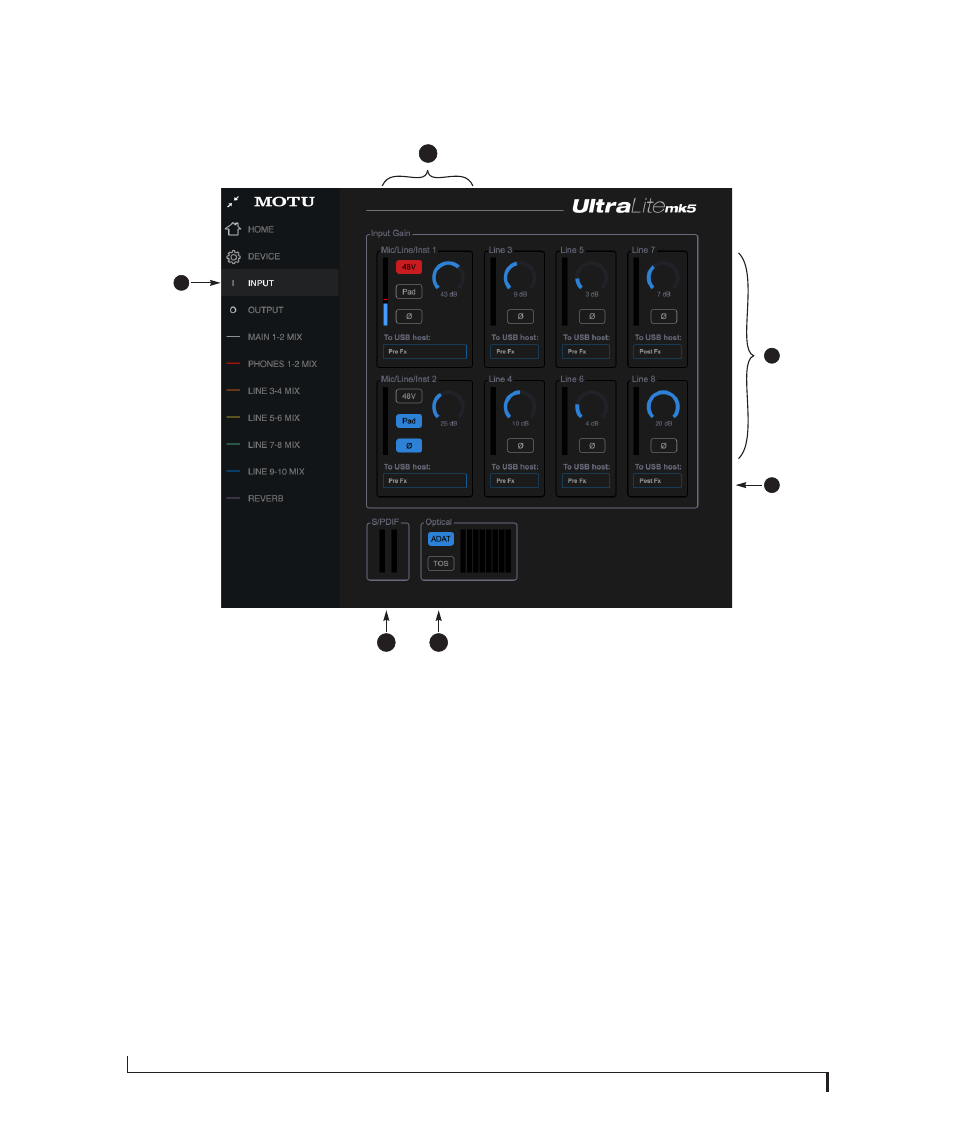
1. This is the
Input
tab, which provides
access to settings for the
UltraLite-mk5 analog and digital
inputs.
2. These channel settings for the
Mic/Line/Inst
inputs are the same as
those shown in the Home tab (item
#7 on page 32) and on the front
panel of the UltraLite-mk5, includ-
ing preamp gain, 48V phantom
power and -20 dB pad.
3. Each line input can be digitally
boosted up to + 20 dB. This allows
the inputs to easily accommodate
+4 dB and -10 dB reference levels.
Each input also includes a
Phase
Invert
switch.
4. In the Mix tabs (page 36), each
analog input channel strip provides
EQ and compression. The mic/line/
inst inputs include gating. These
effects can be applied to the input as
needed (items #1 and 2 on page 38).
This
To USB Host
menu for each line
input lets you choose whether to
send the input signal to your host
software with or without these
hardware effects applied to the
signal. If you want to record the
signal dry,
without
the effects
applied to it, choose
Pre Fx
. If you
want to record the signal
with
the
effects applied, choose
Post Fx
.
Please note: once the signal is
recorded in your DAW with th
Post Fx
option, the effects cannot be
removed from the signal.
5. Configure the
Optical Input
format
for either 8-channel ADAT or stereo
TOSLink. At 88.2 or 96 kHz, the ADAT
setting supports 4-channel SMUX
format. Note that you can choose a
different format for the optical IN
and OUT ports. See “Optical I/O” on
page 47.
6.
S/PDIF Input
level meters are
provided here for convenience.
1
2
4
5
6