Aux masters – Solid State Logic SSL 12 USB Audio Interface User Manual
Page 21
When the
DIRECT
Button is disengaged, the signals can be routed to the HP A, HP
B & Line 3-4 from the SSL Mixer. As with the
Input Channels,
sends to the aux
busses are controlled via the
HP A, HP B & LINE 3-4
Send Level Knobs, with Pan,
and muting button also accessible.
6. SCRIBBLE STRIP
This text box identifies the Playback Return Channel and is named as displayed by
default. The text box is editable, allowing it to be renamed by the user.
FADER
The fader controls the level sent to the Monitor Bus for each Playback Return
Channel (providing DIRECT is disengaged), as well as providing
SOLO,
CUT &
PAN
functionality.
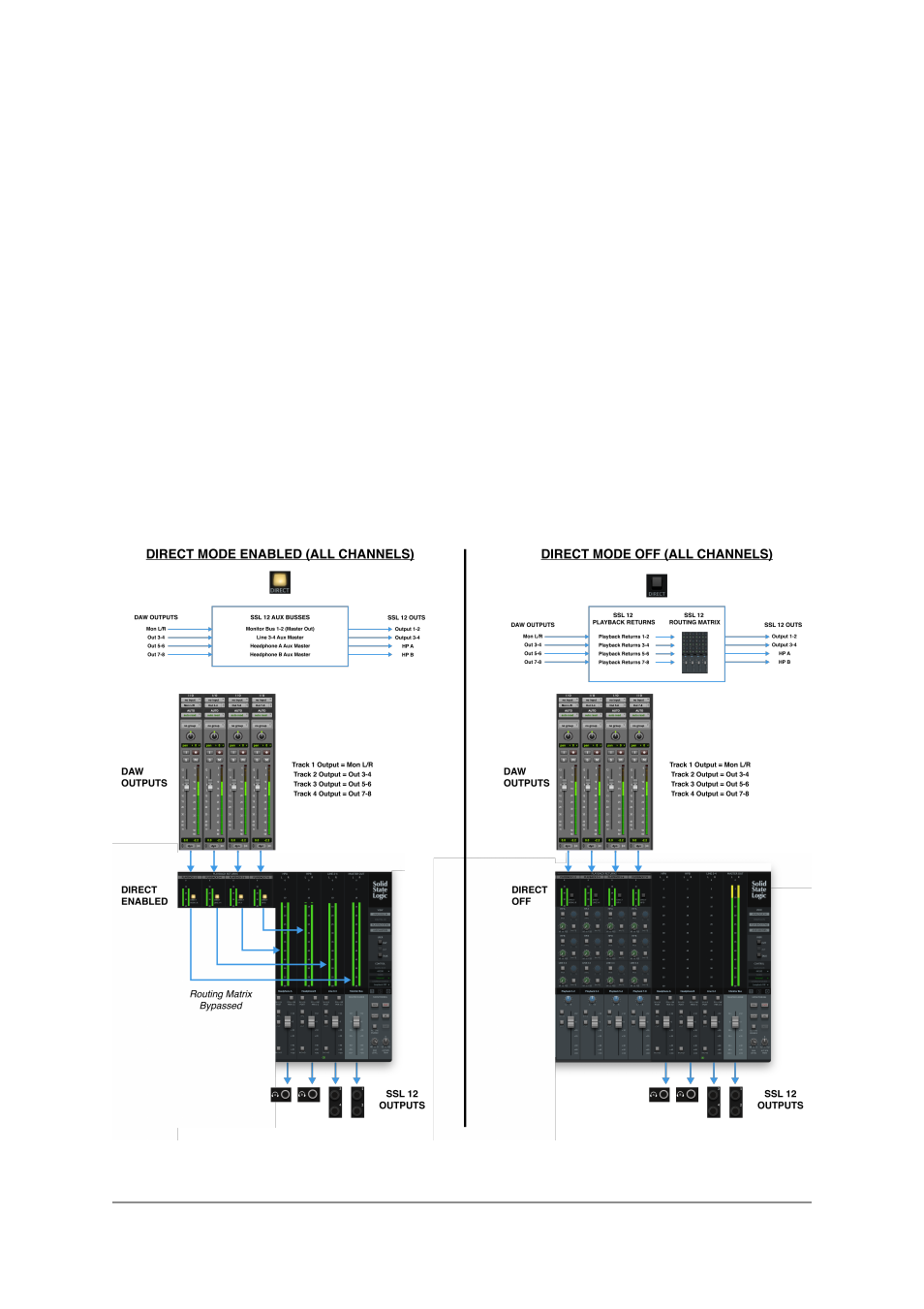
Below is a visual illustration of
DIRECT MODE
. For simplicity, the illustration shows
all Playback Returns with DIRECT Enabled (left-hand side) and all Playback
Returns with DIRECT Disabled (right-hand side). Of course, you have the ability to
toggle the DIRECT mode on/off for each Stereo Playback Return Channel.
AUX Masters
The Aux Masters section of the Mixer View consists of both Headphones A,
Headphones B & Line Out 3&4 aux master outputs.