Monitoring – Solid State Logic SSL 12 USB Audio Interface User Manual
Page 25
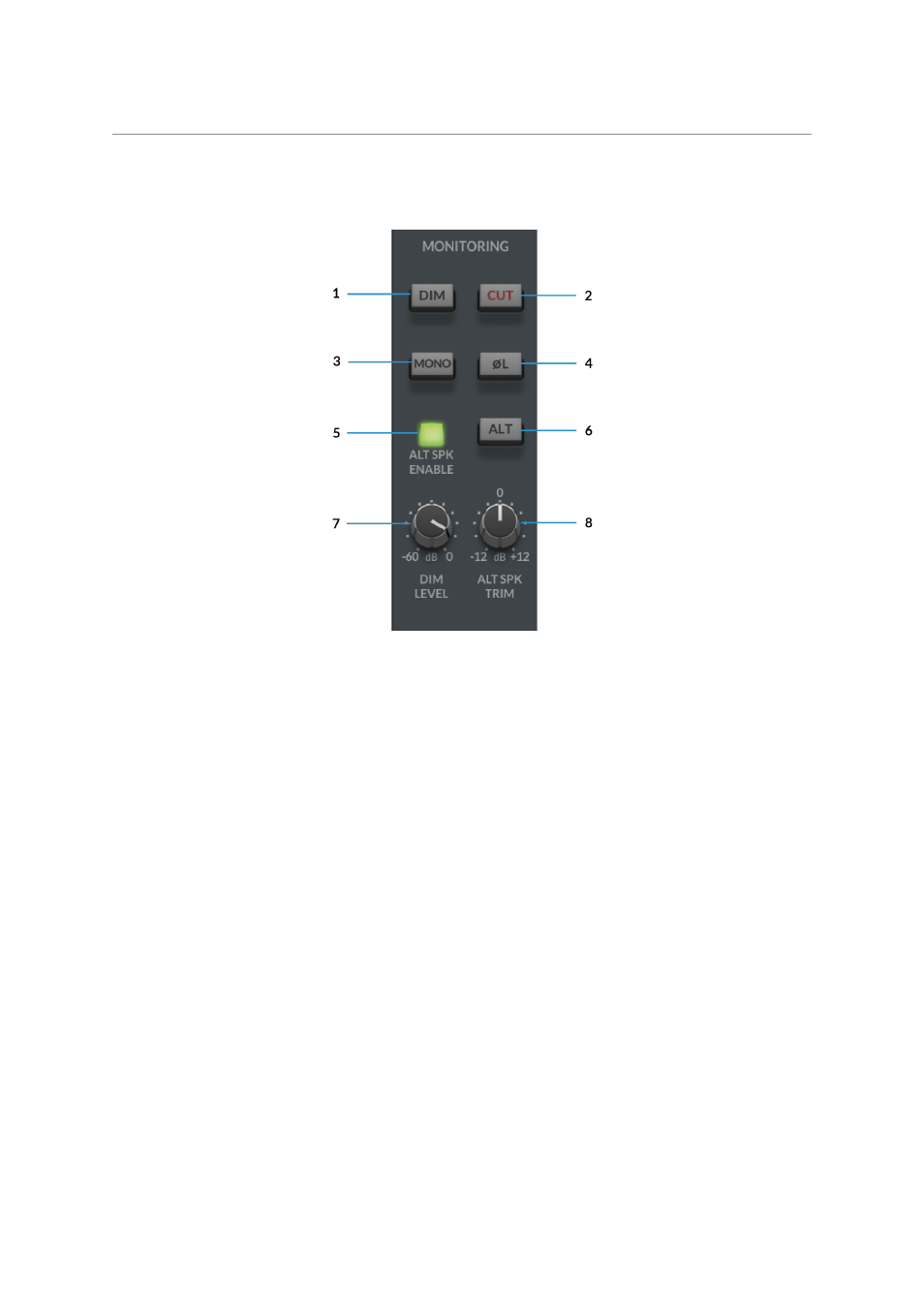
The MASTER FADER level will control the output volume signal, pre the physical
Monitor Level Control on the SSL 12 Interface.
MONITORING
This section of the Mixer pertains to the control of your SSL 12's range of
comprehensive monitoring features.
1. DIM
The DIM button will engage a level attenuation set by the DIM LEVEL (
7
)
2. CUT
Cuts the output to the monitors.
3. MONO
This will sum the Left & Right channel signals of the
Master Out
together and
provide a MONO output signal to the Main Outputs.
4. POLARITY INVERT
This will invert the left side signal, allowing assessment of the phase relationship
between the left & right signal.
5. ALT SPEAKER ENABLE
This function allows you to connect a second set of monitors to Line Outputs 3-4.
When
ALT SPK
is enabled, the MONITOR LEVEL will also affect the output signal
level to Outputs 3&4 when
ALT
is engaged.
6. ALT