Canon imageCLASS MF264dw II Multifunction Monochrome Laser Printer User Manual
Page 153
3
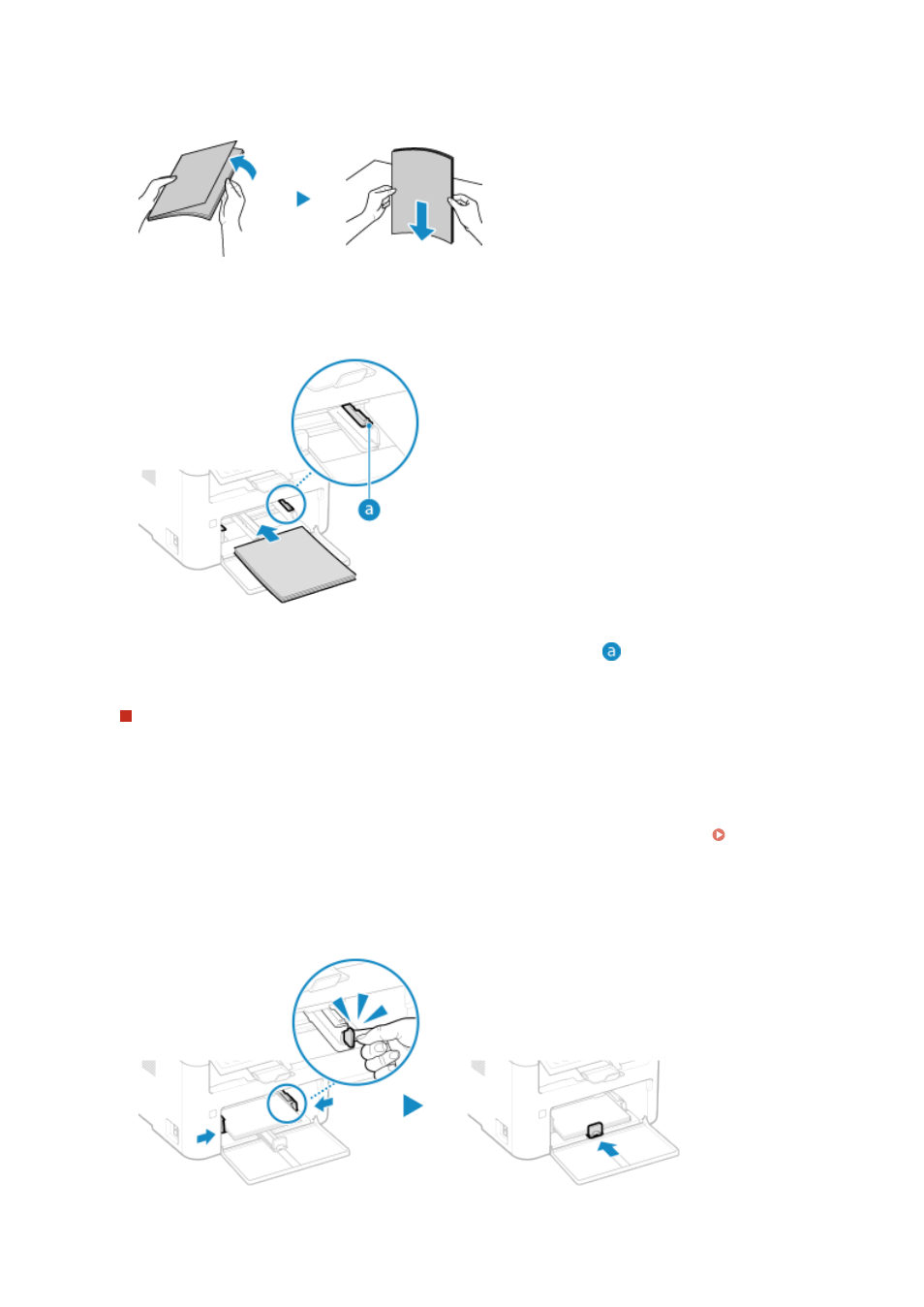
Fan the paper and align the edges.
Fan the paper in small batches, and align the edges by tapping the paper on a flat surface a few times.
4
Load the paper with the print side face up.
●
Insert the paper until the edge of the paper is against the paper tray.
●
Make sure the loaded paper does not exceed the load limit guides (
). If it exceeds the load limit guides,
there may be misfeeds or a paper jam.
When Printing on the Back Side of Printed Paper (Manual 2-sided Printing)
Flatten the edge of the paper to remove any curls, and load the paper with the back (unprinted) side face up.
●
You can use only paper printed with this machine.
●
You cannot print on a side that has been previously printed on.
●
If toner smudges and splatters appear on the back side, adjust the image quality. [Manual Back Side
Print (2-Sided Only)](P. 459)
5
Align the paper guides with the width and length of the paper.
Paper guides that are aligned but too loose or too tight can cause misfeeds or a paper jam.
Basic Operations
144