Is-is authentication configuration example, Network requirements – H3C Technologies H3C S5560 Series Switches User Manual
Page 191
175
IPv4 Destination IntCost ExtCost ExitInterface NextHop Flags
-------------------------------------------------------------------------------
10.1.1.0/24 10 NULL VLAN100 Direct D/L/-
10.1.2.0/24 10 NULL VLAN200 Direct D/L/-
192.168.0.0/24 10 NULL VLAN300 Direct D/L/-
Flags: D-Direct, R-Added to Rib, L-Advertised in LSPs, U-Up/Down Bit Set
Level-2 IPv4 Forwarding Table
-----------------------------
IPv4 Destination IntCost ExtCost ExitInterface NextHop Flags
-------------------------------------------------------------------------------
10.1.1.0/24 10 NULL VLAN100 Direct D/L/-
10.1.2.0/24 10 NULL VLAN200 Direct D/L/-
192.168.0.0/24 10 NULL VLAN300 Direct D/L/-
10.1.4.0/24 10 NULL VLAN300 192.168.0.2 R/L/-
10.1.5.0/24 20 NULL VLAN300 192.168.0.2 R/L/-
10.1.6.0/24 20 NULL VLAN300 192.168.0.2 R/L/-
Flags: D-Direct, R-Added to Rib, L-Advertised in LSPs, U-Up/Down Bit Set
IS-IS authentication configuration example
Network requirements
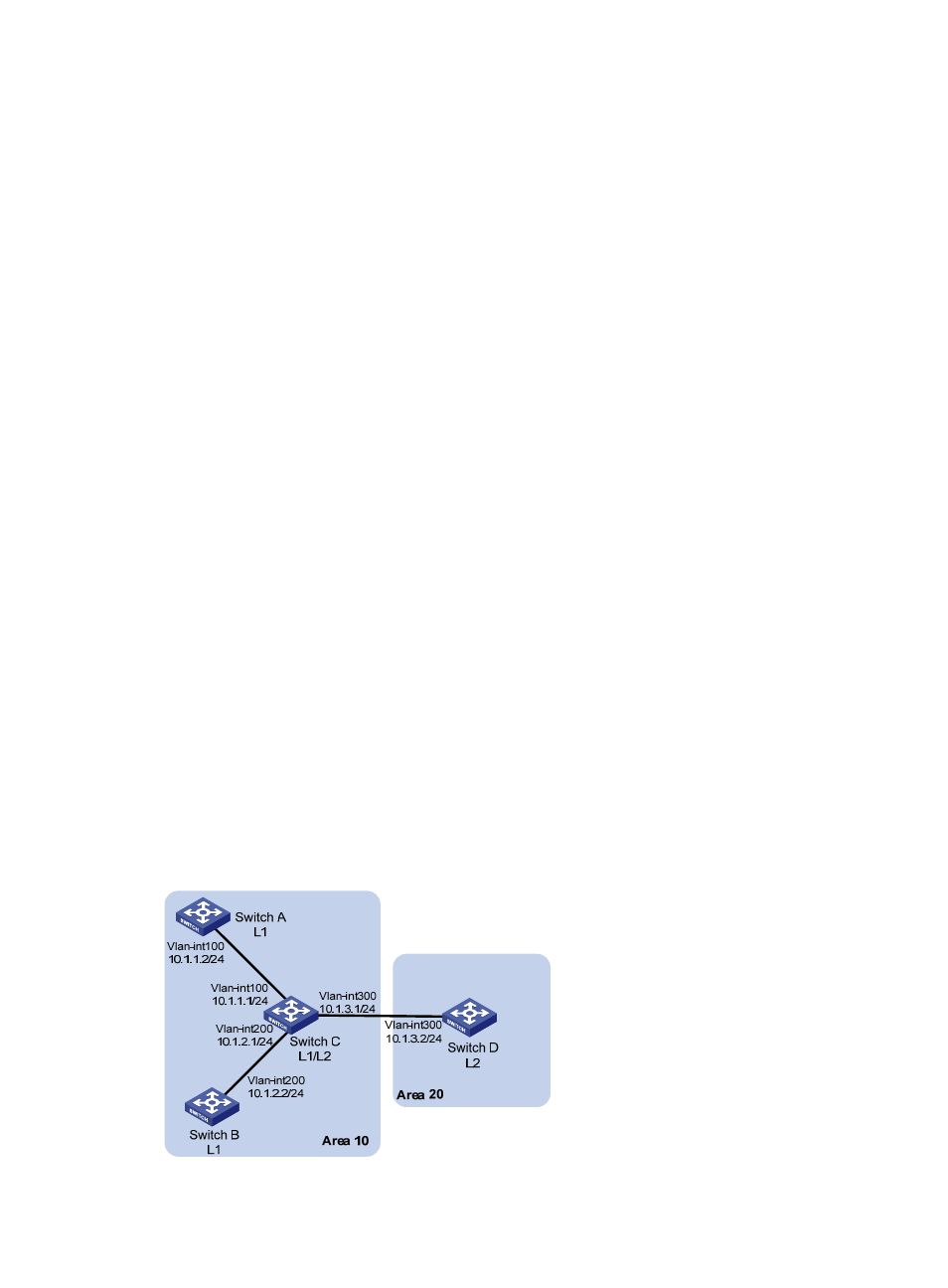
, Switch A, Switch B, Switch C, and Switch D reside in the same IS-IS routing
domain. Run IS-IS among them.
Switch A, Switch B, and Switch C belong to Area 10, and Switch D belongs to Area 20.
•
Configure neighbor relationship authentication between neighbors.
•
Configure area authentication in Area 10 to prevent untrusted routes from entering into the area.
•
Configure routing domain authentication on Switch C and Switch D to prevent untrusted routes from
entering the routing domain.
Figure 43 Network diagram