Using a computer to charge the battery – Canon PowerShot G7 X Mark II User Manual
Page 181
181
Appendix
Before Use
Index
Basic Guide
Advanced Guide
Camera Basics
Auto Mode /
Hybrid Auto Mode
Other Shooting Modes
P Mode
Tv, Av, M, and C Mode
Playback Mode
Wi-Fi Functions
Setting Menu
Accessories
●
For details on charging time and the number of shots and
recording time possible with a fully charged battery pack, see
“Number of Shots/Recording Time, Playback Time” (= 219).
●
You can view images even while the battery is charging, by
turning the camera on and entering Playback mode (= 24).
However, you cannot shoot while the battery is charging.
●
If the USB charge lamp does not light up, remove the interface
cable and insert the cable again.
●
Charged battery packs gradually lose their charge, even when
they are not used. Charge the battery pack on (or immediately
before) the day of use.
●
The charger can be used in areas with 100 – 240 V AC power
(50/60 Hz). For power outlets in a different format, use a
commercially available adapter for the plug. Never use an
electrical transformer designed for traveling, which may damage
the battery pack.
Using a Computer to Charge the Battery
You can also charge the battery pack by inserting the larger plug of the
interface cable into a computer’s USB terminal in step 2 of “Inserting and
Charging the Battery Pack” (= 180). For details about USB connections
on the computer, refer to the computer user manual.
●
Charging is not possible when the camera is off.
●
With some computers, battery charging may require the memory
card to be in the camera. Insert the memory card in the camera
(= 19) before connecting the cable to the computer’s USB
port.
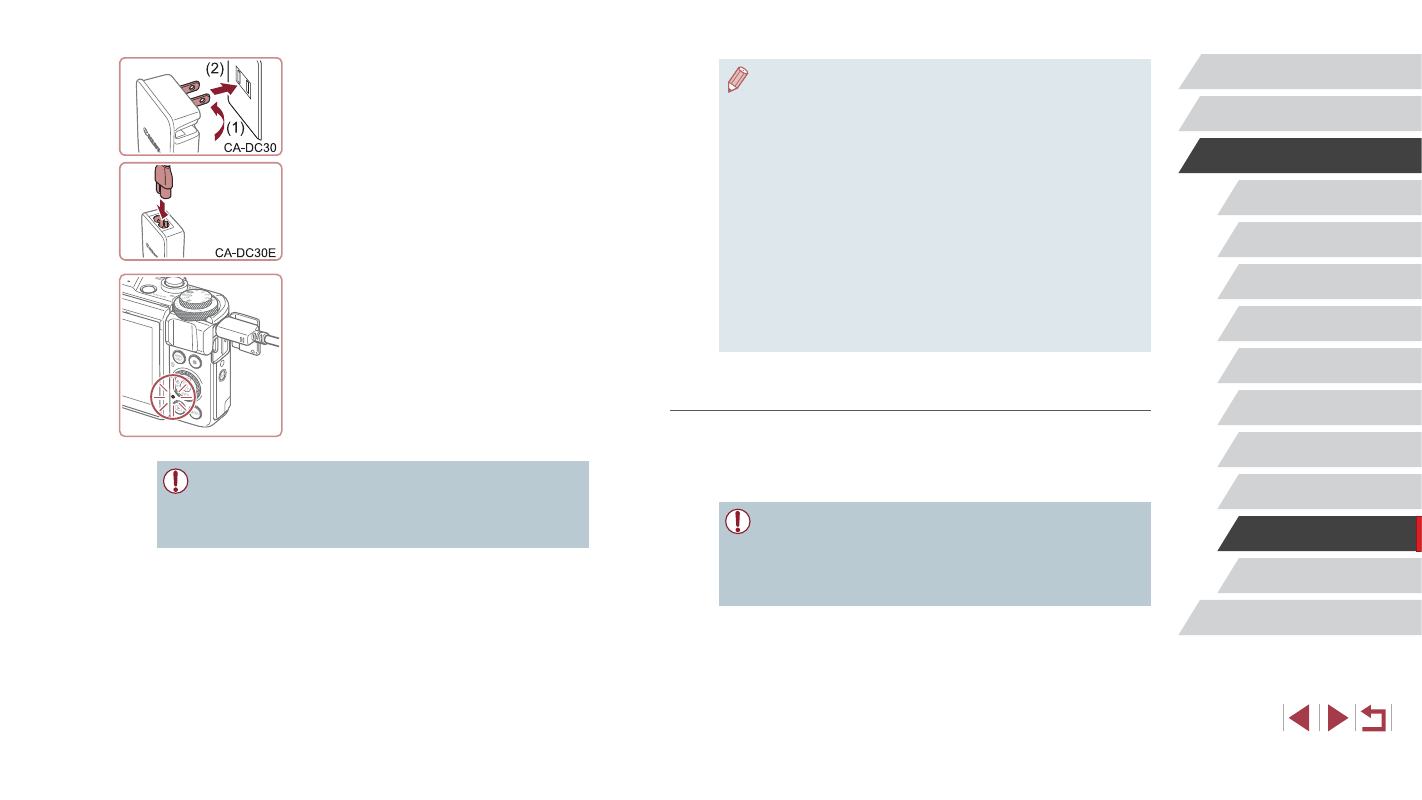
3
Charge the battery pack.
z
CA-DC30: Flip out the plug (1) and plug
the compact power adapter into a power
outlet (2).
z
CA-DC30E: Plug the power cord into the
compact power adapter, then plug the
other end into a power outlet.
z
Charging begins and the USB charge
lamp lights up.
z
The lamp turns off when charging
finishes.
z
Remove the compact power adapter from
the power outlet and the interface cable
from the camera.
●
To protect the battery pack and keep it in optimal condition, do not
charge it continuously for more than 24 hours.
●
When charging another battery, ensure that the interface cable is
removed from the camera before replacing the battery to charge.