Remote control unit – Marantz AV8801 User Manual
Page 169
166
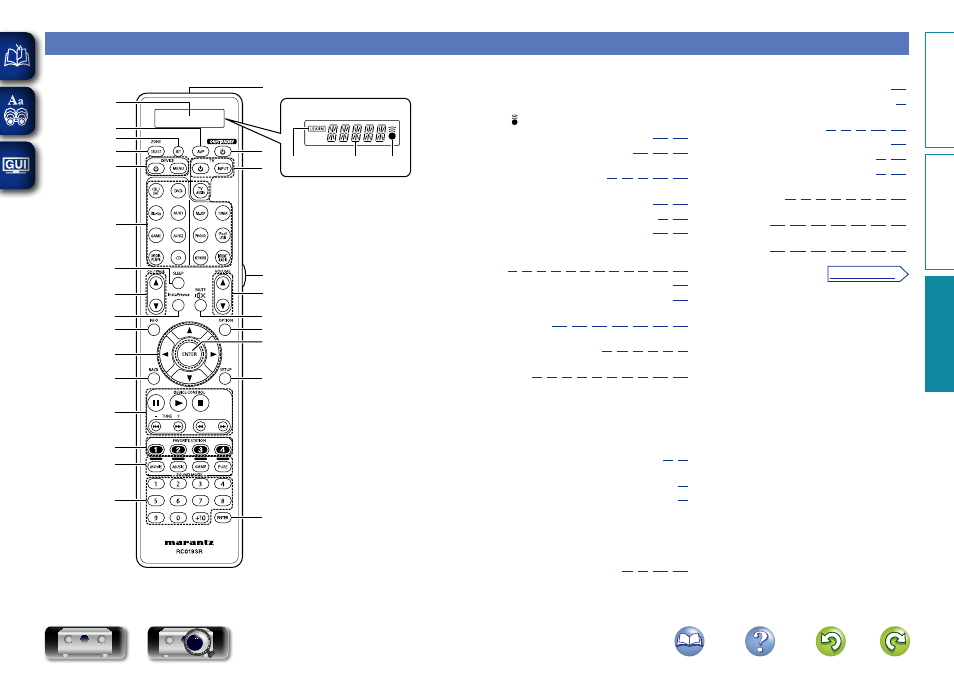
Remote control unit
For buttons not explained here, see the page indicated in parentheses ( ).
q
w
e
t
y
i
u
Q0
Q2
Q3
Q4
Q5
Q6
o
Q1
Q8
Q9
W3
Q7
W1
W0
W5
W4
W4
W2
r
q
w
e
q
Display
q
LEARN indicator
w
Information display
e
indicator
w
AVP button ······································· (
e
SET button ································ (
r
ZONE SELECT button
········································· (
t
Device operation buttons
(DEVICE
X / DEVICE MENU) ··········· (
y
Input source select buttons ··············· (
u
SLEEP button ···································· (
i
Channel/page search buttons
(CH/PAGE
df)
··(
,
,
,
,
o
InstaPrevue button ··································· (
Q0
Information button (INFO) ······················· (
Q1
Cursor buttons (
uio p)
··················· (
Q2
BACK button
······································· (
Q3
DEVICE CONTROL buttons
··········· (
• Pause button (
3)
• Play button (
1)
• Stop button (
2)
• Skip buttons (
8, 9)
• Search buttons (
6, 7)
Tuning up / Tuning down buttons
(TUNE +, –) ············································ (
Q4
FAVORITE STATION buttons
(1 – 4) ··························································· (
Q5
SOUND MODE buttons ······························ (
• MOVIE button
• MUSIC button
• GAME button
• PURE button
Q6
Number buttons
··············································· (
Q7
Remote control signal transmitter ········· (
)
Q8
ON/STANDBY button (
X) ·························· (
)
Q9
TV operation buttons
(TV
X / INPUT) ················ (
)
W0
Light button ·············································· (
)
W1
VOLUME buttons (
df) ······················ (
)
W2
MUTE button (
:) ····························· (
)
W3
OPTION button
························· (
)
W4
ENTER button
··················· (
)
W5
SETUP button
··················· (
)
Basic v
ersion
A
dv
anced v
ersion
Inf
or
mations
Inf
or
mations
v See overleaf
DVD