Configuration of the tcp parameters manually – CIRCUTOR CVM-B Series User Manual
Page 264
7�5�4�2�-
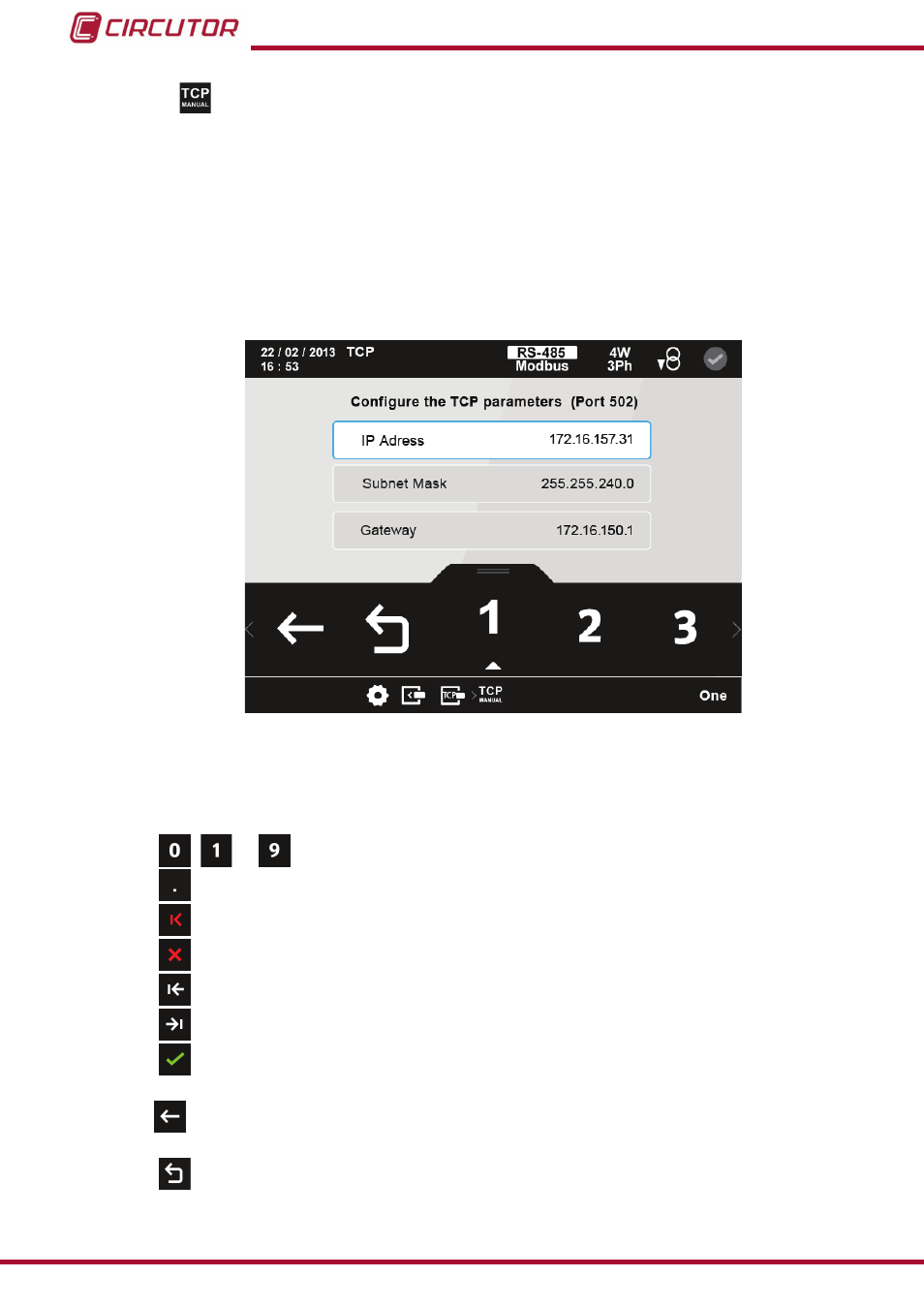
Configuration of the TCP parameters manually.
Note: If DHCP is activated, you will not be able to modify the parameters on this screen. This
is indicated by a * next to each value.
The configuration parameters of the TCP communication are,
:
IP address.
Subnet mask.
Gateway.
figure 184: Configuration screen of the Modbus TCP ( Bridge) module (TCP manual)
The parameter selected is indicated in white.
The following options appear in the lower area:
,
...
the ten possible digits to program
�
Point.
Delete character, deletes the selected character
�
Delete parameter, deletes the characters of the selected parameter.
Previous, selects the previous parameter
�
Next, selects the next parameter
�
Confirm, confirms and saves the values programmed on the screen in the
memory
�
Back, returns to the main configuration screen of the Modbus TCP module,
Main Menu, returns to the main menu,
figure 25
.
264
CVM-B100 - CVM-B150
Instruction Manual