2 voice vlan setting – PLANET WGSW-28040P User Manual
Page 107
User’s Manual of WGSW-28040 / 28040P / 28040P4
107
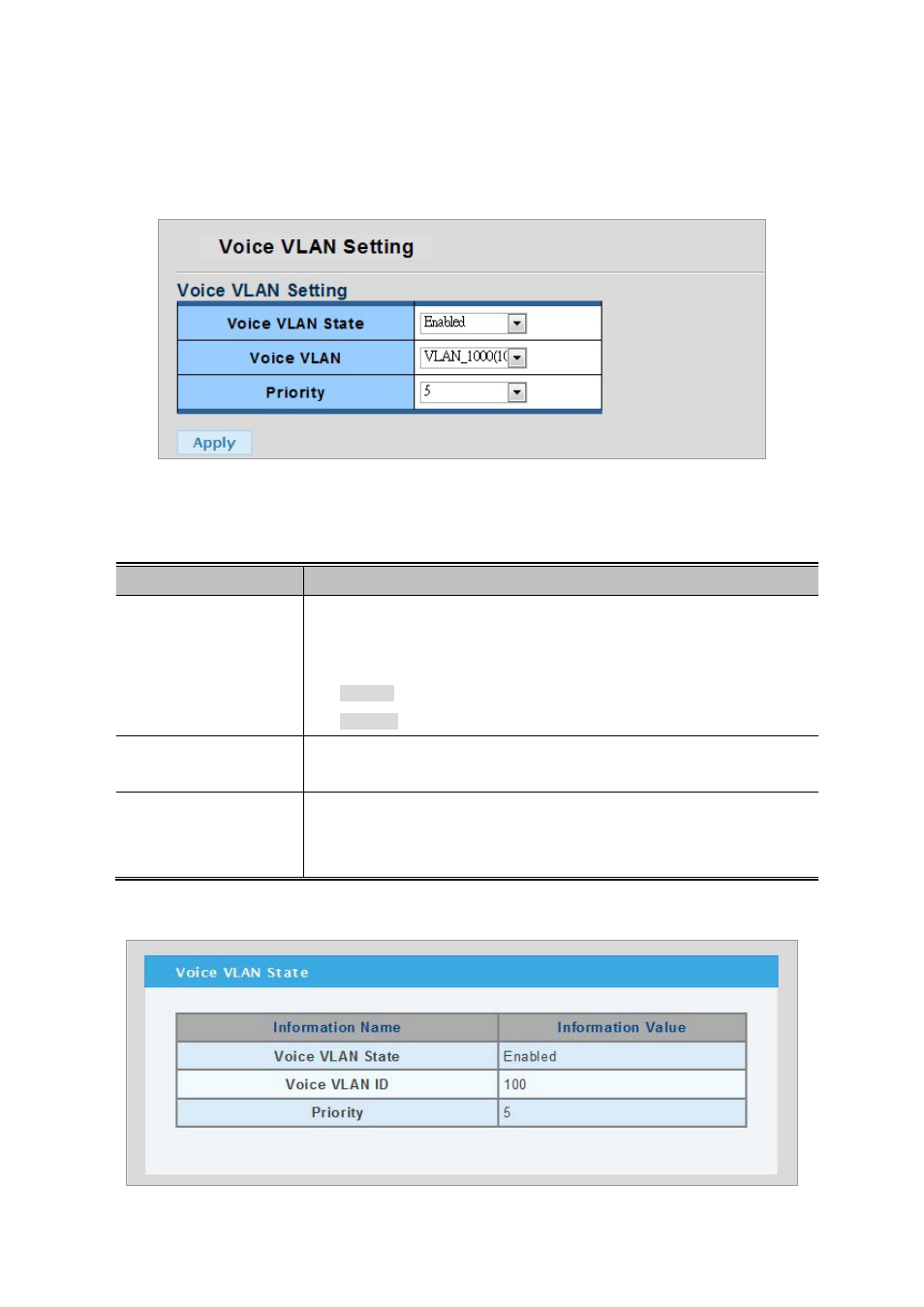
4.5.8.2 Voice VLAN Setting
To configure the Voice VLAN, click on the VLAN folder and then the Voice VLAN Setting. The Voice VLAN Configuration
screen in
Figure 4-5-16
appears.
Figure 4-5-16 Voice VLAN Setting page screenshot
The page includes the following fields:
Object
Description
• Voice VLAN State
Indicates the Voice VLAN mode operation. We must disable MSTP feature
before we enable Voice VLAN. It can avoid the conflict of ingress filter. Possible
modes are:
Enabled: Enable Voice VLAN mode operation.
Disabled: Disable Voice VLAN mode operation.
• Voice VLAN ID
Indicates the Voice VLAN ID. It should be a unique VLAN ID in the system and
cannot equal each port PVID. The allowed range is 1 to 4095.
•
Priority
Defines a CoS priority for port traffic on the Voice VLAN.
The priority of any received VoIP packet is overwritten with the new priority when
the Voice VLAN feature is active for a port.
Current Voice VLAN State
Figure 4-5-17 VLAN Port Settings page screenshot