Virtual crosspoints, Find routers’ page – Grass Valley NV9000-SE v.5.0 User Manual
Page 77
59
NV9000-SE Utilities
User’s Guide
‘Find Routers’ Page
The ‘Find Routers’ page is available in the ‘Tasks’ pane. It is not an essential tool, but can be a
convenience if you want to view a list of accessible routers.
You can think of this page as NV9000-SE Utilities’ “ping” for routers.
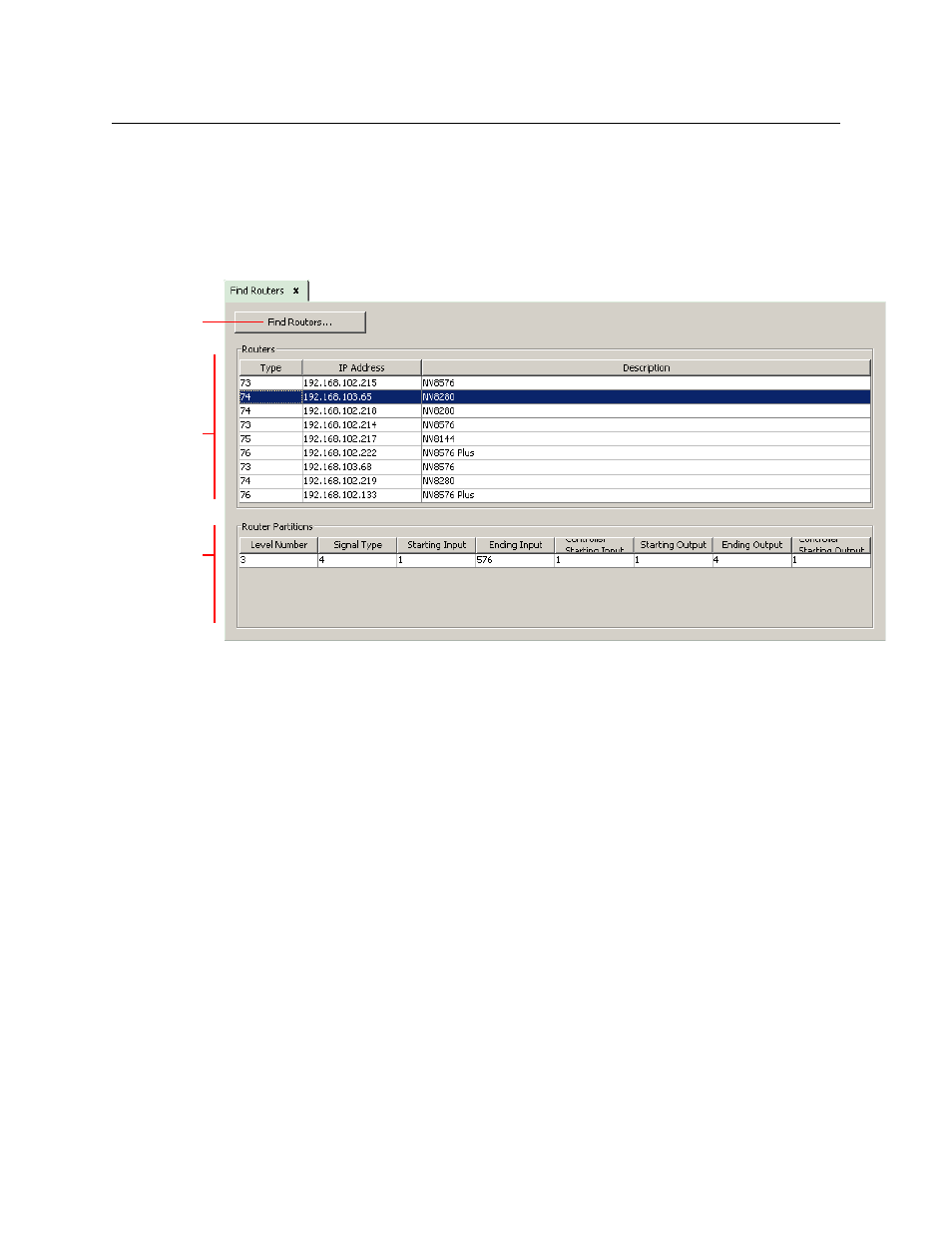
This is the page:
There are 3 parts to the page:
•
‘Find Routers’ button
•
Router list
•
Partition list
Click the ‘Find Router’ button to generate a list of routers (actually router control cards) that are
detectable by your PC.
The router list, in the ‘Routers’ section, has 3 columns:
•
Type. Each router control card has, within its non-volatile storage, a router type ID. This field
shows the router’s type ID.
•
IP address. This is the IP address of the router’s control card. (Most NVISION series routers
have two control cards.)
•
Description. This is a brief description of the router.
If you click a row in the router list, the page will list data for one of the router’s partitions. None of
the fields in the page are editable. The page is a report only.
Virtual Crosspoints
Virtual crosspoints are a concept developed at NVISION (now Grass Valley) that allows re-entry
without consuming any physical ports (either input or output).
Router
List
Button
Partition
List