Attaching a lens, Detaching a lens – Canon EOS M10 User Manual
Page 22
22
Before Use
Basic Guide
Advanced Guide
Camera Basics
Auto Mode /
Hybrid Auto Mode
Other Shooting Modes
Tv, Av, and M Mode
Playback Mode
Wi-Fi Functions
Setting Menu
Accessories
Appendix
Index
P Mode
●
To retract the lens, hold the lens
retraction switch toward [ ] as you turn
the zoom ring. Align the lens retraction
index with the zoom position index, and
then release the switch.
●
To zoom, turn the zoom ring on the lens
with your fingers.
●
If you want to zoom, do it before focusing.
Turning the zoom ring after achieving
focus may throw off the focus slightly.
●
To protect the lens, keep the lens cap on when the camera is not
in use.
Detaching a Lens
●
Make sure the camera is off.
●
Hold down the lens release button (1) as
you turn the lens in the direction shown
(2).
●
Turn the lens until it stops, and then
remove it in the direction shown (3).
●
Attach the lens cap to the lens after
removal.
●
Minimizing Dust
-
When changing lenses, do it quickly in a place with minimal
dust.
-
When storing the camera without a lens attached, be sure to
attach the body cap to the camera.
-
Remove dust on the body cap before attaching it.
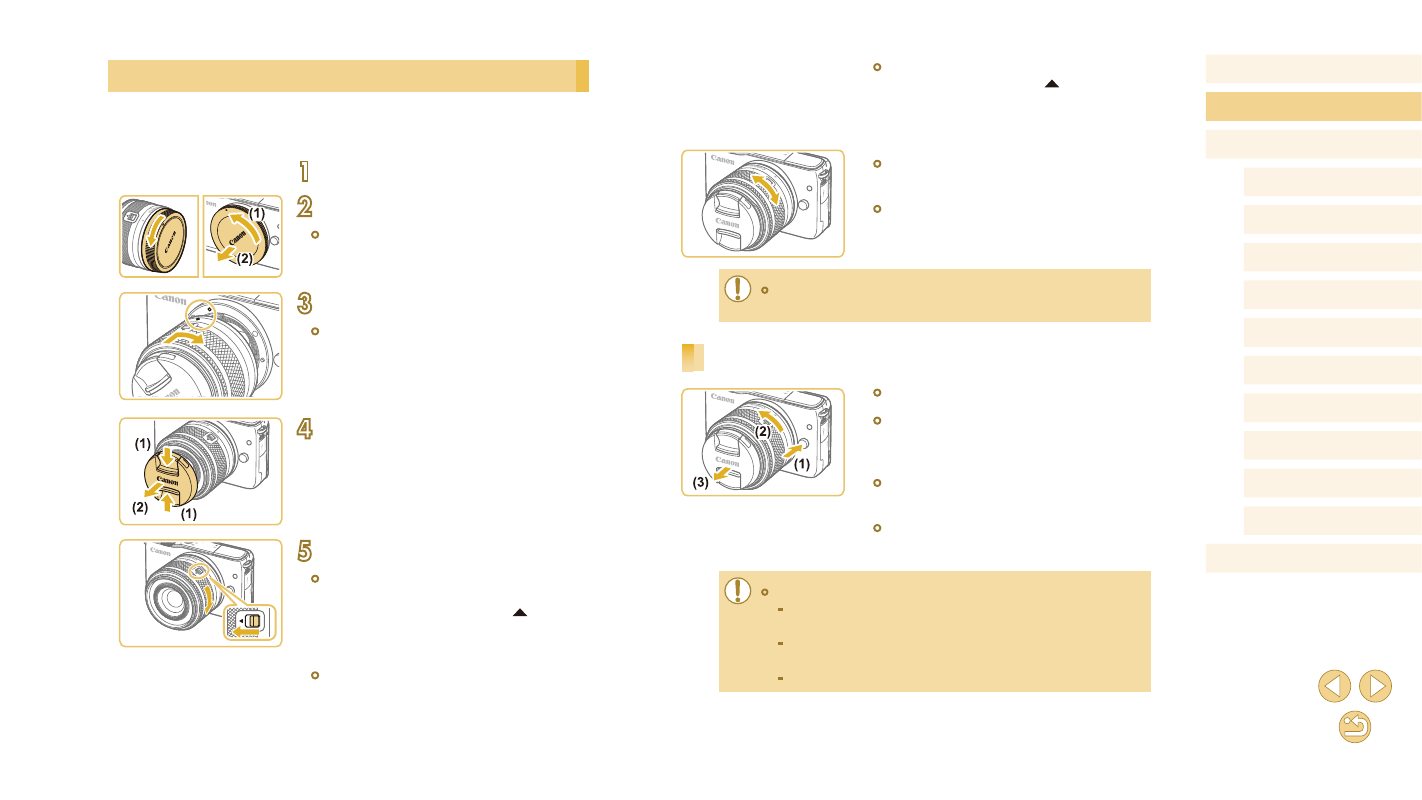
Attaching a Lens
The camera is compatible with EF-M lenses. If you use Mount Adapter
EF-EOS M, you can also use EF and EF-S lenses (= 23).
1
Make sure the camera is off.
2
Remove the caps.
●
Remove the lens cap and body cap by
turning them in the directions shown.
3
Attach the lens.
●
Align the mount indexes (the white dots)
on the lens and camera, and then turn
the lens in the direction shown until it
clicks into place.
4
Remove the front lens cap.
5
Prepare to shoot.
●
With the lens retraction index aligned
with the zoom position index, hold the
lens retraction switch toward [ ] as you
turn the zoom ring a little in the direction
shown, and then release the switch.
●
Continue turning the zoom ring until it
clicks, indicating that the lens is ready for
shooting.