Conventions in this guide – Canon EOS M10 User Manual
Page 5
5
Before Use
Basic Guide
Advanced Guide
Camera Basics
Auto Mode /
Hybrid Auto Mode
Other Shooting Modes
Tv, Av, and M Mode
Playback Mode
Wi-Fi Functions
Setting Menu
Accessories
Appendix
Index
P Mode
Conventions in This Guide
●
In this guide, icons are used to represent the corresponding camera
buttons and switches on which they appear or which they resemble.
●
The following camera buttons and controls are represented by icons.
●
Shooting modes and on-screen icons and text are indicated in
brackets.
●
: Important information you should know
●
: Notes and tips for expert camera use
●
: Indicates touch-screen operations
●
=
xx: Pages with related information (in this example, “xx” represents
a page number)
●
Instructions in this guide apply to the camera under default settings.
●
For convenience, all lenses and mount adapters are simply referred to
as “lenses” and “mount adapters”, whether they are included or sold
separately.
●
The illustrations in this guide show the camera with the EF-M15-45mm
f/3.5-6.3 IS STM lens attached as an example.
●
For convenience, all supported memory cards are simply referred to as
the “memory card”.
●
The symbols “ Still Images” and “ Movies” below titles indicate
how the function is used—whether for still images or movies.
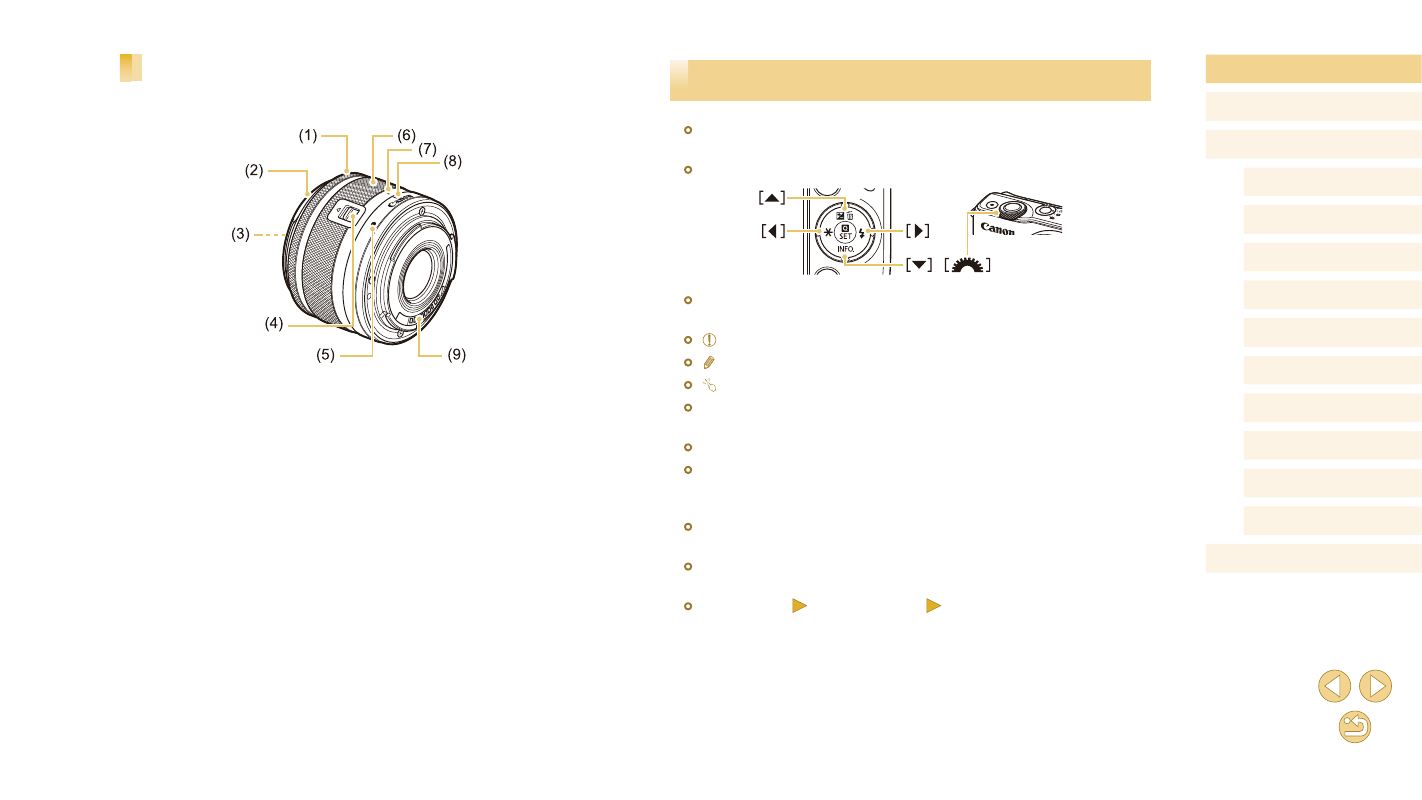
Lens
EF-M Lens
(1) Focusing ring
(2) Hood mount
(3) Filter-mounting thread
(4) Lens retraction switch
(5) Lens mount index
(6) Zoom ring
(7) Lens retraction index
(8) Zoom position index
(9) Contacts