Opening the monitor – Nikon COOLPIX P950 Digital Camera User Manual
Page 43
Advertising
43
Opening the monitor
Opening the monitor
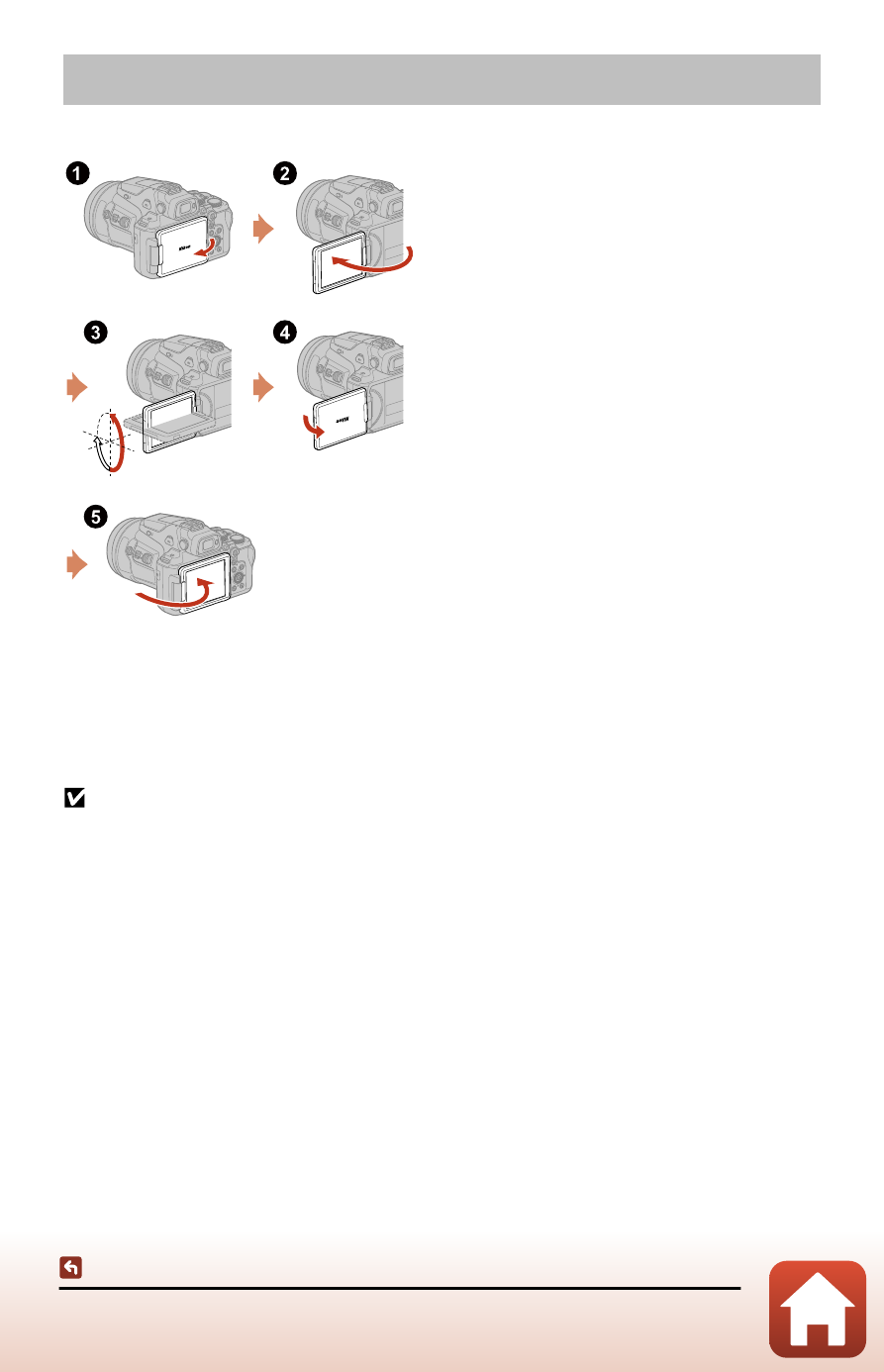
• You can adjust the direction and angle of the monitor. For normal shooting, fold
the monitor against the back of the camera, facing out (
5
).
• When you are not using or carrying the camera, fold the monitor against the
camera body with the screen facing in (
1
).
Notes about the monitor
•
The monitor’s adjustable range may be limited when a cable or accessories are attached
to the camera.
•
When moving the monitor, do not apply excessive force and move slowly within the
monitor's adjustable range so that the connection will not be damaged.
Advertising
See also other documents in the category Nikon Cameras:
- D800 (472 pages)
- D800 (38 pages)
- D800 (48 pages)
- N80 (116 pages)
- n65 (116 pages)
- D300 (452 pages)
- D80 (162 pages)
- F100 (57 pages)
- D200 (48 pages)
- D200 (221 pages)
- D40X (139 pages)
- D100 (212 pages)
- D60 (204 pages)
- D40 (139 pages)
- Coolpix S3000 (184 pages)
- Coolpix L110 (156 pages)
- F3 (3 pages)
- F3 (71 pages)
- D50 (148 pages)
- D700 (472 pages)
- COOLPIX-P100 (216 pages)
- COOLPIX-S8100 (220 pages)
- D90 (300 pages)
- D90 (2 pages)
- D3000 (216 pages)
- D3000 (68 pages)
- D5000 (256 pages)
- D3100 (224 pages)
- D300s (432 pages)
- EM (34 pages)
- FG (34 pages)
- fe (49 pages)
- fe2 (66 pages)
- f2 (70 pages)
- n2000 (54 pages)
- COOLPIX P500 (252 pages)
- Coolpix S550 (2 pages)
- Coolpix 5400 (4 pages)
- Coolpix 775 (2 pages)
- Coolpix 2500 (120 pages)
- Coolpix S4 (28 pages)
- Coolpix S4 (8 pages)
- Coolpix S560 (172 pages)
- SQ (116 pages)
- Coolpix 990 (50 pages)