Videos – Nikon Zfc Mirrorless Camera with 28mm Lens User Manual
Page 201
The
i
button (playback mode)
201
A
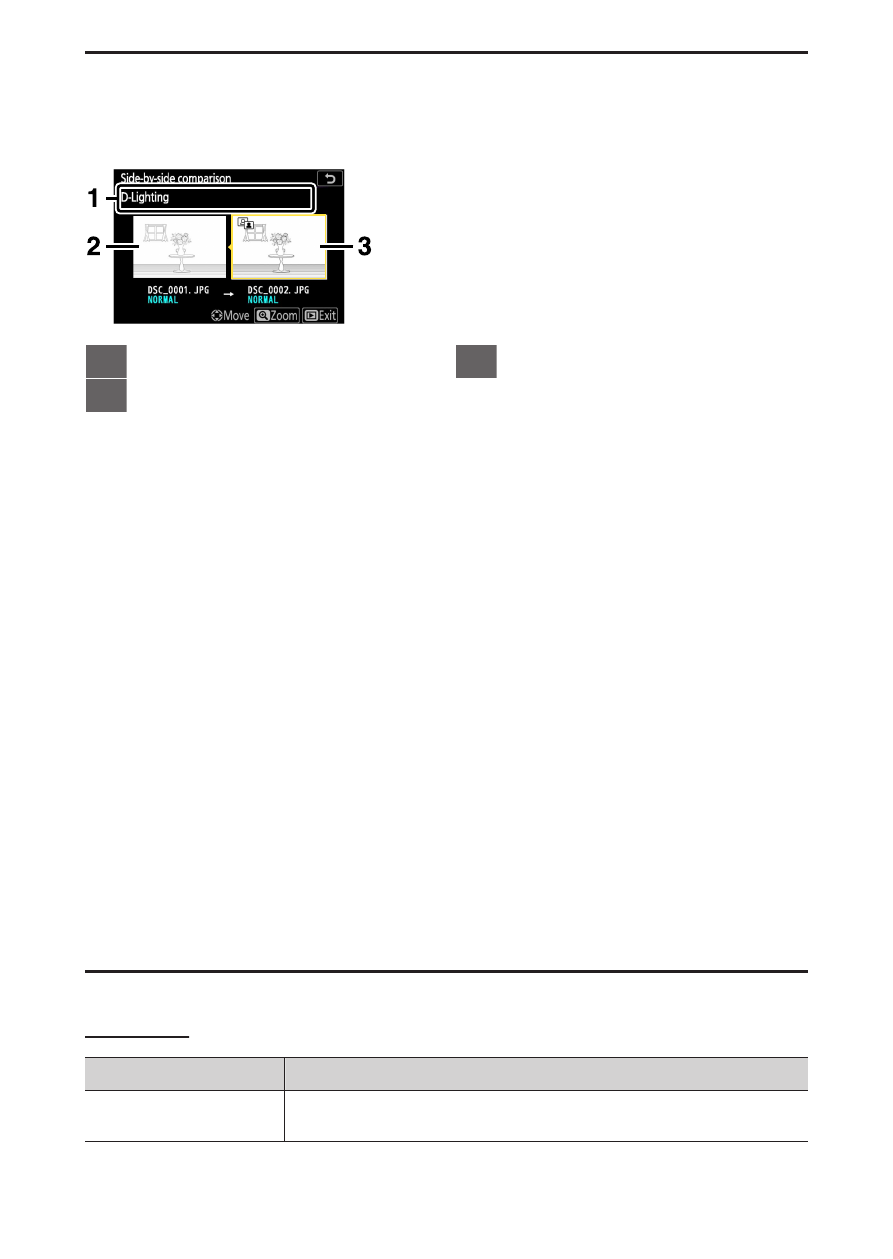
[Side-by-side comparison]
Choose [Side
-by-side comparison] to compare retouched copies with the
unretouched originals.
1
Options used to create copy
2
Source image
3
Retouched copy
・
The source image is displayed on the left, the retouched copy on the
right.
・
The options used to create the copy listed at the top of the display.
・
Press
4
or
2
to switch between the source image and the retouched
copy.
・
If the copy is an overlay created from multiple source images, press
1
or
3
to view the other images.
・
If the source has been copied multiple times, press
1
or
3
to view the
other copies.
・
To view the highlighted picture zoomed in, press and hold the
X
button.
・
Press
J
to return to playback with the highlighted image displayed full-
frame.
・
To exit to playback, press the
K
button.
・
The source image will not be displayed if the copy was created from a
photograph that is now protected.
・
The source image will not be displayed if the copy was created from a
photograph that has since been deleted.
Videos
Option
Description
[Rating]
Rate the current video (