Connecting in access-point mode – Nikon Zfc Mirrorless Camera with 28mm Lens User Manual
Page 459
Advertising
Connecting to computers via Wi-Fi
459
D
Infrastructure mode
・
This guide assumes you are connecting via an existing wireless network.
・
Connection to computers beyond the local area network is not supported.
You can connect only to computers on the same network.
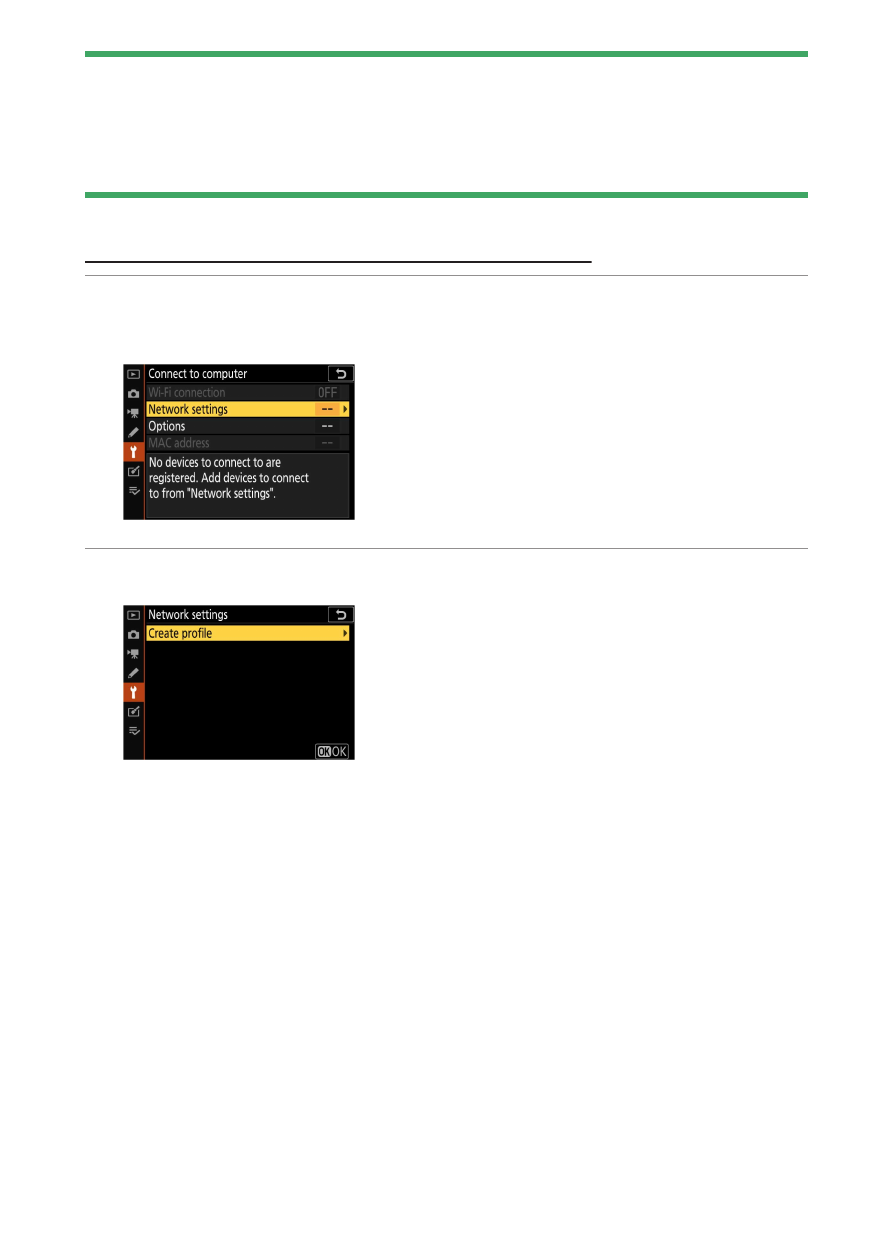
Connecting in access-point mode
1
Select [Connect to computer] in the camera setup menu, then
highlight [Network settings] and press
2
.
2
Highlight [Create profile] and press
J
.
Advertising
See also other documents in the category Nikon Cameras:
- D800 (472 pages)
- D800 (38 pages)
- D800 (48 pages)
- N80 (116 pages)
- n65 (116 pages)
- D300 (452 pages)
- D80 (162 pages)
- F100 (57 pages)
- D200 (221 pages)
- D200 (48 pages)
- D40X (139 pages)
- D100 (212 pages)
- D60 (204 pages)
- D40 (139 pages)
- Coolpix S3000 (184 pages)
- Coolpix L110 (156 pages)
- F3 (3 pages)
- F3 (71 pages)
- D50 (148 pages)
- D700 (472 pages)
- COOLPIX-P100 (216 pages)
- COOLPIX-S8100 (220 pages)
- D90 (300 pages)
- D90 (2 pages)
- D3000 (216 pages)
- D3000 (68 pages)
- D5000 (256 pages)
- D3100 (224 pages)
- D300s (432 pages)
- EM (34 pages)
- FG (34 pages)
- fe (49 pages)
- fe2 (66 pages)
- f2 (70 pages)
- n2000 (54 pages)
- COOLPIX P500 (252 pages)
- Coolpix S550 (2 pages)
- Coolpix 5400 (4 pages)
- Coolpix 775 (2 pages)
- Coolpix 2500 (120 pages)
- Coolpix S4 (8 pages)
- Coolpix S4 (28 pages)
- Coolpix S560 (172 pages)
- SQ (116 pages)
- Coolpix 990 (50 pages)