Setup software – Panasonic AW-RP60 Remote Camera Controller User Manual
Page 76
76
Setup Software
(continued)
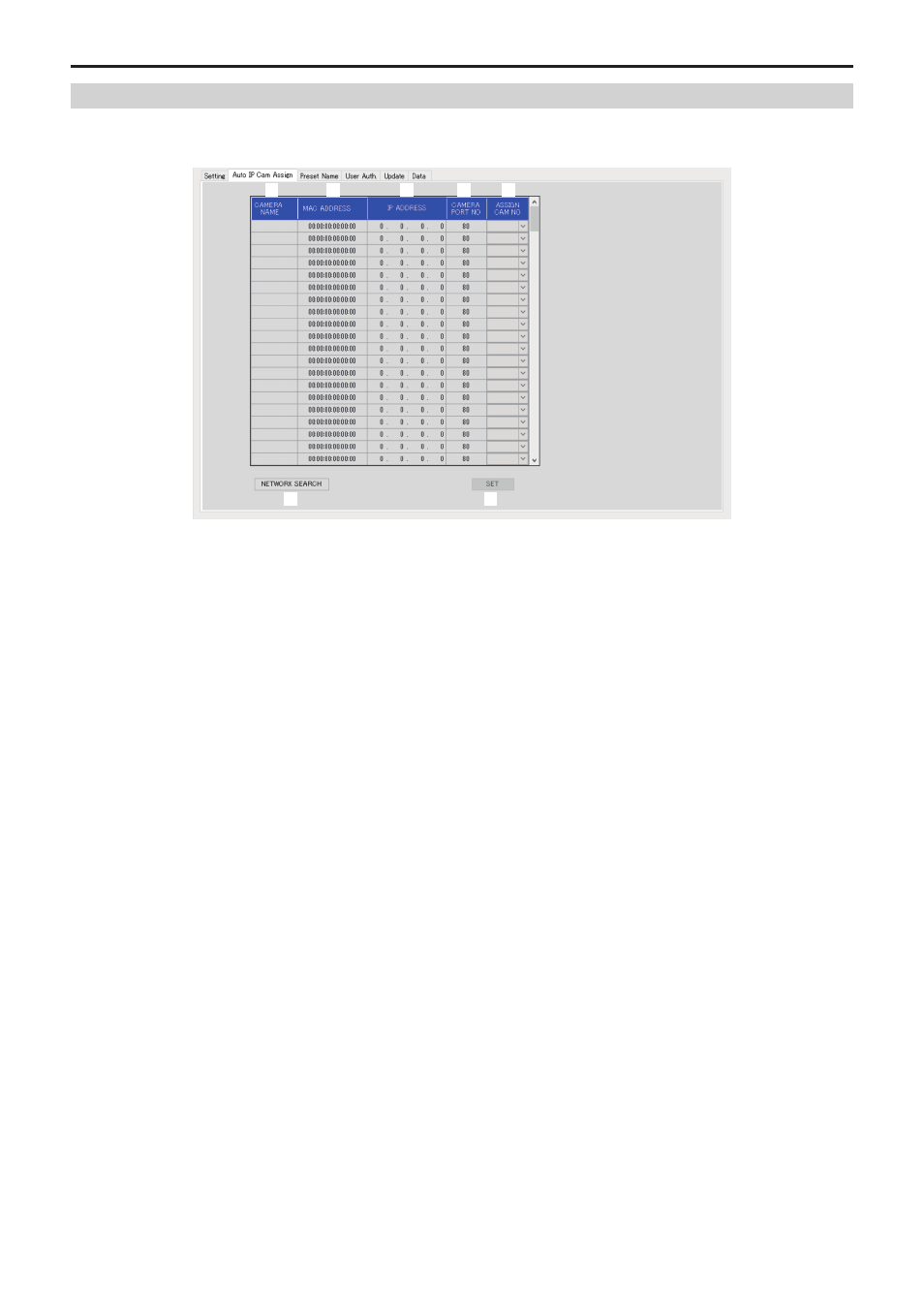
Displaying the [Auto IP Cam Assign] tab
When a [NETWORK SEARCH] is executed and applicable remote cameras are found, they are displayed in a list.
The list shows then in the order they were found.
6
7
1
5
4
3
2
1 CAMERA NAME
The camera names found in the search are displayed.
2 MAC ADDRESS
The MAC address found in the search are displayed.
3 IP ADDRESS
The IP address found in the search are displayed.
4 CAMERA PORT NO
The port numbers found in the search are displayed.
5 ASSIGN CAM NO
Allocate the camera numbers to be assigned to the remote cameras returned in the search results.
z
z
Camera number allocations made here are reflected in the main unit.
6 NETWORK SEARCH button
Acquires the network information of cameras existing in the network, then displays them as items on the [Auto IP Cam Assign] tab.
7 SET button
Reflects the set data to AW‑RP60.