Native Instruments MASCHINE MK3 Groove Production Studio (Black) User Manual
Page 831
⇨
The
ARRANGER
lights up to indicate that Arrange mode is enabled.
1
2
4
5
6
8
9
10
7
3
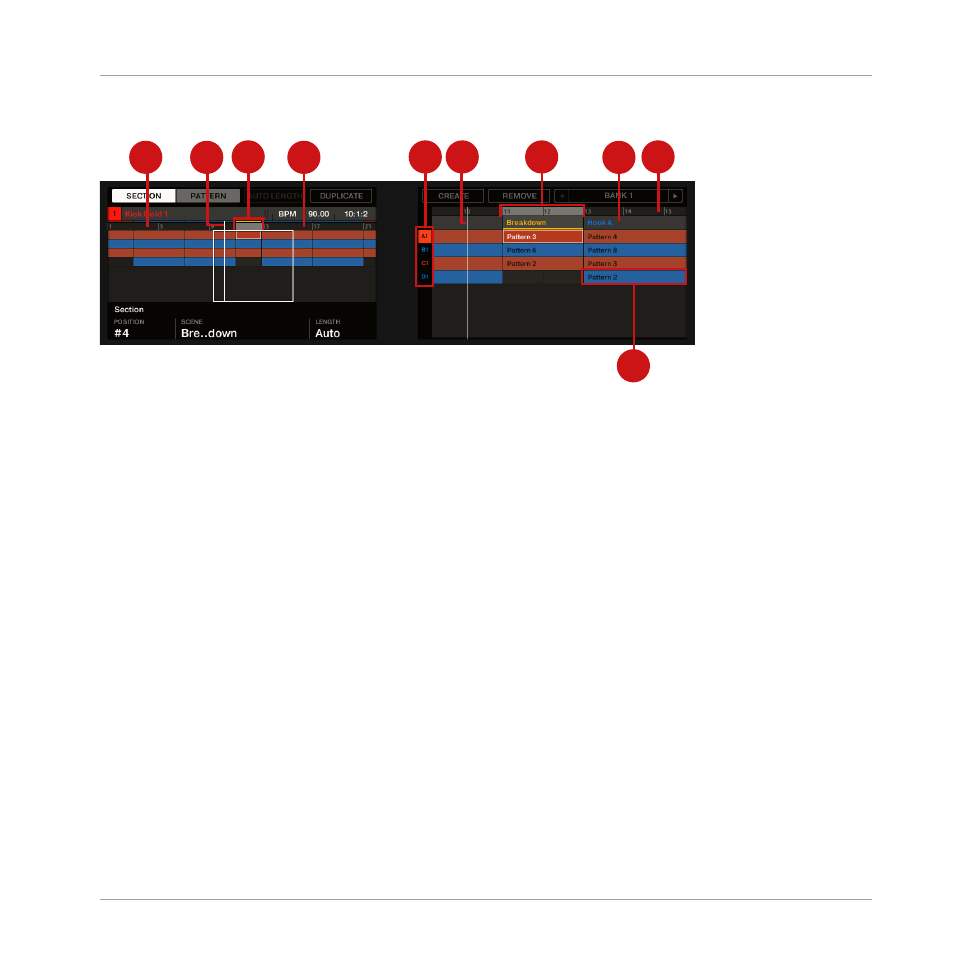
The Section Arrange mode in the controller displays.
In Section Arrange mode, the displays of your controller show the following:
▪
The left display provides an overview of the arrangement for your entire Project:
◦
Similarly to the Arranger in the software, you will find Sections organized in columns
and Groups organized in rows.
◦
The overview includes a timeline (1) and shows the current Loop Range (4). A white
vertical line indicates the current playback position (2). In addition, a frame (3) shows
you which part of your arrangement is currently shown in the right display (see below).
◦
Above the arrangement overview, you see the name of the Project, the focused Group
or the focused Sound (depending on which of the
MASTER
,
GROUP
or
SOUND
tab is
selected in the software’s Control area) along with the current tempo and playback po-
sition.
▪
The right display provides a detailed view of your Patterns for a portion of your arrangement:
◦
Similarly to the left display and the Arranger in the software, you will find Sections
organized in columns and Groups organized in rows.
◦
Vertically, only one Group bank is shown: At any time you will see the Group bank
containing the focused Group. The eight Groups are represented in the leftmost col-
umn by their bank letter and index number (5). The focused Group is highlighted.
Working with the Arranger
Using Song View
MASCHINE - Manual - 831