Native Instruments MASCHINE MK3 Groove Production Studio (Black) User Manual
Page 877
Advertising
▪
If you have just recorded a Sample, it will directly appear here. If you have recorded more
than one Sample, the Sampled selected in the Recording History (by default the last re-
corded Sample) will appear here, see section
17.2.6, Checking Your Recordings
information on the Recording History.
▪
If the Sample in that Sound is already split into Slices, each Slice has its own Zone and
the Slice of the focused Zone will appear here. See section
more information on slicing Samples.
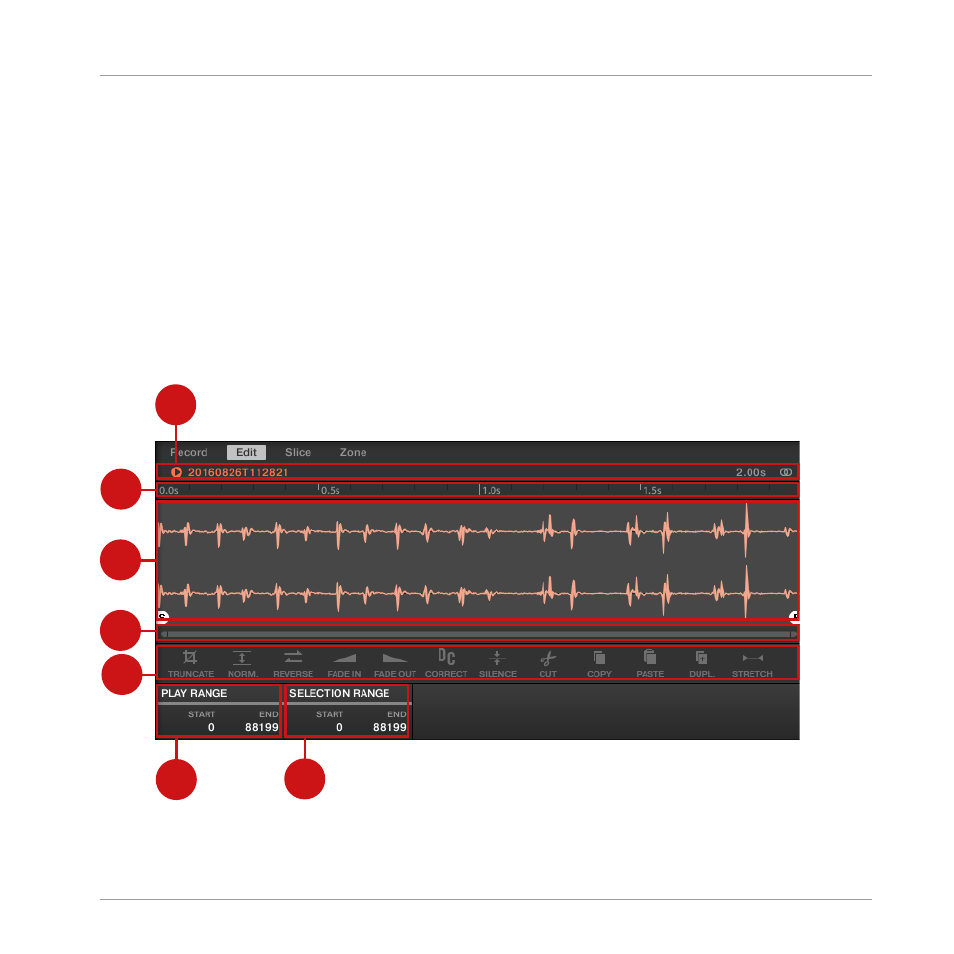
17.3.1 Using the Edit Page
►
In the Sample Editor, click the
Edit
tab at the top to open the
Edit
page.
The
Edit
page looks as follows:
1
2
3
4
7
5
6
The Edit page in the software.
Sampling and Sample Mapping
Editing a Sample
MASCHINE - Manual - 877
Advertising