File saving settings – Plustek Opticpro A320E Flatbed Scanner User Manual
Page 95
Scanner Buttons Guide
20
All Rights Reserved.
File Saving Settings
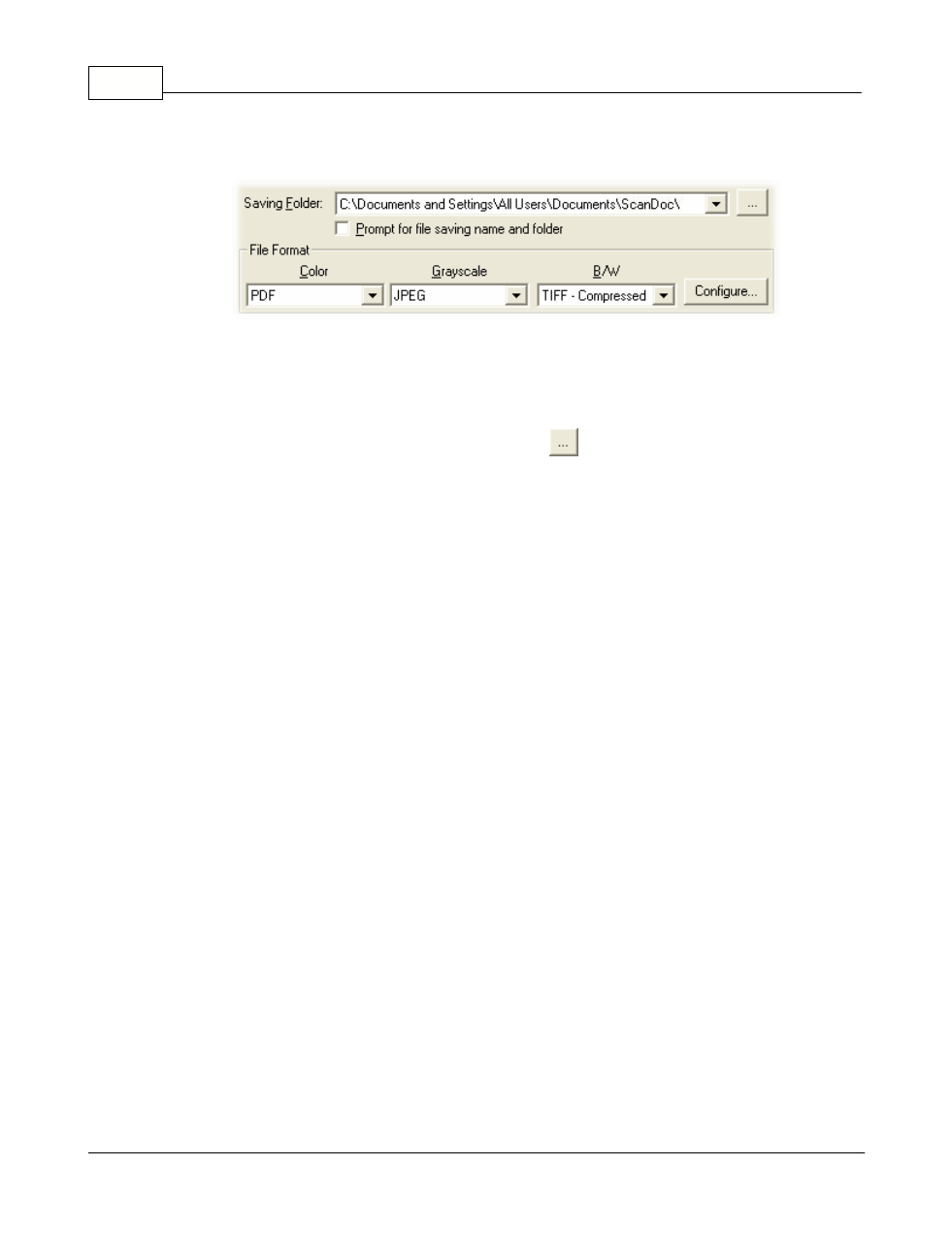
Saving Folder
The scanned documents or images are automatically saved to the folder
displayed here.
To select or modify the saving folder, click
to open a dialog box where you
may browse your disk drives to select a desired saving folder. You can also
directly enter the folder name in this field to create a new folder. This newly
added saving folder will be added to the drop-down menu. Next time when
you want to use this folder again, you may simply click to select it from this
drop-down menu.
DocAction will automatically assign the file name to save the images.
Prompt for file saving name and folder
Tick this check box If you prefer to save each scanned image manually. After
the scan of each page finishes, a Save dialog box appears on screen and you
may select the folder and file name to save the scanned images individually.
This option is useful if you want to save the images scanned in a batch to
different folders or in different file naming patterns.
File Format
Determines the image file format to save the scanned documents or images
to. The following file formats are available from the drop-down list box:
·
JPEG: Not available for B/W scan mode.