Panasonic Lumix GX8 User Manual
Page 342
12. Connecting to other equipment
342
∫
Copying to a PC without using “PHOTOfunSTUDIO”
If you are not able to install “PHOTOfunSTUDIO”, you can copy files and folders to your
PC by dragging and dropping files from this unit.
•
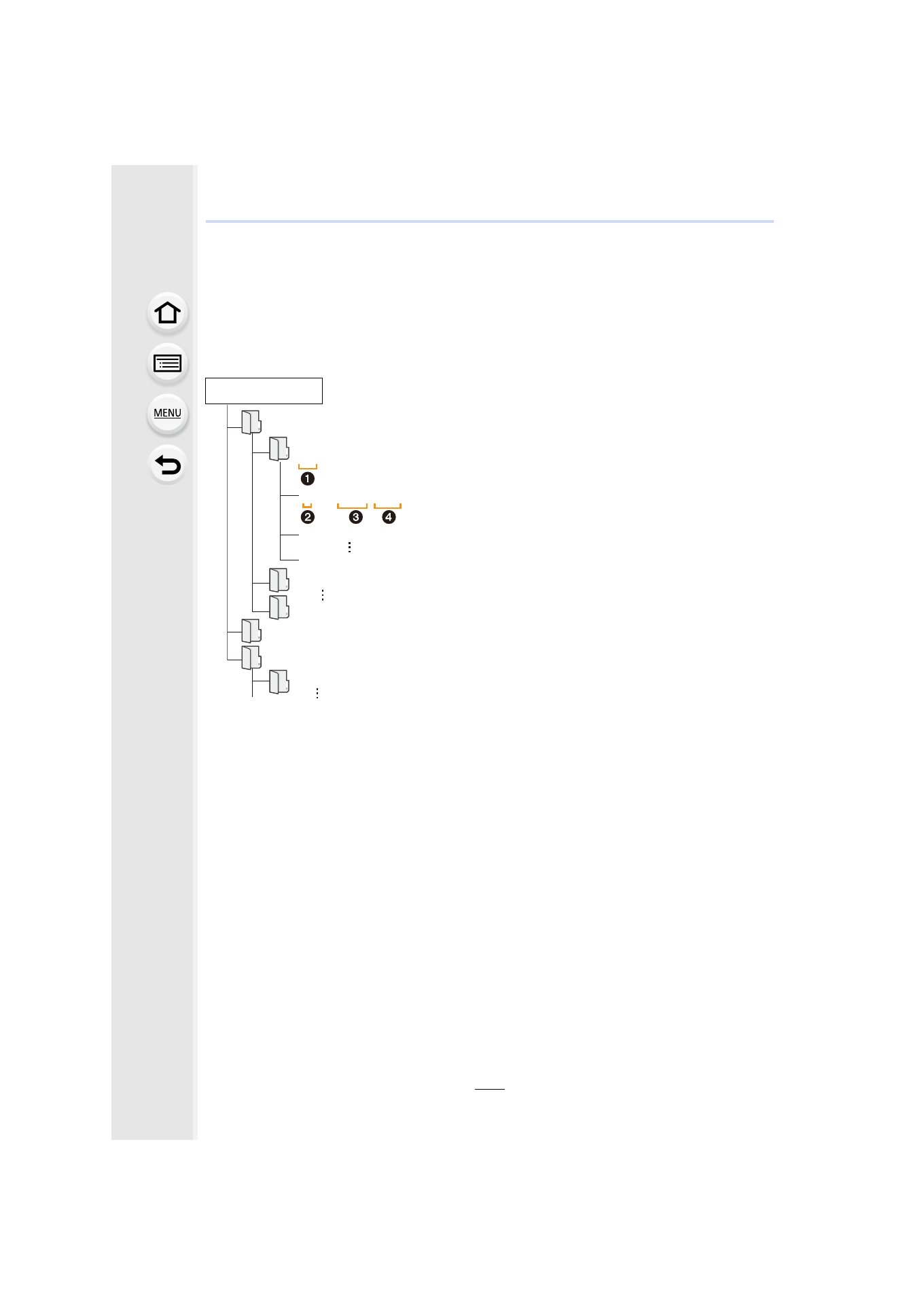
The content (folder structure) on the card of this unit is as follows.
•
A new folder is created when pictures are taken in the following situations.
–
After [No.Reset]
in the [Setup] menu has been executed
–
When a card containing a folder with the same folder number has been inserted
(such as when pictures were taken using another maker of camera)
–
When there is a picture with file number 999 inside the folder
∫
Connection in the PTP Mode
Set [USB Mode] to [PictBridge(PTP)].
•
Data can now be read only from the card in the PC.
•
When there are 1000 or more pictures on a card, the pictures may not be imported in the PTP
Mode.
•
Motion picture cannot be played back in PTP Mode.
For Windows:
A drive ([LUMIX]) is displayed in [Computer]
For Mac:
A drive ([LUMIX]) is displayed on the desktop
•
Card
DCIM:
Images
1 Folder number
2 Color space
P: sRGB
_: AdobeRGB
3 File number
4 JPG:
Still pictures
MP4:
[MP4] Motion pictures
RW2:
Pictures in RAW files
MPO:
3D pictures
MISC:
DPOF print
Favorite
AVCHD:
[AVCHD] Motion pictures
AVCHD
DCIM
100_PANA
101_PANA
999_PANA
P1000001.JPG
P1000002.JPG
P1000999.JPG
PRIVATE
MISC
- Lumix G85 Mirrorless Camera with 12-60mm Lens Lumix DMC-G85M Lumix DMC-G85 Lumix GH5 Lumix GX80 Lumix GX85 Mirrorless Camera with 12-32mm and 45-150mm Lenses Lumix G7 Mirrorless Camera with 14-42mm and 45-150mm Lenses (Black) Lumix G7 Mirrorless Camera with 14-42mm Lens Deluxe Kit (Silver) Lumix G7 Mirrorless Camera with 14-42mm Lens (Silver) Lumix DMC-G7 body