Nu] button, P66), Calling frequently-used menus instantly – Panasonic Lumix GX8 User Manual
Page 66: Quick menu), Press [q.menu] to display the quick menu, Rotate the front dial to select the menu item, Rotate the rear dial to select the setting, Auto
2. Getting Started/Basic Operations
66
Calling frequently-used menus instantly
(Quick Menu)
By using the Quick Menu, some of the menu settings can be easily found.
•
The features that can be adjusted using Quick Menu are determined by the mode or a display
style the camera is in.
1
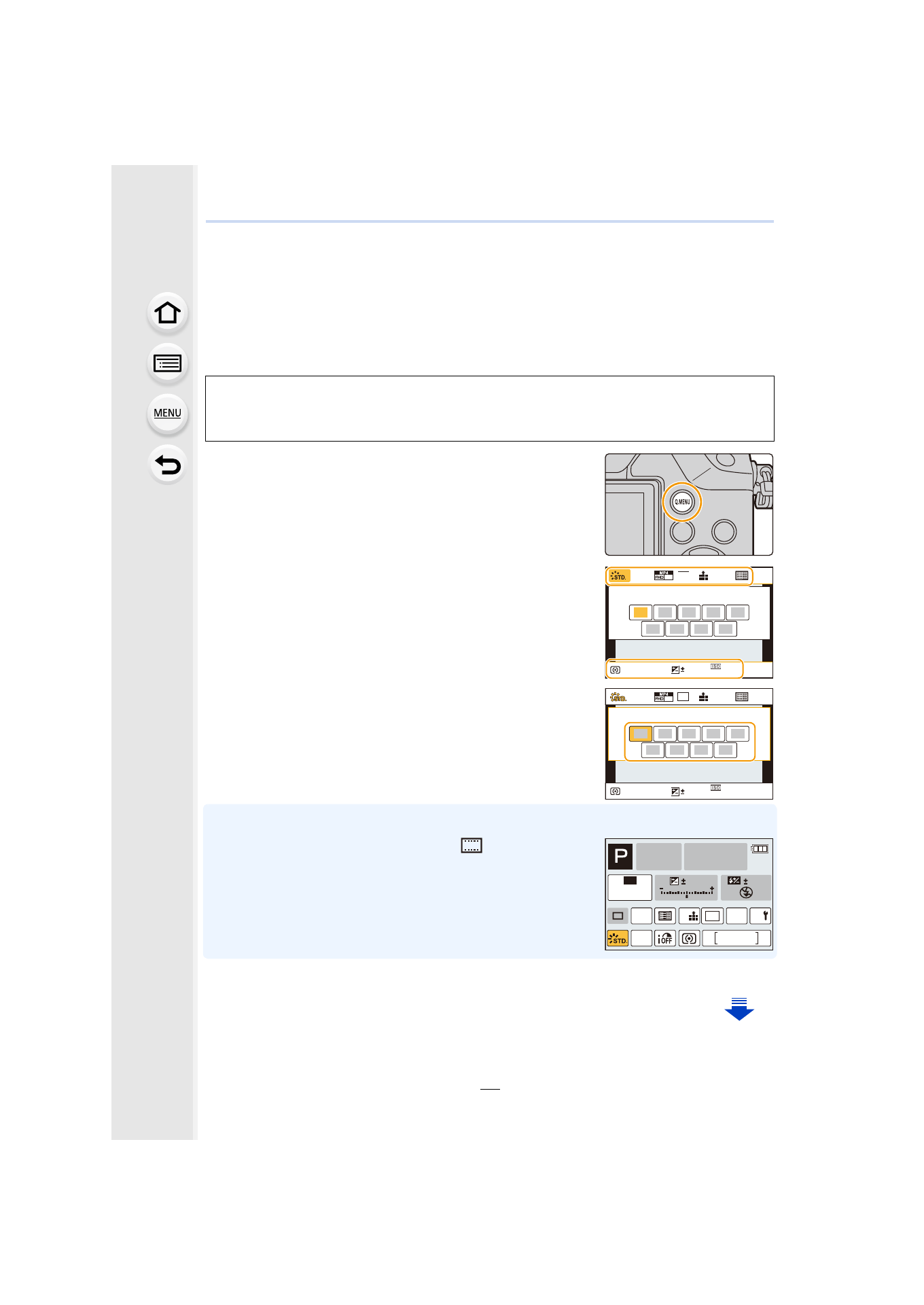
Press [Q.MENU] to display the Quick Menu.
2
Rotate the front dial to select the menu item.
3
Rotate the rear dial to select the setting.
4
Press [Q.MENU] to exit the menu once the
setting is complete.
•
You can also set items by pressing the cursor buttons 3/4/2/1.
On-monitor recording information in [
] (Monitor style)
Select the item by pressing the [Q.MENU] button and rotating
the rear dial, and then select the setting by rotating the front
dial.
•
You can also set with 3/4/2/1 and [MENU/SET].
[Q.MENU] button can be used in two ways, as [Q.MENU] or as [Fn2] (function 2). At the
time of purchase, it is initially set to [Q.MENU].
•
Refer to
for details about the function button.
AFS
AFS
AU
TO
60
3.5
AWB
60p
L
4:3
0
60p
AFS
AFS
AU
TO
60
3.5
AWB
L
4:3
0
AFS
AFS
98
AWB
0
0
0
Fn
ISO
AUTO
Wi-Fi
L
4:3
- Lumix G85 Mirrorless Camera with 12-60mm Lens Lumix DMC-G85M Lumix DMC-G85 Lumix GH5 Lumix GX80 Lumix GX85 Mirrorless Camera with 12-32mm and 45-150mm Lenses Lumix G7 Mirrorless Camera with 14-42mm and 45-150mm Lenses (Black) Lumix G7 Mirrorless Camera with 14-42mm Lens Deluxe Kit (Silver) Lumix G7 Mirrorless Camera with 14-42mm Lens (Silver) Lumix DMC-G7 body