Customizing the quick menu settings – Panasonic Lumix GX8 User Manual
Page 68
2. Getting Started/Basic Operations
68
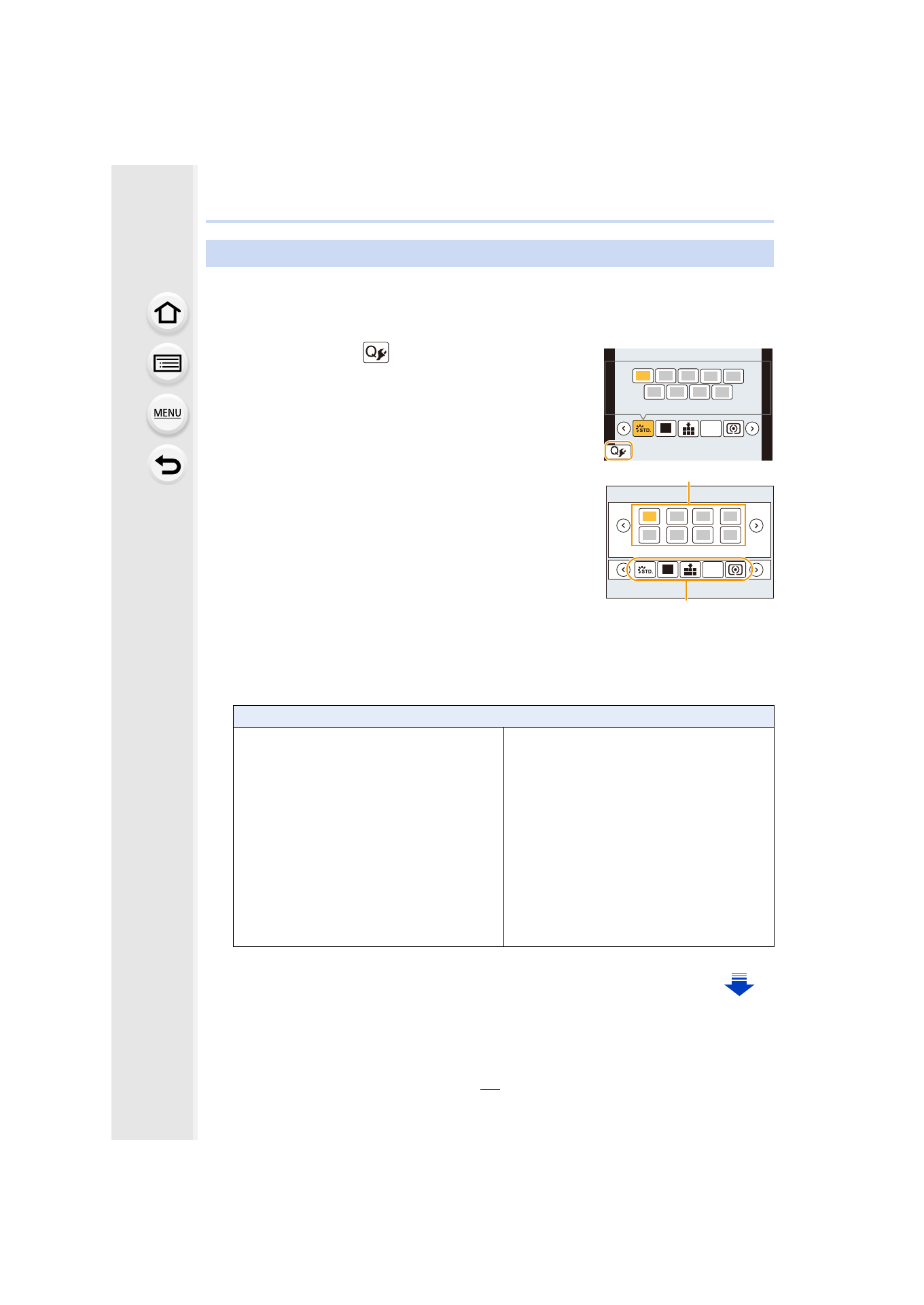
in the [Custom] menu is set to [CUSTOM], the Quick Menu can be
changed as desired.
Up to 15 items can be set to the Quick Menu.
1
Press 4 to select [
] and then press [MENU/SET].
2
Press 3/4/2/1 to select the menu item in the top
row and then press [MENU/SET].
3
Press 2/1 to select the empty space in the bottom
row and then press [MENU/SET].
A Items that can be setup as Quick Menus.
B Items that can be displayed in the Quick Menu screen.
•
You can also set the menu item by dragging it from the top
row to the bottom row.
•
If there is no empty space in the bottom row, you can
replace an existing item with a new select item by selecting the existing item.
•
To cancel the setting, move to the bottom row by pressing 4 and select an item to cancel,
and then press [MENU/SET].
•
Items that can be set are as follows:
Customizing the Quick Menu settings
[Rec] menu/Recording functions
–
[Photo Style]
–
[Filter Select]
–
[Picture Setting]
([Aspect Ratio]
/[Picture Size]
)
–
[Quality]
–
[AFS/AFF]
–
[Metering Mode]
–
[4K PHOTO]
–
[i.Dynamic]
–
[i.Resolution]
–
–
–
[Flash Mode]
–
–
[Ex. Tele Conv.]
(still pictures/motion pictures)
–
[Digital Zoom]
–
–
[Sensitivity]
–
[White Balance]
–
[AF Mode]
–
[Drive Mode]
L
4:3
AFS
1
2
345
L
4:3
AFS
A
B
- Lumix G85 Mirrorless Camera with 12-60mm Lens Lumix DMC-G85M Lumix DMC-G85 Lumix GH5 Lumix GX80 Lumix GX85 Mirrorless Camera with 12-32mm and 45-150mm Lenses Lumix G7 Mirrorless Camera with 14-42mm and 45-150mm Lenses (Black) Lumix G7 Mirrorless Camera with 14-42mm Lens Deluxe Kit (Silver) Lumix G7 Mirrorless Camera with 14-42mm Lens (Silver) Lumix DMC-G7 body