Splitting a pamphlet original by, Select the binding edge of the pamphlet original, Copier ► other functions – Sharp MX-6070N User Manual
Page 233
2-69
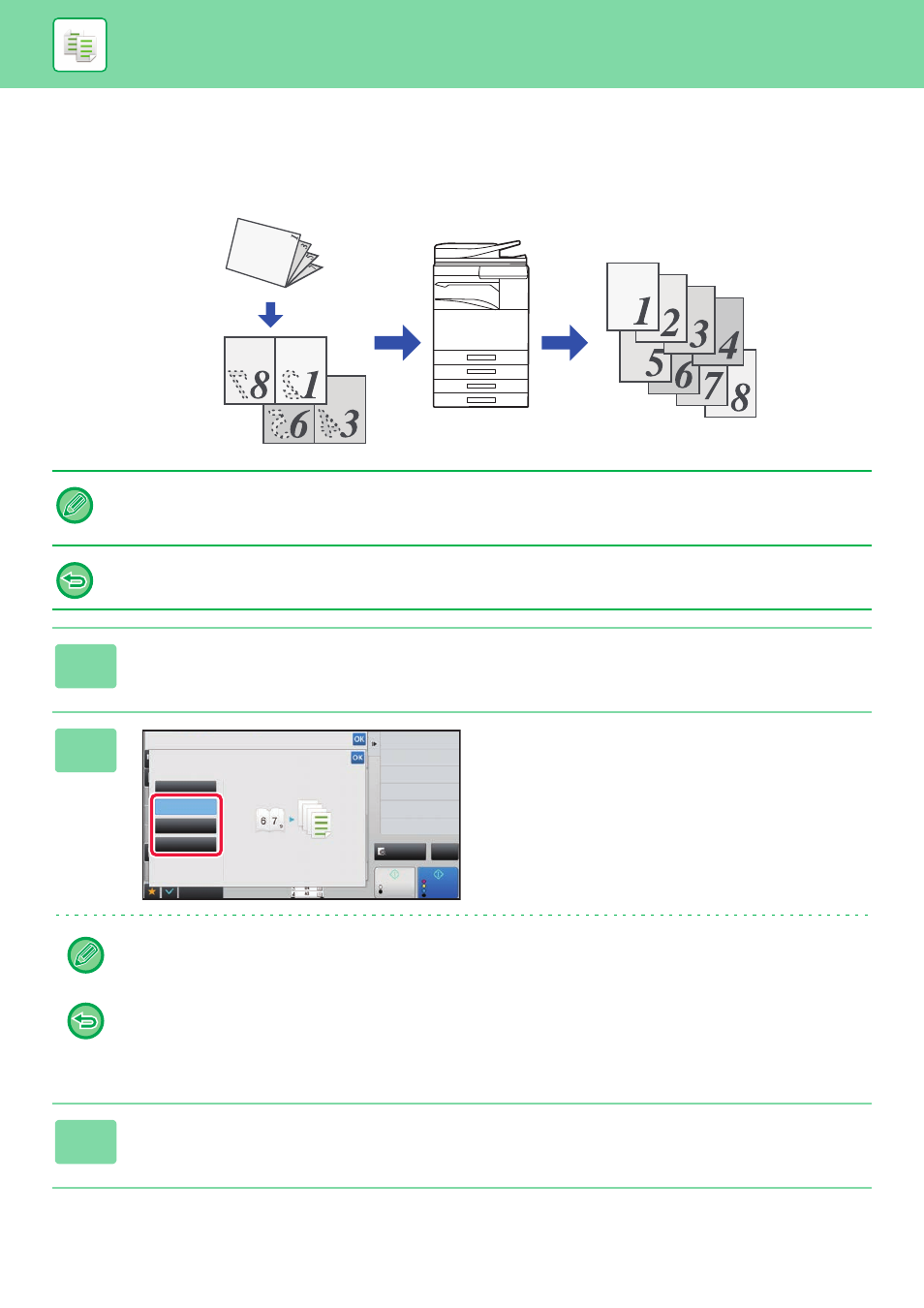
SPLITTING A PAMPHLET ORIGINAL BY PAGE
(BOOK DIVIDE)
This function splits a saddle-stitch original such as a catalogue or a pamphlet page by page, and copies in sequence.
• Book Divide must be specified before scanning the original.
• This function supports three original binding edges: left binding, right binding, and top open.
• The scanned original is split in the centre.
The document glass is not available for this function.
1
Tap the [Others] key, and tap the [Book Divide] key.
2
Select the binding edge of the
pamphlet original.
Check the preview image displayed in the screen, and make sure that the binding edge is correct.
• To cancel the Book Divide setting:
Tap the [Off] key.
• To cancel all settings:
Tap the [CA] key.
3
Tap the [Colour Start] or [B/W Start] key to start copying.
Start
Back
Colour
Start
Book Divide
Select Original Binding Edge.
Others
Off
Right Binding
Left Binding
Tablet
Preview
2-Sided Copy
Colour Mode
Staple
Erase Shadow Around
Erase
Skip Blank Page in Original
Blank Page Skip
CA
B/W