Filter / eq – D16 Group Drumazon 2 Drum Machine 909 Emulation Plug-In User Manual
Page 10
Filter / EQ
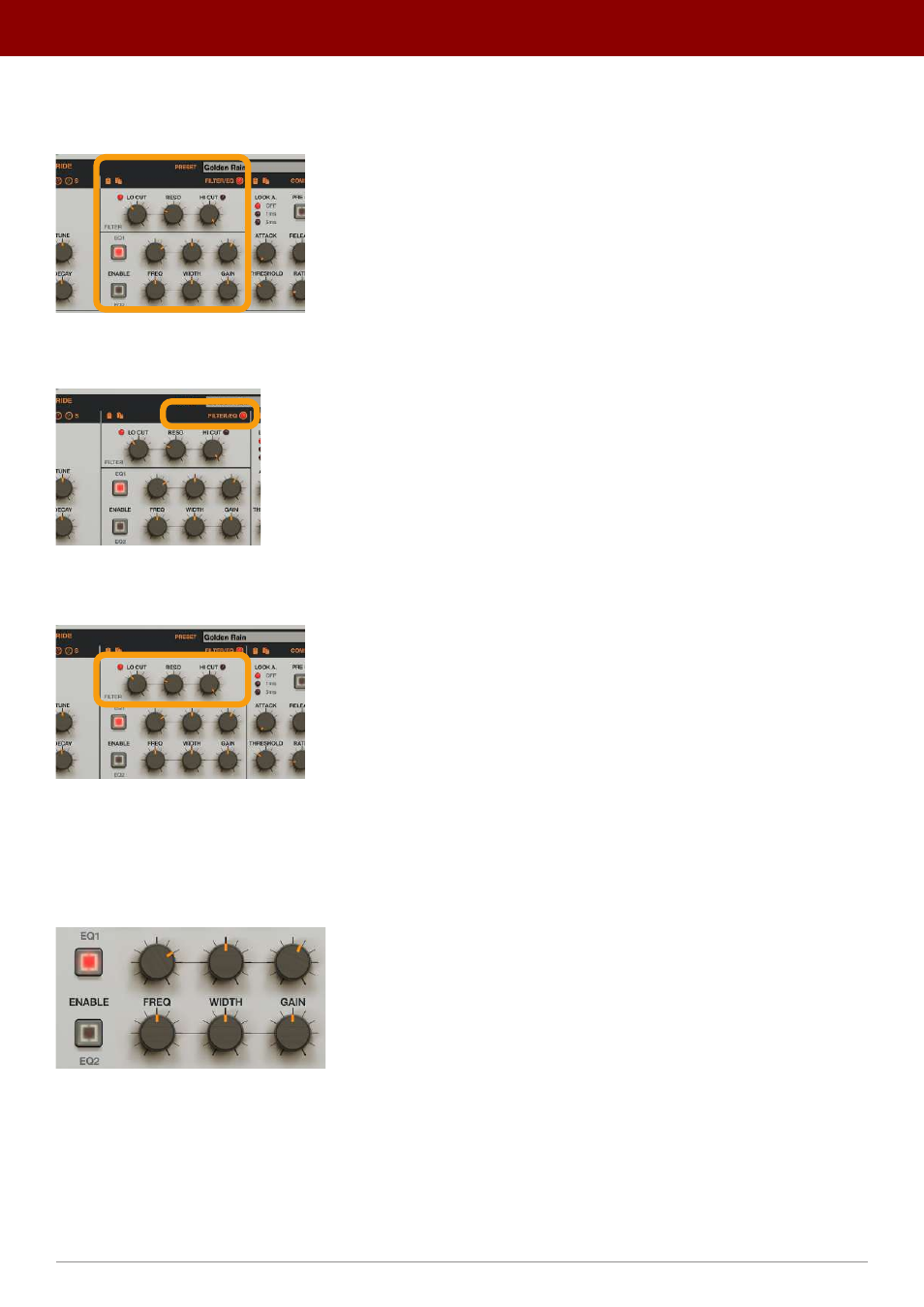
Then, the drum sound goes into the
Filter / EQ
:
The Filter / EQ section
Which can be
Enabled
/
Disabled
using the toggle LED in the upper-right corner of the section:
The LED to enable / disable the Filter / EQ
The first row of parameters controls
Low Cut
and
High Cut
filters with shared
Resonance
:
18 The Low Cut / High Cut filters
•
Low Cut
- Selects the
Low Cut
filter’s frequency.
•
Resonance
- Sets the level of emphasis for both
Low Cut
and
High Cut
filters.
•
Hi Cut
- Sets the
High Cut
filter’s frequency.
The two consecutive rows below control a two-band
Parametric EQ
(one row for each band):
The parametric EQ
•
EQ1 / EQ2
-
Enables
/
Disables
the corresponding band.
•
Freq
- Adjusts the center frequency of the band filter’s peak.
•
Width
- Broadens or narrows the frequency range of the band from
4
to
0.5
octaves.
•
Gain
- Boosts or attenuates the amplitude of the band by up to
+/- 24
dB.
10
inteRface oveRview •
The sound conTrol secTion