D16 Group Drumazon 2 Drum Machine 909 Emulation Plug-In User Manual
Page 46
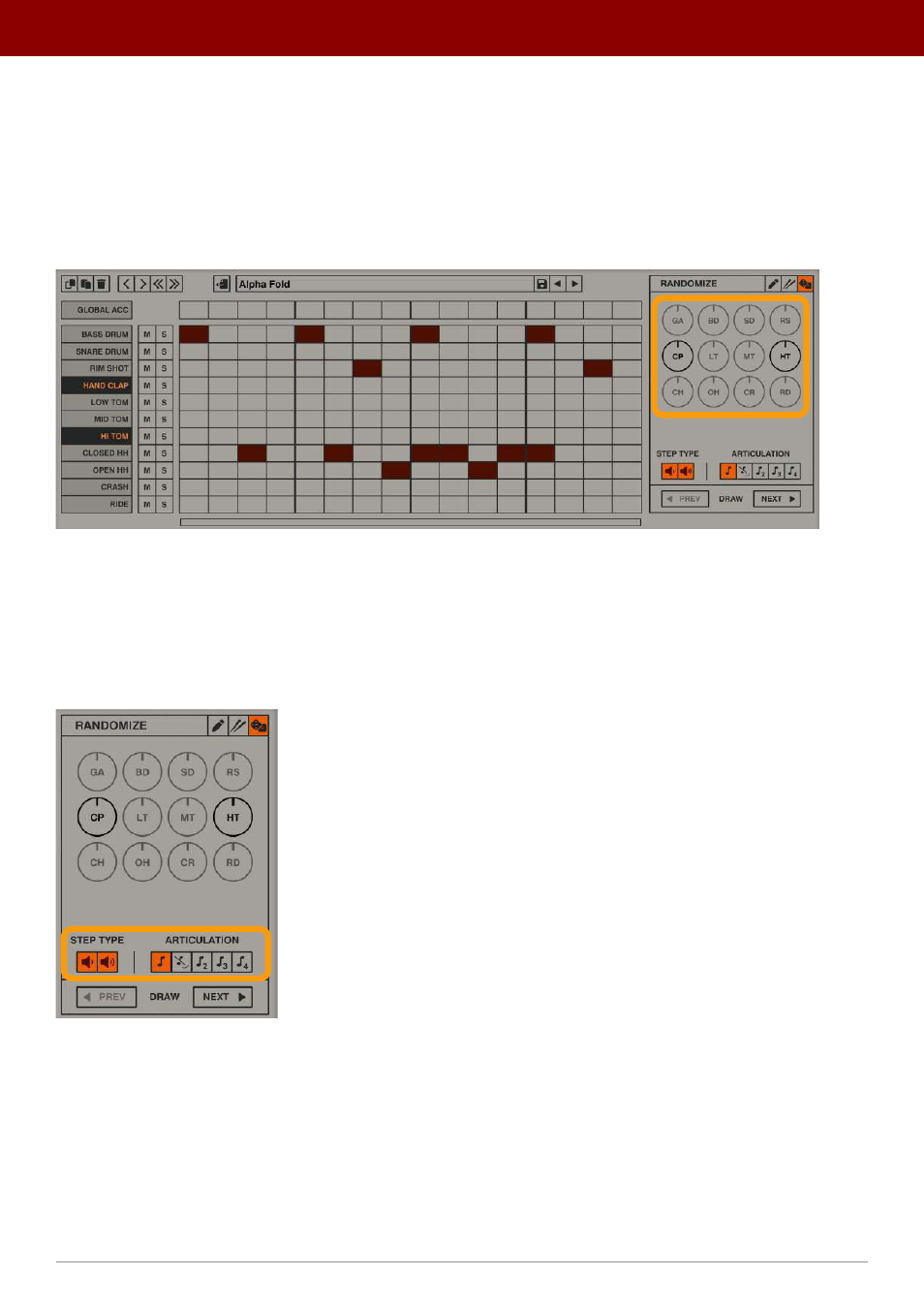
If you haven’t selected any tracks then the entire pattern will be randomized (all tracks).
It’s worth mentioning that randomization isn’t a special mode; you can switch between
Edit
and
Random
tabs with no
restrictions. Also, when the
Random
tab is selected, you can modify sequence content (in the grid), just like you were
editing it.
Every time a new sequence is drawn, you can use the
Amount
knobs to precisely set the “density” of the generated
sequence individually for each of the randomized tracks:
Setting densities
The greater a knob’s value, the “denser” (more numerous) a generated sequence for a particular part will be.
The
Amount
knobs for unselected tracks are grayed out; they are inactive.
The
Modifiers
at the bottom choose what type of steps (accented, non-accented or both) and articulations are included
in randomized patterns:
The Randomizer’s modifiers
Any change to the
Modifiers
will be taken into account in the next random draw, which happens by clicking the
Next
button.
Each time you hit
Next
, a new seed for the randomizer is set, changing the probability distribution and generating a new
pattern. Using the
Prev
button, you can go back to the previous seeds / randomization patterns.
46
inteRface oveRview •
Play modes