Generating drum sounds – D16 Group Drumazon 2 Drum Machine 909 Emulation Plug-In User Manual
Page 7
Both subsections have the following controls:
•
Preset
display - Opens a browser to load, save and manage presets (more on that in the
Preset Management
part
of the manual).
•
Save
button - Saves current sound settings as a new preset.
Generating drum sounds
Drumazon
is a drum machine comprising
11
synthesized percussion instruments (the
Synth
view). Each of the instru-
ments has its own independent effect chain (
Strips
view) and can then be routed / sent to one of two
Bus
effects (in the
bottom part of the
Sound Control
section) or directly onto the
Master
effect chain (
Master
view).
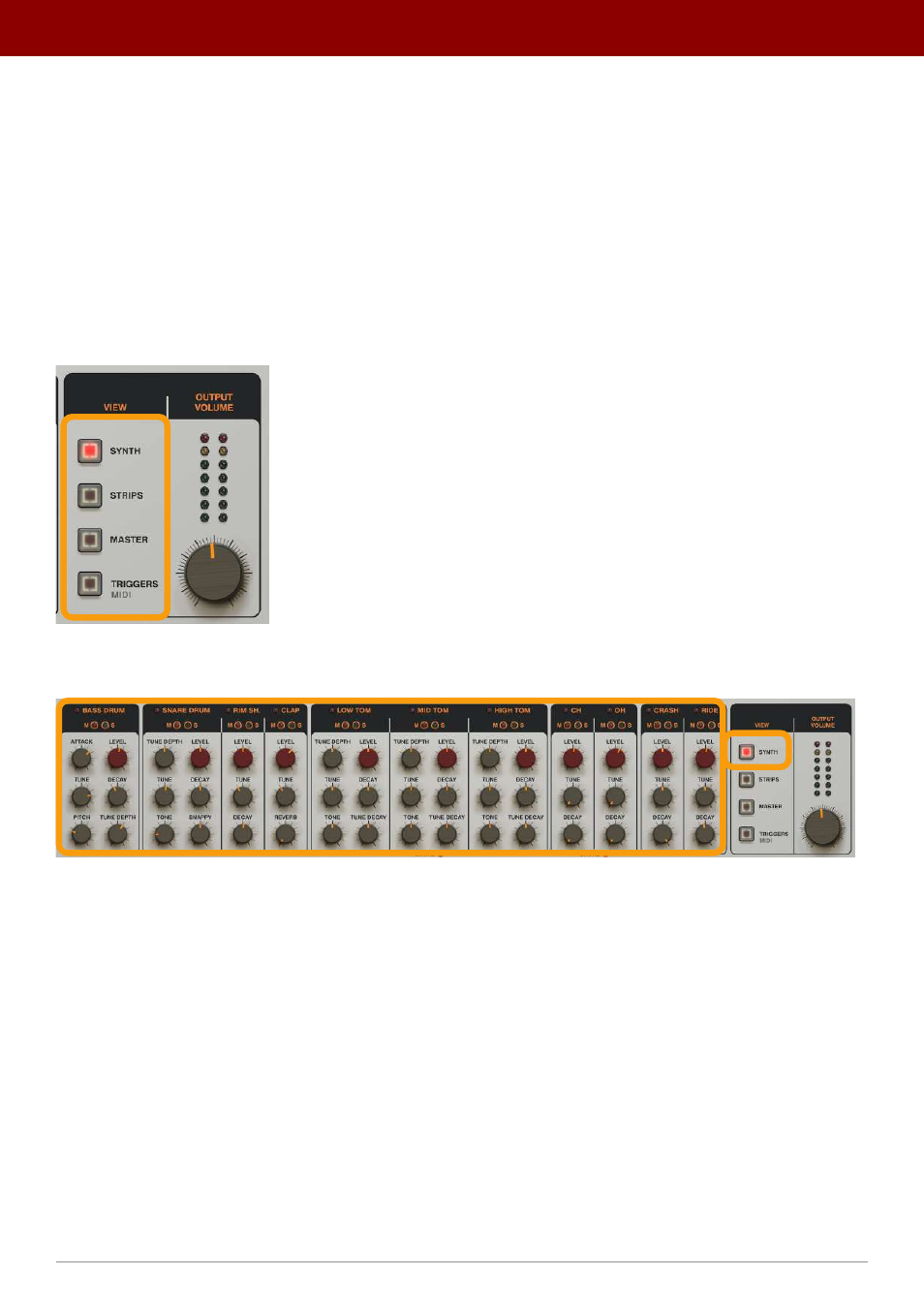
To switch between all available views in the
Sound Control
section, use the
View
selector:
The View selector in the Sound Control section
The parameters for all
11
instruments are available in the
Synth
view:
The Synth view
The parameters correspond with the following drum sounds:
•
Bass Drum
•
Snare Drum
•
Rim Shot
•
Hand Clap
•
Low Tom
•
Middle Tom
•
High Tom
•
Closed Hihats
•
Open Hihats
•
Crash
•
Ride
Each of these instruments have a common parameter:
7
inteRface oveRview •
The sound conTrol secTion