Fx buses – D16 Group Drumazon 2 Drum Machine 909 Emulation Plug-In User Manual
Page 14
FX Buses
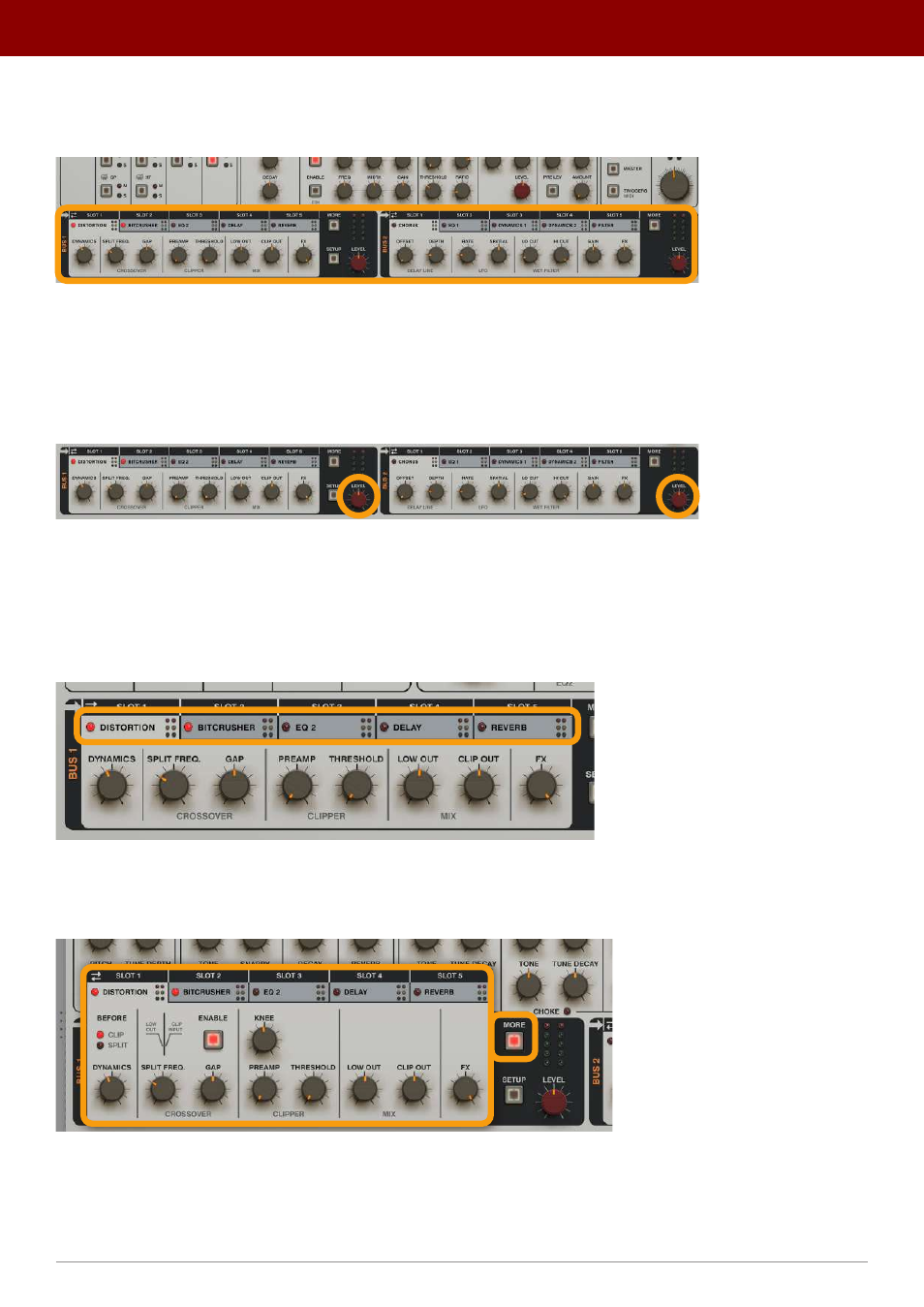
In the middle part of the GUI, there are two
FX Bus
sections:
The FX Bus sections
They are labeled
Bus 1
and
Bus 2
and work independently of each other.
Each
Bus
is a chain of
5
effects working in series. When a signal enters a
Bus
,
it’s processed by the effect in
Slot 1
, then
the effect in
Slot 2
and so on until it’s processed by the last one,
Slot 5
; it then leaves the
Bus
. Before the signal leaves a
Bus
, we can adjust its output level using the
Level
knobs:
The Level knobs in the Buses
Buses
are fed by signals from individual drum instruments (the
Strips
), which are then processed by the
Buses
and
continue onto the
Master
effect chain.
Graphically, the effects chain in
Buses
is organized as tabs. We can access each effect’s parameters by clicking a corre-
sponding tab:
The Bus tabs
By default, only essential parameters are shown in the tab’s content. Clicking the
More
button in a
Bus
expands the
section, allowing access to all parameters for the effects:
30 Accessing the complete range of parameters in the Bus effects section
14
inteRface oveRview •
The sound conTrol secTion