Bus send, Drum sounds’ presets, Copy / paste functions for strip’s sections – D16 Group Drumazon 2 Drum Machine 909 Emulation Plug-In User Manual
Page 13
Bus Send
This section is controlled by the following set of parameters:
•
Route To
- The signal leaving the strip is sent to;
•
Bus 1
- First
FX Bus
.
•
Bus 2
- Second
FX Bus
.
•
Bus Slot
- Selects which
Bus Slot
the signal is sent to within the
Bus
chosen by
Route To
.
•
Panning
- Adjusts stereo panning.
•
St. Spread
- Adjusts the delay between
Left
/
Right
stereo channels.
•
Pre Lev
- If
Pre Level
is enabled, the signal level (controlled by the
Amount
knob) sent to its destination is propor-
tional to the
Level
setting in the
Audio Out
section. When
Pre Level
is disabled, the
Amount
is independent of
the
Level
parameter.
•
Amount
- Sets the volume of the signal sent to its destination
AUDIO OUT
BUS SEND
IN
INs
PRE. LEVEL
OUT
LEVEL
AMOUNT
ROUTE TO
BUS or MASTER
BUS
ROUTE TO
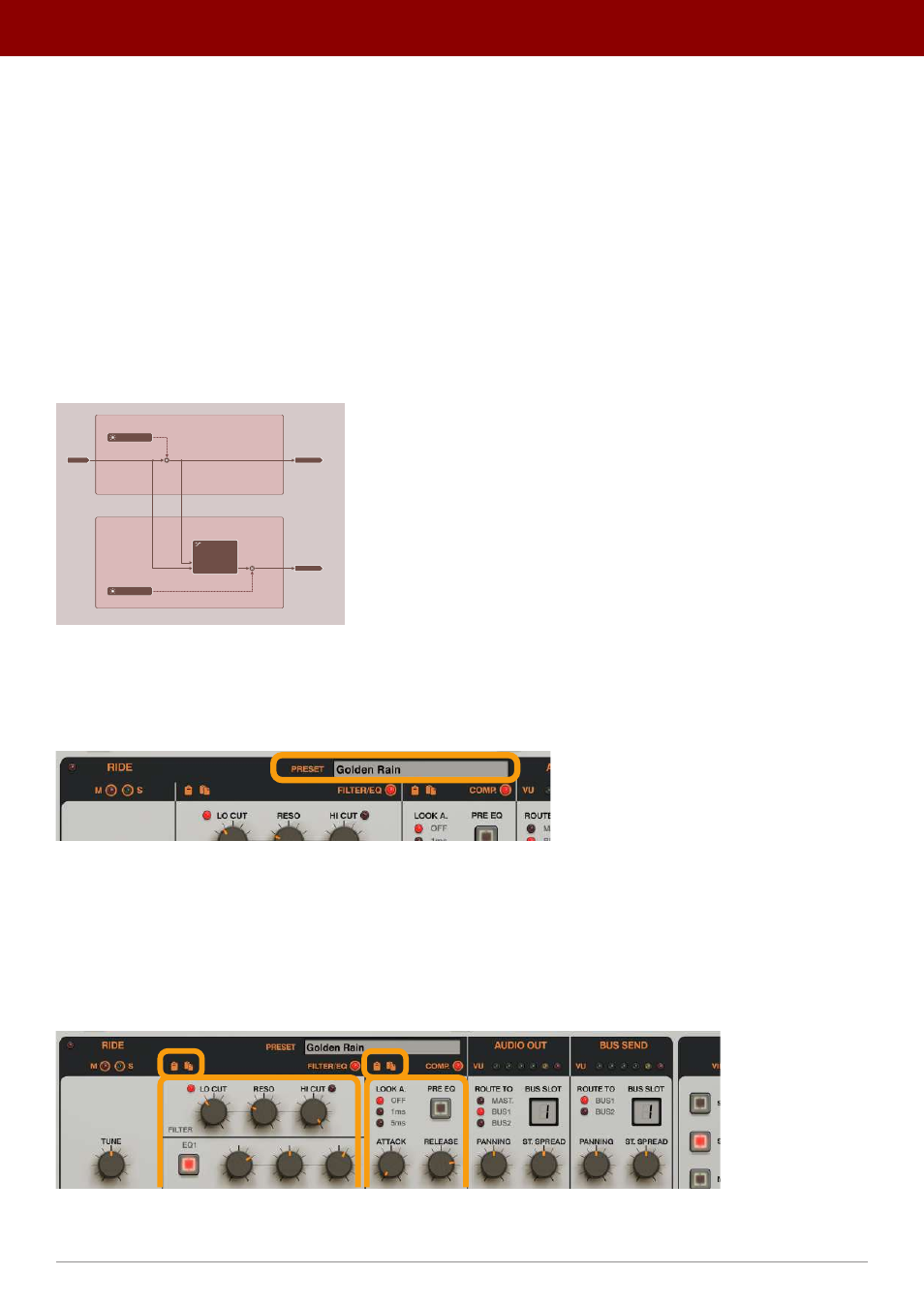
A diagram showing Amount and Pre Level dependency
Drum Sounds’ presets
The
Presets
display in the
Strip
view lets you manage presets for individual drum sounds:
The Drum Sounds’ Presets display
Clicking the display opens a browser to load, save and manage
Presets
(more on that in the
Preset Management
part of
the manual).
Copy / Paste functions for strip’s sections
The
Copy / Paste
icons in the
Filter / EQ
and
Comp.
sections;
The Copy / Paste functions for a Strip’s sections
These allow you to duplicate the section’s parameter values between different drum sounds.
13
inteRface oveRview •
The sound conTrol secTion