Signal routing, Audio out – D16 Group Drumazon 2 Drum Machine 909 Emulation Plug-In User Manual
Page 12
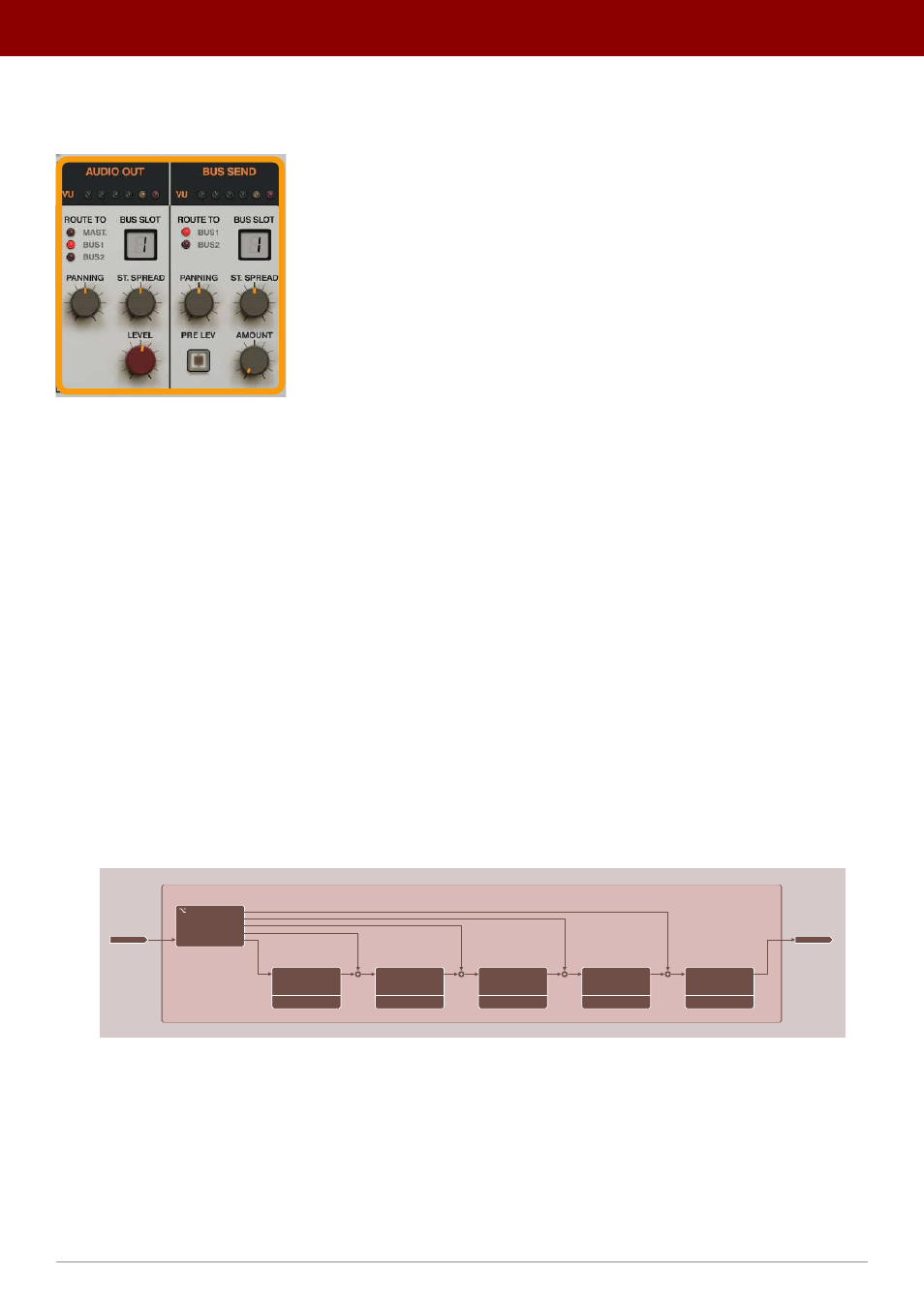
Signal routing
The two remaining sections,
Audio Out
and
Bus Send
, are responsible for redirecting the signal leaving the
Strip
:
Routing the signal as it leaves the Strip
From the
Audio Out
section, we can decide where to direct the
Strip’s
output; it can be routed to one of the
FX Buses
or directly to the
Master
effect chain.
The
Bus Send
section decides how much signal from
Audio Out
is sent to one of the two
FX Buses
, relative to the
output
Level
set in
Audio Out
section - the principle is similar to mixer sends
Audio Out
Here, you’ll find the following set of parameters:
•
Route To
- The destination to which the signal is routed to;
•
Mast
-
Master
effect chain.
•
Bus 1
- First
FX Bus
.
•
Bus 2
- Second
FX
Bus
.
•
Bus Slot
- If the
Route To
parameter is set to one of the
Buses
, we can also decide at which
Bus Slot
the signal
enters the
Bus
effect chain. Each
Bus
is a series of
5 effects
working in a chain so there are
5 slots
where the
signal can enter. If we set the slot to
1
, then the signal is routed to the
first effect
in the chain and then further
processed by the rest of the
Bus
. If
2
, then the signal is routed to the
second effect
(omitting the first one) then
further processed by the
rest of the
Bus
(by consecutive effects in the chain - the 3
rd
, 4
th
and 5
th
).
BUS CHAIN
FX 1
FX 2
FX 3
FX 4
FX 5
OUT
OUT
OUT
OUT
OUT
IN
IN
IN
IN
IN
IN
BUS SLOT
1
2
3
4
5
BUS INPUT
BUS INPUT
A diagram showing the Bus Slots
You can find more on
Buses
in the
FX Buses
chapter.
•
Panning
- Adjusts stereo panning.
•
St. Spread
- Adjusts the delay between
Left
/
Right
stereo channels.
•
Level
- Sets the output signal volume before it’s routed to its destination.
12
inteRface oveRview •
The sound conTrol secTion