Pattern editing, Editing sequences – D16 Group Drumazon 2 Drum Machine 909 Emulation Plug-In User Manual
Page 37
Pattern editing
The
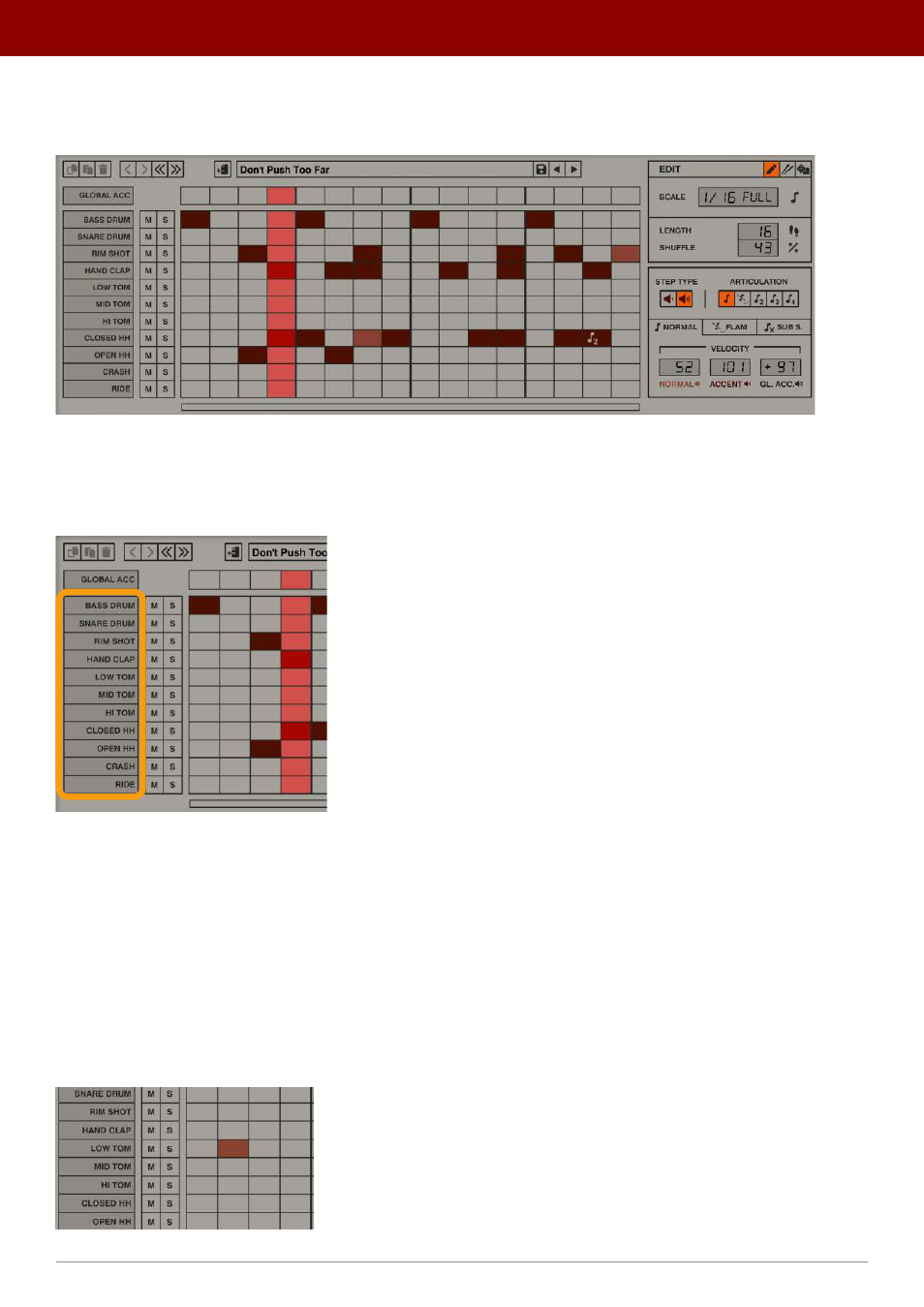
Pattern Editor
is located in the bottom section of the GUI:
The Pattern editor
The grid section is the actual
Sequencer
. Each cell in the grid represents a single sequence step; the X axis represents
time and the Y axis represents tracks for every drum instrument that
Drumazon
features. We can find the instruments’
names on the right side:
The Column with drum sound names
Each step can be enabled as
Normal
(with base loudness), or
Accented
(with increased loudness). The precise values
for both types of steps can be specified for an entire pattern in the
Pattern Properties
section.
Apart from volume for each step, we can define additional attributes and articulations; such as
Flam
(or added grace
note) and
Sub Step
(or subdivisions of 2, 3 or 4 repetitions per step).
Editing sequences
We can “draw” over the grid using mouse clicks to set / unset the steps (working as an on/off toggle). A filled rectangle
means the step has been set / enabled:
An enabled step
37
inteRface oveRview •
Play modes