Access from web browser, Start your web browser, Set user name and password – Panasonic TH-86EQ2W 85.6" 4K Digital Signage Display User Manual
Page 96: Click [ok
96
English
3 Deselect the [Web Proxy] and [Automatic Proxy
Configuration] boxes.
4 Click [Apply Now].
Enable JavaScript
1 Display [Security] of Safari.
2 Select [Enable JavaScript] under [Web content].
Access from Web Browser
Access to the TOP screen of the Web browser control
using a Web browser.
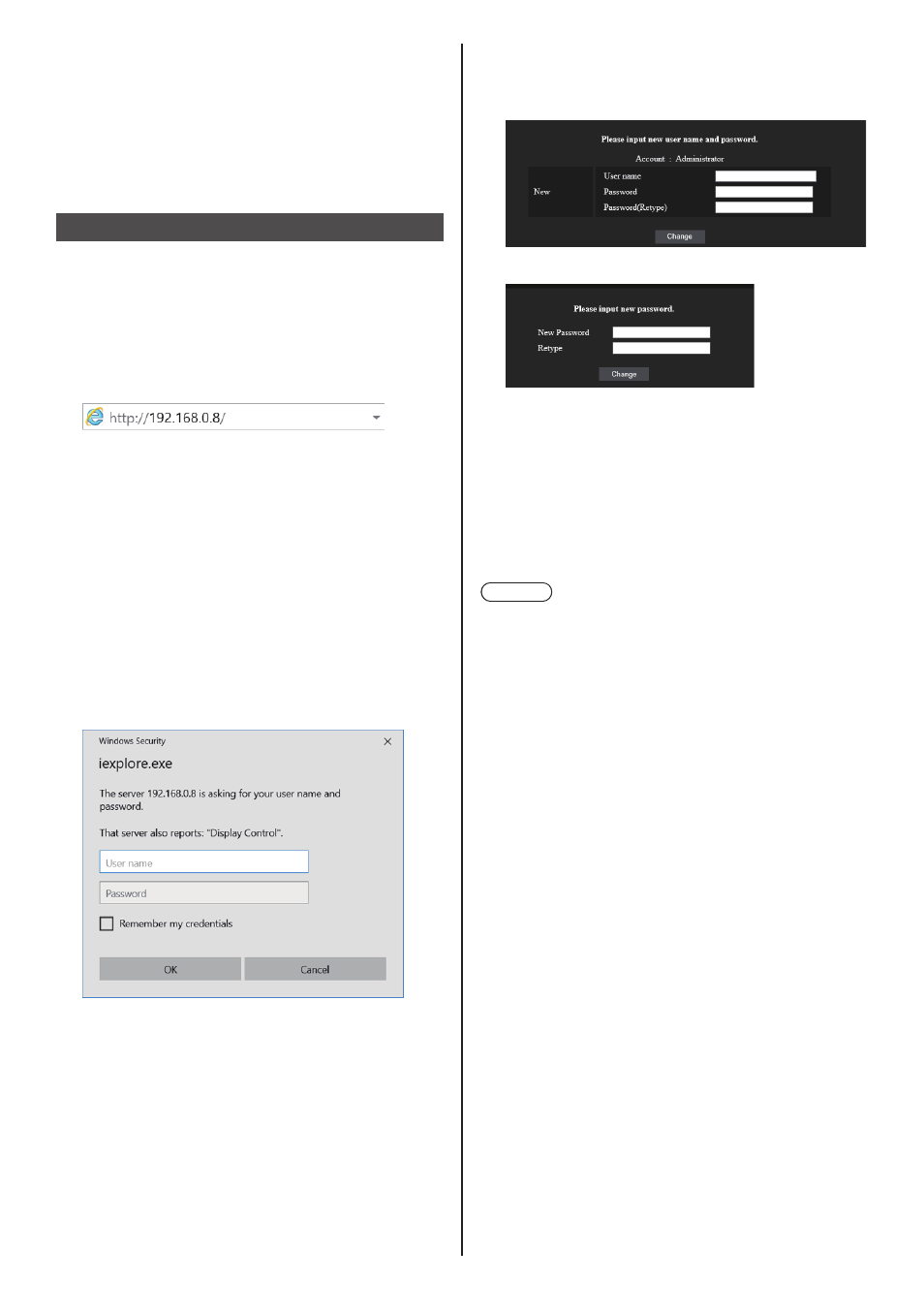
1
Start your Web browser.
2
Enter the IP address set with the
[LAN setup] of the unit.
(see page 76)
When the user name and password have been set
in [Administrator account settings] (see pages 34
and 74) or with the WEB control function, proceed
to step
3
.
When they have not been set and the WEB control
function is used for the first time, proceed to step
4
.
Do the same in the case of user privileges.
3
Enter the user name and password
when the Authentication screen is
displayed.
Proceed to step
7
.
When the password has not been set with the user
privileges, click [OK] and proceed to step
4
.
4
Set user name and password.
Change User name / Password page is displayed.
For [Administrator]
For [User]
5
Enter the new user name and password, and
then click [Change].
The screen of step 3 is displayed again.
6
Enter the new user name and password.
Enter the new user name and password set in step
5.
7
Click [OK].
Note
●
The password used here is common to the password
specified in [Network settings] - [Administrator
account settings]. (see page 74)
●
The default settings are as described below:
•
Administrator privilege
Specify the user name and password you set for
[Administrator account settings]. (see page 34)
•
User permission
User name: dispuser
Password: None
Change password first.
●
When [Reset] for [Network settings] of this unit is
executed, the password change is also required after
log-in. (see page 78)
●
The password can be changed on the Password
Setup screen after logging in (see page 101). The
user name can be changed when connecting by
logging in with administer privileges.
●
If a wrong user name/password is entered 3 times
when you log in, the field will be locked for several
minutes.
●
When using [Detailed set up] (see page 98), log in
with the administrator rights.
●
Depending on the browser, displayed operations may
change.
●
Under no circumstances, Panasonic Connect Co.,
Ltd. or its associated companies will ask customers
their password directly.
Even if you are asked directly, please do not reveal
your password.