Details screen, P. 79 – Oki MC363dn User Manual
Page 79
- 79 -
5. smart PrintSuperVision (sPSV)
Details Screen
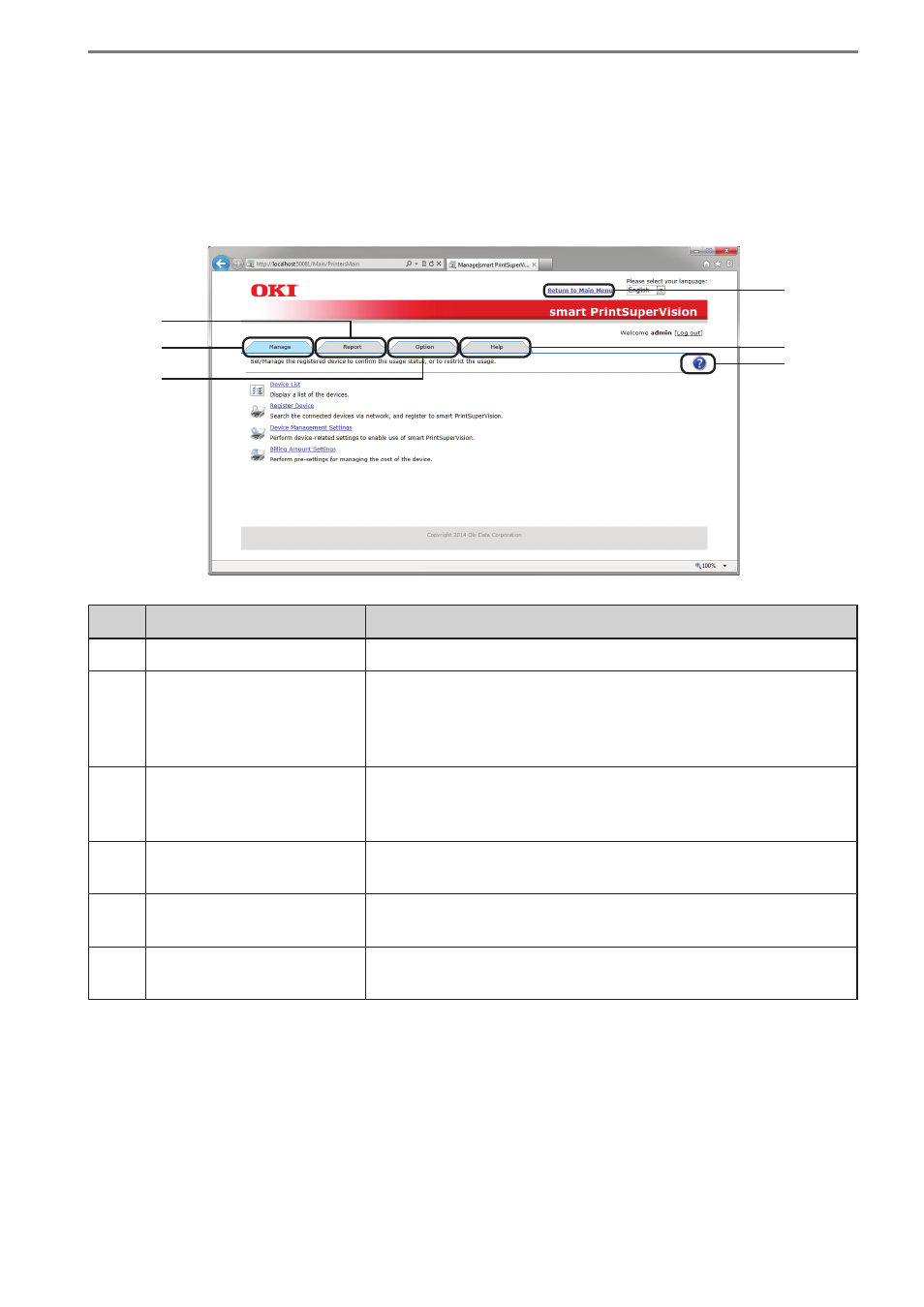
This window is arranged according to types of sPSV function. Functions are separated by tabs.
Click [Go to Details Screen] on the main menu window to display the top page of the Details
Screen (top page of the [Manage] tab).
(1)
(5)
(2)
(6)
(3)
(4)
No.
Item
Details
(1)
[Return to Main Menu]
Click to switch to the main menu. ⇒ P. 51
(2)
[Manage] Tab
Configure functions related to the device, such as device
registration, access control settings to the device and billing
amount settings. Click to switch to the options window.
⇒ P. 80
(3)
[Report] Tab
Check the device usage status or sPSV operating status,
and configure settings such as email notification receipt
settings. Click to switch to the options window. ⇒ P. 89
(4)
[Option] Tab
Configure the settings of various options used with this
software. Click to switch to the options window. ⇒ P. 92
(5)
[Help] Tab
Browse sPSV help information, version information and
other related information. ⇒ P. 101
(6)
Help Icon
Click to display help related to the currently displayed page
in a different window. ⇒ P. 105