Installation – Areca ARC-8050T3U 6-Bay Thunder3 Desktop RAID Storage Array User Manual
Page 31
INSTALLATION
31
3. ARC-8050T3U RAID storage automatically turns off when the
computer to which it is attached sleeps or is disconnected.
•
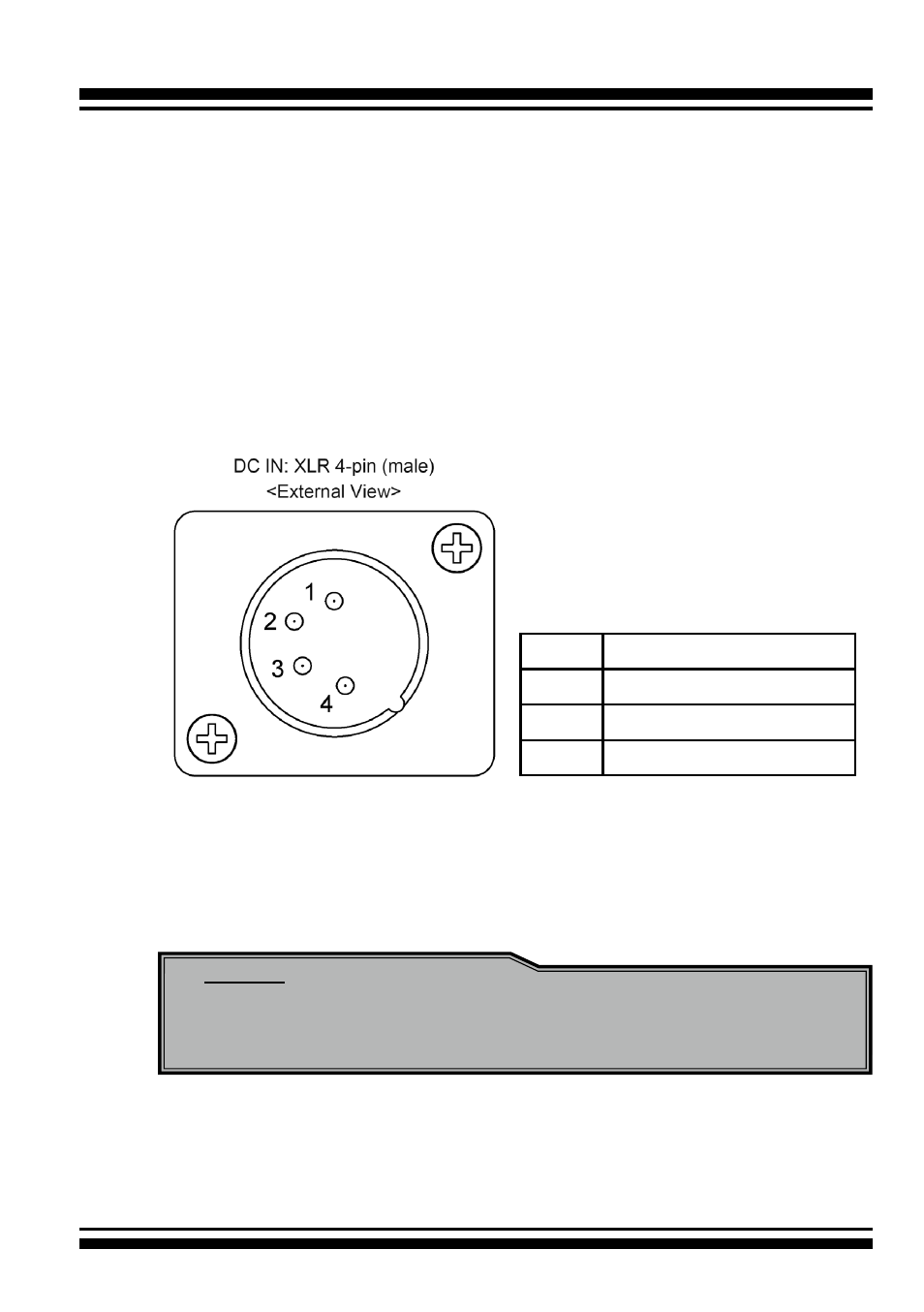
To power the ARC-8050T3U-6M using 4-Pin XLR D.C.
Power Connections:
There is an industry standard 4-pin XLR on the ARC-8050T3U-
6M to accept alternative power from a 4pin XLR power source
(use battery power or supplied AC Adapter). There is no univer-
sal standard for this, however the most common convention for
DC power on ARC-8050T3U-6M XLR 4-pin connectors is:
pin 1
GND (0V)
pin 2
NC
pin 3
NC
pin 4
EXT DC (+11.5~17.5V)
The connector on ARC-8050T3U-6M is male. Check and double
check that the wiring is correct to your equipment before con-
necting DC power source to ARC-8050T3U-6M.
Note:
You can press and hold the “Reset” button for 3 seconds to
force the RAID storage power on or off.
When you are finished installing the ARC-8050T3U RAID storage,
you can set up the RAID volume using McRAID storage manager
or LCD to set up RAID volumes.