Manual focusing (mf), Mf assist functions, Focus peaking – LEICA Q3 Digital Camera User Manual
Page 100: Manual focusing (mf) mf assist functions
PHOTOGRAPHY ▸ FOCUSING
100
MANUAL FOCUSING (MF)
Focusing manually may in some situations be a better choice than
autofocus.
– the same setting is used for several shoots
– it would take longer to use the metering memory lock function
– the setting is to be kept at infinity for landscape pictures
– poor, i.e. very dark lighting conditions prevent AF operation or
would slow it down
▸
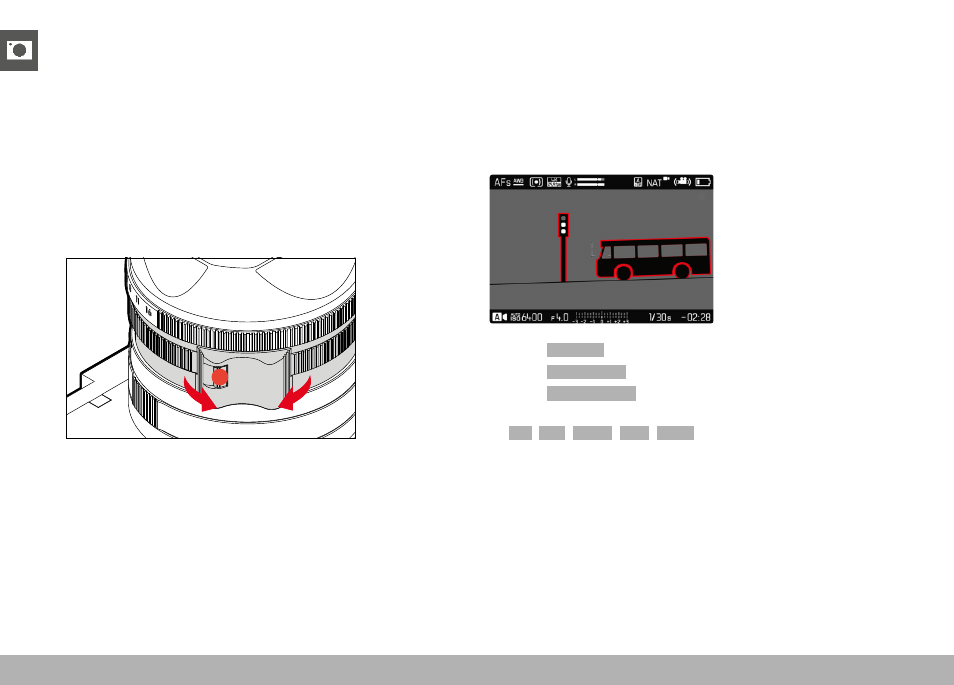
Move the focus ring out of the
AF
position
(press and hold the AF/MF lock release)
▸
Turn the focus ring until the desired part of the object is in clear
focus
MF ASSIST FUNCTIONS
The following assist functions are available in MF mode.
FOCUS PEAKING
This assist function highlights the edges of in focus subject elements
in color. The color can be user-specified. The sensitivity can be
additionally adjusted. See p. 87 for settings.
▸
Select
Focusing
in the main menu
▸
Select
Focus Assist
▸
Select
Focus Peaking
▸
Select the desired setting
(
Off
,
Red
,
Green
,
Blue
,
White
)
▸
Select an image section
▸
Turn the focus ring to mark the desired subject elements
Note
• Focus peaking is based on subject contrast, i.e. differences be-
tween light and dark. As a result, high contrast subject elements
could be marked, even if they are not completely in focus.