Photography, Drive mode – LEICA Q3 Digital Camera User Manual
Page 92
PHOTOGRAPHY ▸ DRIVE MODE
92
PHOTOGRAPHY
The settings described in this chapter only apply for photo mode.
They are therefore part of the photo menu and must always be
accessed and configured from within photo mode (see chapter
“Camera operation” in the section “Menu Control”). Any menu
items of the same name in the video menu are entirely independent
of these.
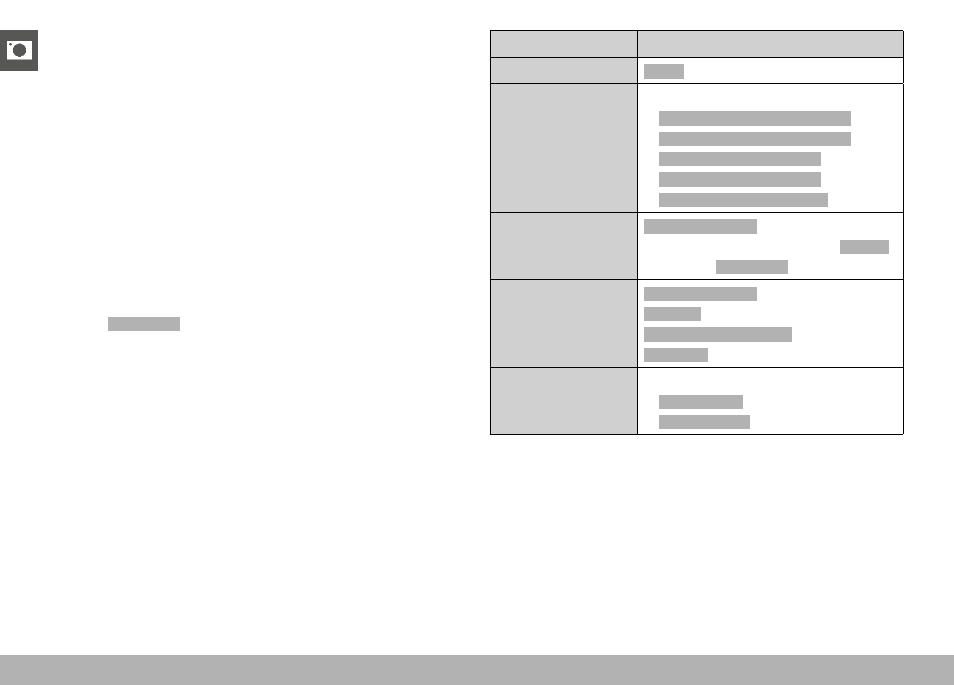
DRIVE MODE
The functions and settings described in the following generally
refer to the exposure of individual shots. In addition to single frame
shooting, the Leica Q3 offers a number of other exposure modes.
Please read the relevant sections for information about functional-
ities and setting options.
▸
Select
Drive Mode
in the main menu
▸
Select the desired function options
Mode
Setting options / Variants
Single frame shooting
Single
Continuous shooting
(see p. 120)
Speed:
–
Continuous - 2 fps / 14 bit / AF
–
Continuous - 4 fps / 14 bit / AF
–
Continuous - 7 fps / 14 bit
–
Continuous - 9 fps / 12 bit
–
Continuous - 15 fps / 12 bit
Interval shooting
(see p. 121)
Number of Frames
Interval between the shootings (
Interval
)
Delay time (
Countdown
)
Exposure bracketing
(see p. 123)
Number of Frames
(3 or 5)
EV Steps
Exposure Compensation
Automatic
Self-timer
(see p. 124)
Delay time:
–
Self-timer 2 s
–
Self-timer 12 s