Settings in photo and video mode – LEICA Q3 Digital Camera User Manual
Page 47
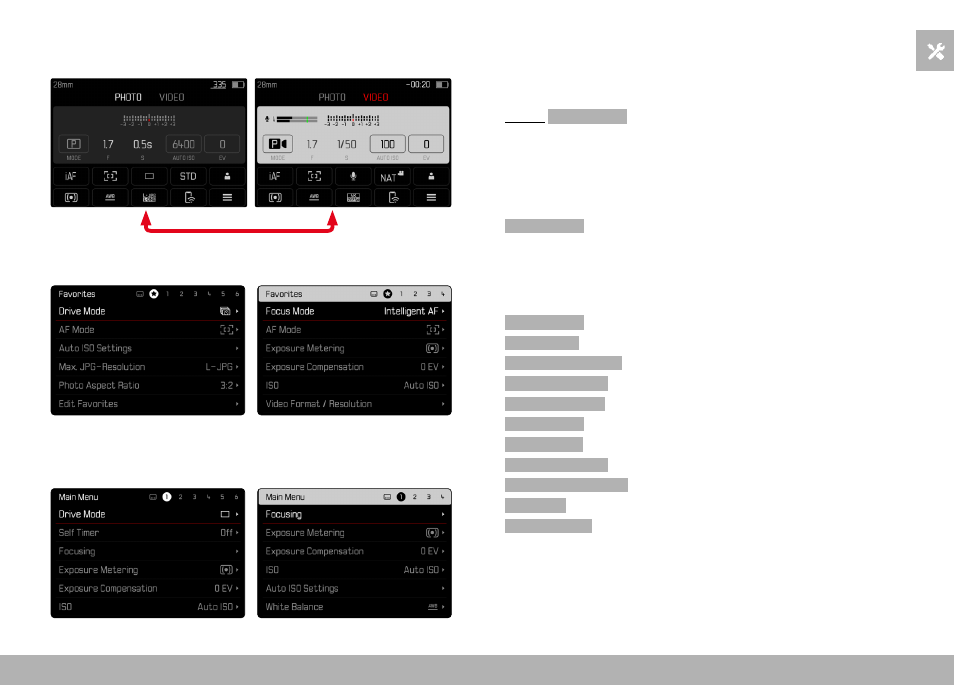
CAMERA OPERATION ▸ MENU CONTROL
47
STATUS SCREEN
Photo
Video
FAVORITES
MAIN MENU
SETTINGS IN PHOTO AND VIDEO MODE
The available settings depend on the operating mode (Photo or
Video) currently in use.
– All menu items and their sub items available in the main menu
before
Digital Zoom
are mode-specific. That means that any
changes made here, will only apply for the operating mode
currently in use. Any menu items of the same name in the other
operating mode will be unaffected. That includes settings for
focusing, exposure metering or white balance.
– All settings and functions after that in the main menu (including
Digital Zoom
) are available in both operating modes and have
global effect. A setting selected in one of the modes will also
apply to the other.
Settings and functions with global effect are:
–
Digital Zoom
–
User Profile
–
Capture Assistants
–
Play Mode Setup
–
Display Settings
–
Leica FOTOS
–
Format Card
–
Camera Settings
–
Camera Information
–
Language
–
Reset Camera