Color profile, Monochrome profile, Customizing video profiles – LEICA Q3 Digital Camera User Manual
Page 160
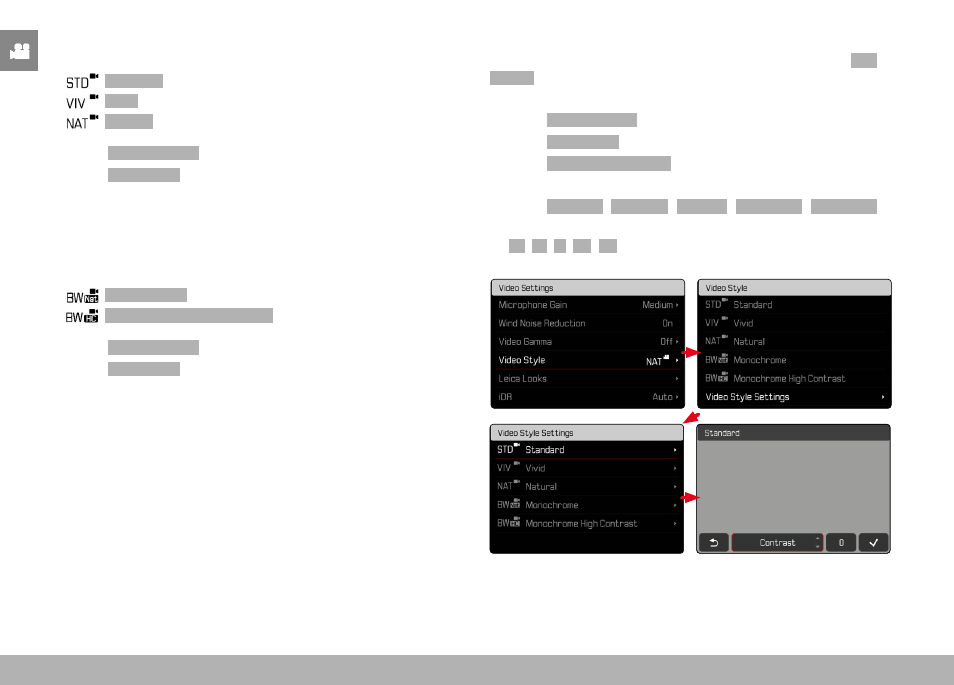
VIDEO SETTINGS ▸ IMAGE PROPERTIES
160
COLOR PROFILE
3 pre-configured color profiles are available:
–
Standard
–
Vivid
–
Natural
▸
Select
Video Settings
in the main menu
▸
Select
Video Style
▸
Select a profile
MONOCHROME PROFILE
There are two additional profiles available for monochrome video
recordings:
–
Monochrome
–
Monochrome High Contrast
▸
Select
Video Settings
in the main menu
▸
Select
Video Style
▸
Select a profile
CUSTOMIZING VIDEO PROFILES
These parameters can be adjusted for all available profiles (
Sat-
uration
only for color profiles). See p. 56 for details on menu
operation.
▸
Select
Video Settings
in the main menu
▸
Select
Video Style
▸
Select
Video Style Settings
▸
Select a profile
▸
Select
Contrast
/
Highlight
/
Shadow
/
Sharpness
/
Saturation
▸
Select the desired level
(
-2
,
-1
,
0
,
+1
,
+2
)