LEICA Q3 Digital Camera User Manual
Page 34
Advertising
PREPARATION ▸ INSERTING/REMOVING THE MEMORY CARD
34
▸
Ensure that the camera is switched OFF (see p. 38)
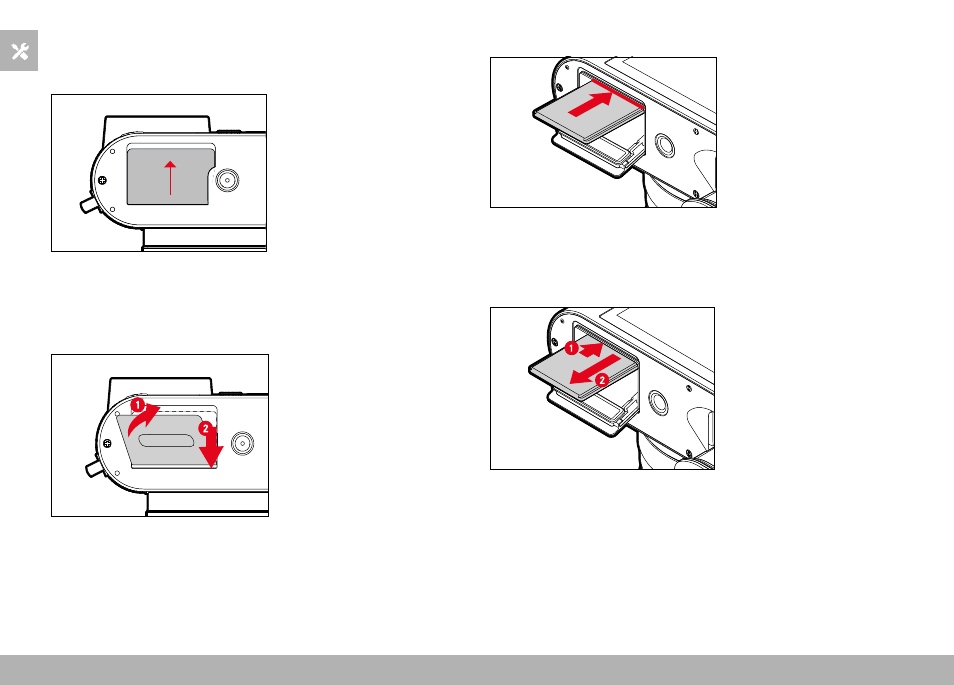
OPENING THE COVER OVER THE MEMORY CARD SLOT
▸
Slide the cover as shown in the illustration until you hear a click
• The cover lifts automatically.
CLOSING THE COVER OVER THE MEMORY CARD SLOT
▸
Close and hold down the cover
▸
Slide the cover as shown in the illustration until it audibly clicks
into place
INSERTION
▸
Push the memory card into the slot with the contacts pointing to-
wards the LCD panel until you hear and feel it clicking into place
REMOVAL
▸
Push down on the card until you hear a click
• The card pushes out slightly.
▸
Remove the memory card
Advertising