LEICA Q3 Digital Camera User Manual
Page 50
Advertising
CAMERA OPERATION ▸ MENU CONTROL
50
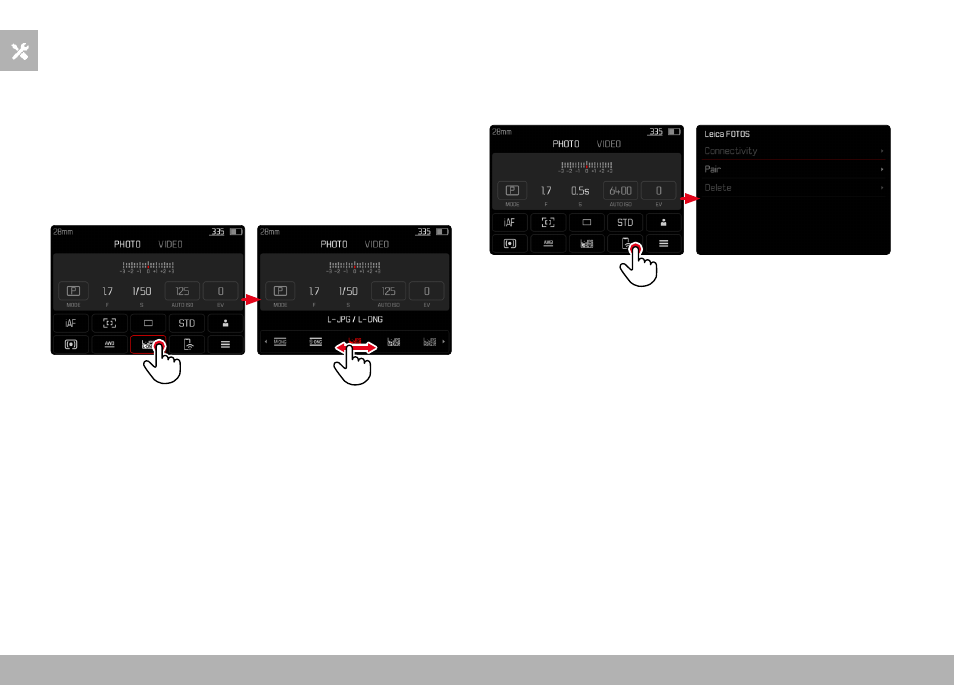
SELECTING SETTINGS
Settings can be selected in various ways from within the status
screen. The setting types vary from menu to menu.
▸
Tap the desired control panel
• The relevant menu appears.
DIRECT SETTINGS
A version of the menu bar appears in the lower area of the status
screen (see p. 55).
▸
Select the desired function directly or swipe
ACCESSING A STANDARD SUBMENU
These menus behave as if they were accessed from within the main
menu (see p. 52). Touch control is therefore unavailable. From
there, you return to the status screen and not to the next higher
menu item.
▸
Select the desired setting
Advertising