Video editing, Setting the volume, Playback mode ▸ video playback 221 – LEICA Q3 Digital Camera User Manual
Page 221: Using touch control
Advertising
PLAYBACK MODE ▸ VIDEO PLAYBACK
221
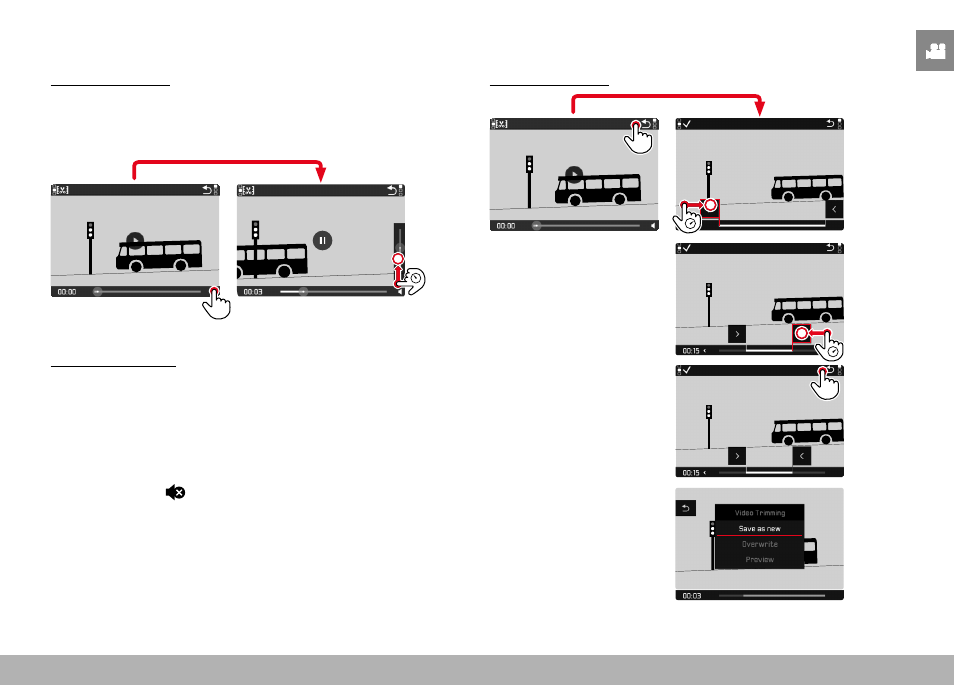
SETTING THE VOLUME
Using touch control
While the control elements are visible:
▸
Tap the volume icon
▸
Tap the volume bar at the desired position
INFO
1/8000
2.8
F
12500
ISO
EV
SET
-3 2
1 0
2
1
3+
8234
12
MP
18:26
Using button control
▸
Press the directional pad up/down
• The volume bar appears.
▸
Press the directional pad up (louder) or down (quieter)
Note
• Sound is switched off at the lowest part of the bar and the volume
icon changes to .
VIDEO EDITING
Using touch control
INFO
1/8000
2.8
F
12500
ISO
EV
SET
-3 2
1 0
2
1
3+
8234
12
MP
Advertising