Manual exposure setting – m – LEICA Q3 Digital Camera User Manual
Page 113
PHOTOGRAPHY ▸ EXPOSURE
113
MANUAL EXPOSURE SETTING – M
The following manual settings for shutter speed and aperture are a
good choice:
– to create a special image mood that can only be achieved with a
very specific type of exposure
– to ensure a perfectly identical exposure for multiple images with
different cropped sections
▸
Select
Scene Mode
in the main menu
▸
Select
P-A-S-M
▸
Set the desired exposure manually (using the shutter-speed dial
and the aperture ring of the lens).
• The exposure compensation is done using the scale of the light
balance.
▸
Tap and hold the shutter button
• Exposure information is displayed at the bottom of the screen.
• All other visible displays of the info bars will be hidden.
▸
Shutter release
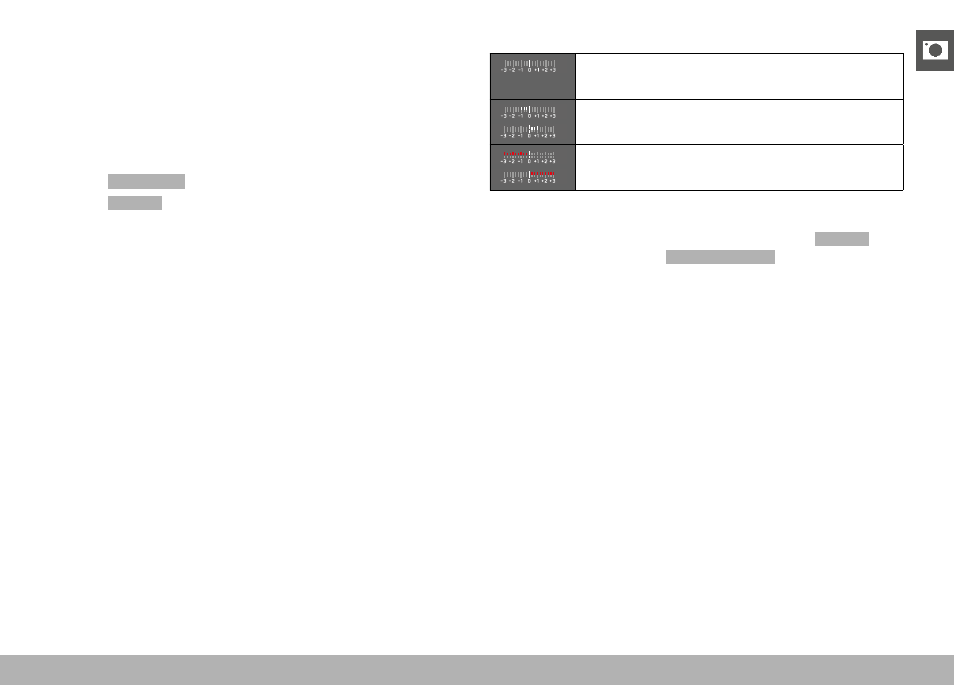
Displays on the light balance:
Correct exposure
Underexposure or overexposure by the displayed
value
Underexposure or overexposure by more than 3 EV
(Exposure Value)
Notes
• The screen image will show an exposure preview if
P-A-S-M
is
selected in the menu item
Exposure Preview
(after exposure
metering, see p. 116).
• The shutter-speed dial must be clicked to one of the engraved
exposure shutter speeds.