Special shooting modes, Digital zoom – LEICA Q3 Digital Camera User Manual
Page 125
PHOTOGRAPHY ▸ SPECIAL SHOOTING MODES
125
SPECIAL SHOOTING MODES
DIGITAL ZOOM
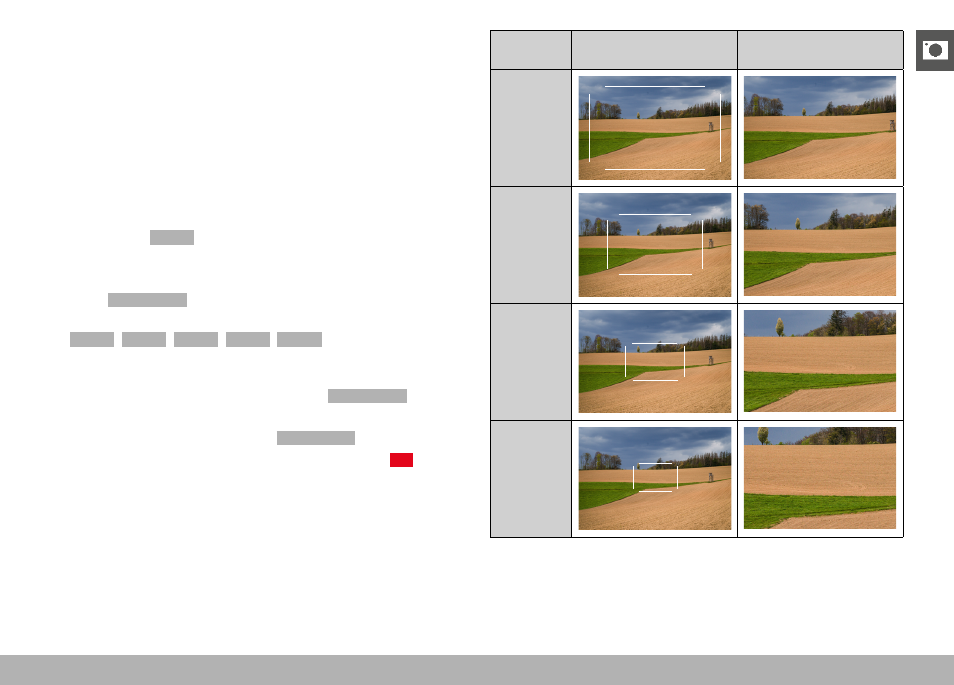
Several other cropped section sizes are available in addition to the
Summilux 28 f/1.7 ASPH. image sections. These are similar to the
focal lengths 35 mm, 50 mm, 75 mm, or 90 mm.
A frame appears around the image section on screen, indicating the
final image size. Th magnification level is displayed as an equivalent
focal length, i.e. the system displays the focal length corresponding
to the image section shown.
Factory setting:
28 mm
(no Digital Zoom)
PERMANENT SETTING
▸
Select
Digital Zoom
in the main menu
▸
Select the desired setting
(
28 mm
,
35 mm
,
50 mm
,
75 mm
,
90 mm
)
DIRECT ZOOM CHANGE
The zoom level can be switched quickly if the
Digital Zoom
function
is assigned to a function button (see p. 59).
▸
Press the function button with the
Digital Zoom
assignment
• In the factory setting, that will be the FN Button 1 (
+13
).
• A frame appears around the image section on screen, indicat-
ing the final image size.
• The display cycles through the magnification factors each time
the button is pressed.
• The set level will remain until the next change.
Digital
Zoom
In shooting mode
In Review mode
Digital
Zoom
35 mm
35
Digital
Zoom
50 mm
50
Digital
Zoom
75 mm
75
Digital
Zoom
90 mm
90