Deleting multiple images – LEICA Q3 Digital Camera User Manual
Page 150
REVIEW MODE ▸ DELETING IMAGES
150
Cancelling a deletion and returning to normal review mode
▸
Select the “Go back” icon
(tap the icon directly or press the
PLAY
button)
Notes
• The Delete screen can be called up only by pressing the
MENU
button when in overview mode, because the menu function
Delete
of the “Play menu” is not available in this context.
• The “Scroll” and “Magnify” functions continue to be available
when the “Delete” screen is active.
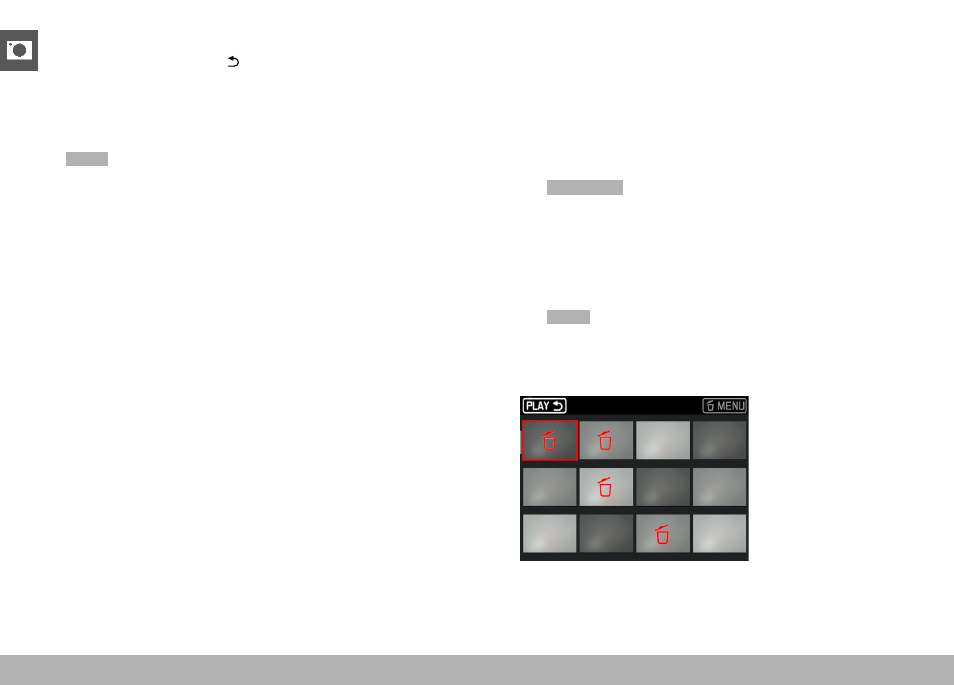
DELETING MULTIPLE IMAGES
Several images can be marked in a Delete overview with twelve
thumbnails and can then be deleted all at once. This overview can
be reached in two ways.
▸
Turn the thumbwheel to the left
• The overview screen appears.
▸
Press the
MENU
button
▸
Select
Delete Multi
in the play menu
• The Delete overview appears.
or
▸
Press the
MENU
button
▸
Select
Delete
in the play menu
• The Delete screen appears.
▸
Turn the thumbwheel to the left
• The Delete overview appears.