Level gauge – LEICA Q3 Digital Camera User Manual
Page 179
PRACTICAL DEFAULT SETTINGS ▸ AUXILIARY DISPLAYS
179
LEVEL GAUGE
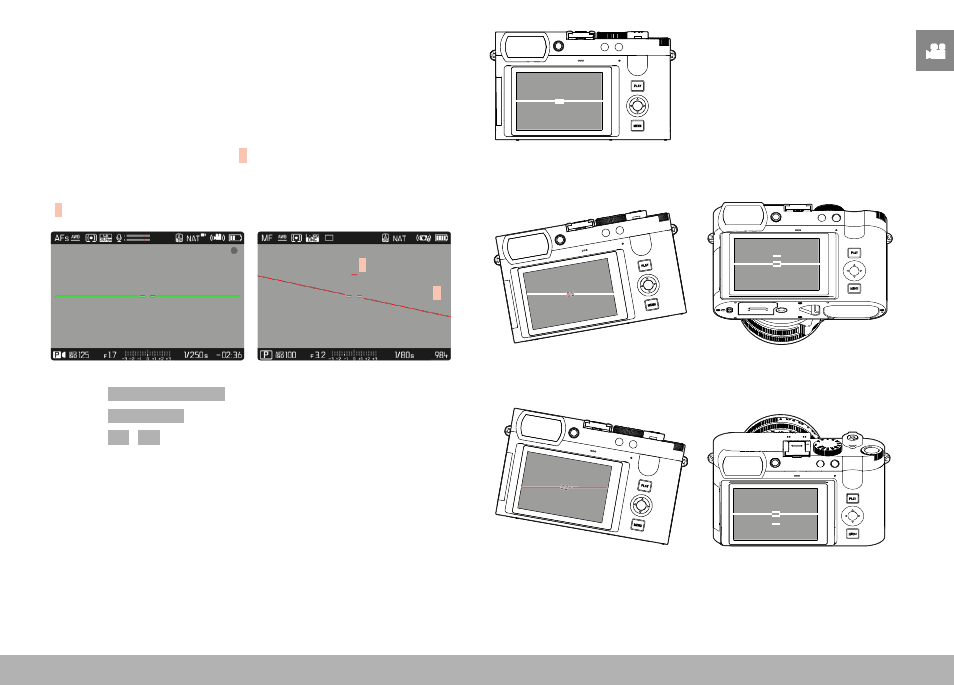
The integrated sensors of the camera show its orientation. These
indicators ensure exact camera orientation along the longitudinal
and transverse axes of critical objects, e.g. architecture.
Deviations in relation to the longitudinal axis (i.e. when the camera
is tilted up or down in the direction of view) are indicated by a short
line in the center of the image (
1
). Deviations in relation to the
transverse axis (when the camera is tilted to the left or right) are
indicated by two long lines to the left and right of the image center
(
2
).
2
1
▸
Select
Capture Assistants
in the main menu
▸
Select
Level Gauge
▸
Select
On
/
Off
Note
• The camera will switch the aspect of the level gauge autonomously
for shoots in vertical format.
Correct alignment
Tilted laterally to the left
Tilted downward in the direction
of view
Tilted laterally to the right
Tilted upward in the direction
of view