Customizing photo profiles, Leica looks – LEICA Q3 Digital Camera User Manual
Page 75
STILL IMAGE SETTINGS ▸ IMAGE PROPERTIES
75
CUSTOMIZING PHOTO PROFILES
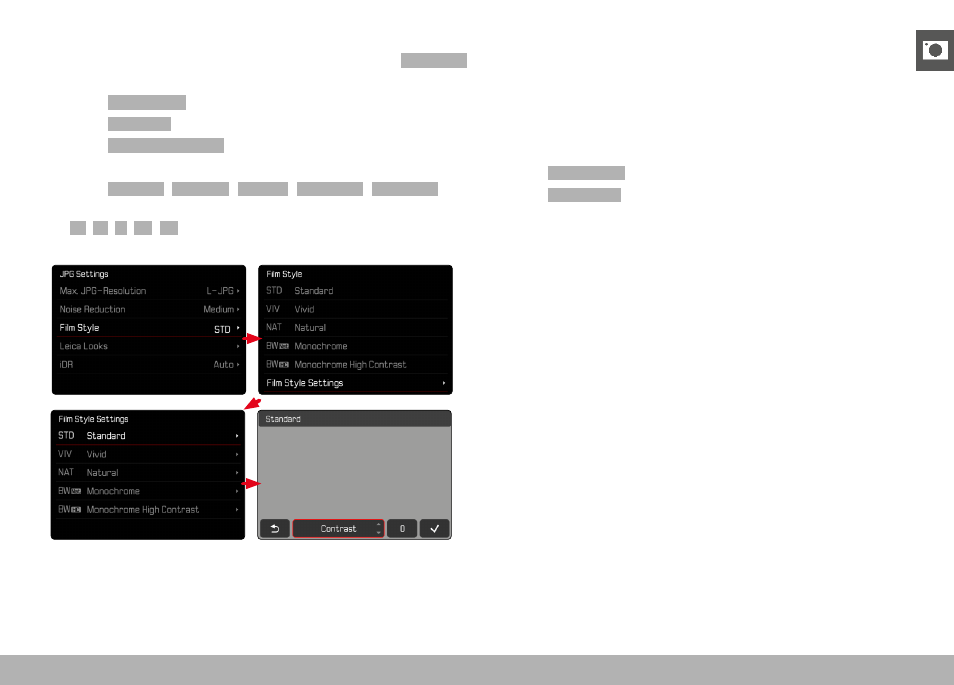
These parameters can be adjusted for all available profiles (
Saturation
only for color profiles). See p. 56 for details on menu operation.
▸
Select
JPG Settings
in the main menu
▸
Select
Film Style
▸
Select
Film Style Settings
▸
Select a profile
▸
Select
Contrast
/
Highlight
/
Shadow
/
Sharpness
/
Saturation
▸
Select the desired level
(
-2
,
-1
,
0
,
+1
,
+2
)
▸
Confirm
LEICA LOOKS
Leica Looks offer a selection of professionally aligned, pre-defined
profiles. These can be conveniently loaded to the camera via Leica
FOTOS.
There are six memory slots available for Leica Looks.
Applying a Look
▸
Select
JPG Settings
in the main menu
▸
Select
Leica Looks
▸
Select a memory slot
Selecting a memory slot
Leica Looks can be easily downloaded to the camera via Leica
FOTOS.
▸
Connecting to Leica FOTOS
▸
Follow the instructions provided by the Leica FOTOS app
Note
• The memory space assignments from the downloaded Leica
Looks apply for photo and video mode alike. The various profiles
can be selected individually for the two operating modes.