Touch af + shutter button, Touch af in evf mode, Auxiliary displays – LEICA Q3 Digital Camera User Manual
Page 85: Touch af + shutter button touch af in evf mode
PRACTICAL DEFAULT SETTINGS ▸ AUXILIARY DISPLAYS
85
TOUCH AF + SHUTTER BUTTON
The combination
Touch AF + Release
allows a direct placement of
the AF frame for immediate recording.
▸
Select
Focusing
in the main menu
▸
Select
Touch AF
▸
Select
Touch AF + Release
▸
Tap the LCD panel in the desired position
Note
• The AF frame cannot be reset as usual via a double tap if
Touch
AF + Release
is activated.
TOUCH AF IN EVF MODE
Touch AF is deactivated by default when EVF is in use to prevent
any inadvertent altering of the AF frame. AF Quick Setting (see
p. 189) continues to be accessible. This function can also be dis-
abled if that is not wanted (e.g. when focusing with the left eye).
Factory setting:
Off
▸
Select
Focusing
in the main menu
▸
Select
Touch AF in EVF
▸
Select the desired setting
(
On
,
AF Quick Setting only
,
Off
)
–
On
– Positioning the AF frame (tap)
– Accessing the AF Quick Setting (tap and hold)
–
AF Quick Setting only
– Accessing the AF Quick Setting (tap and hold)
–
Off
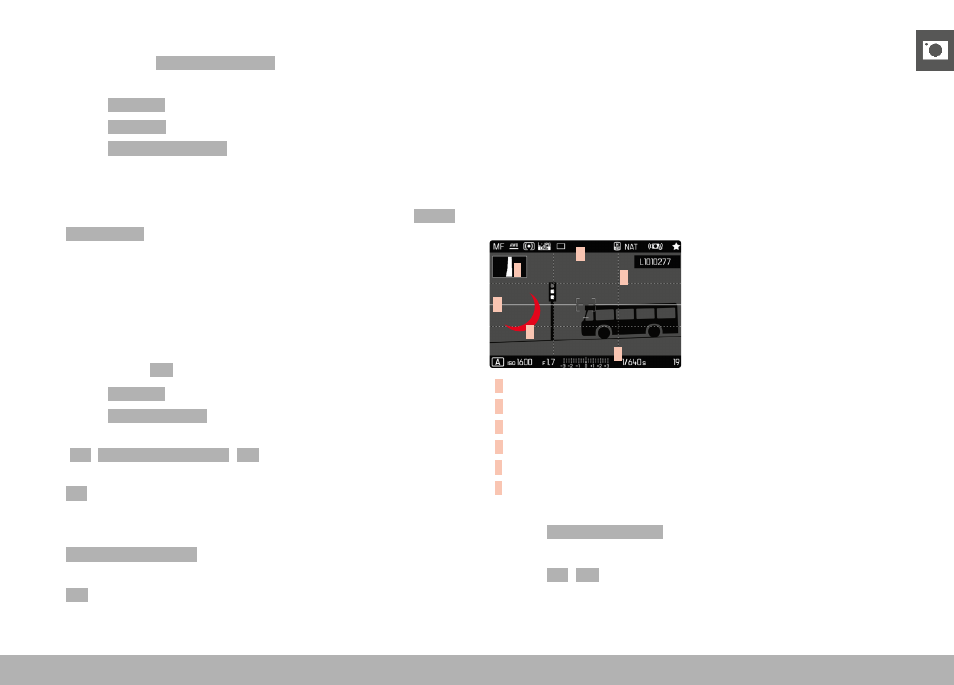
AUXILIARY DISPLAYS
You can select a number of other displays in addition to the standard
information contained in the header and footer to adapt the screen
image to your needs. The following functions are available:
– Grid (only shooting mode, see p. 86)
– Focus Peaking (see p. 87)
– Clipping (see p. 89)
– Level Gauge (only shooting mode, see p. 88)
– Histogram (see p. 89)
E
A
A
B
D
C
A
Info Bars (= header and footer line)
B
Grid
C
Focus peaking
D
Clipping
E
Level gauge
F
Histogram
▸
Select
Capture Assistants
in the main menu
▸
Select the desired function
▸
Select
On
/
Off