Menu control, Control elements, Menu sections – LEICA Q3 Digital Camera User Manual
Page 46: Control elements menu sections
CAMERA OPERATION ▸ MENU CONTROL
46
MENU CONTROL
CONTROL ELEMENTS
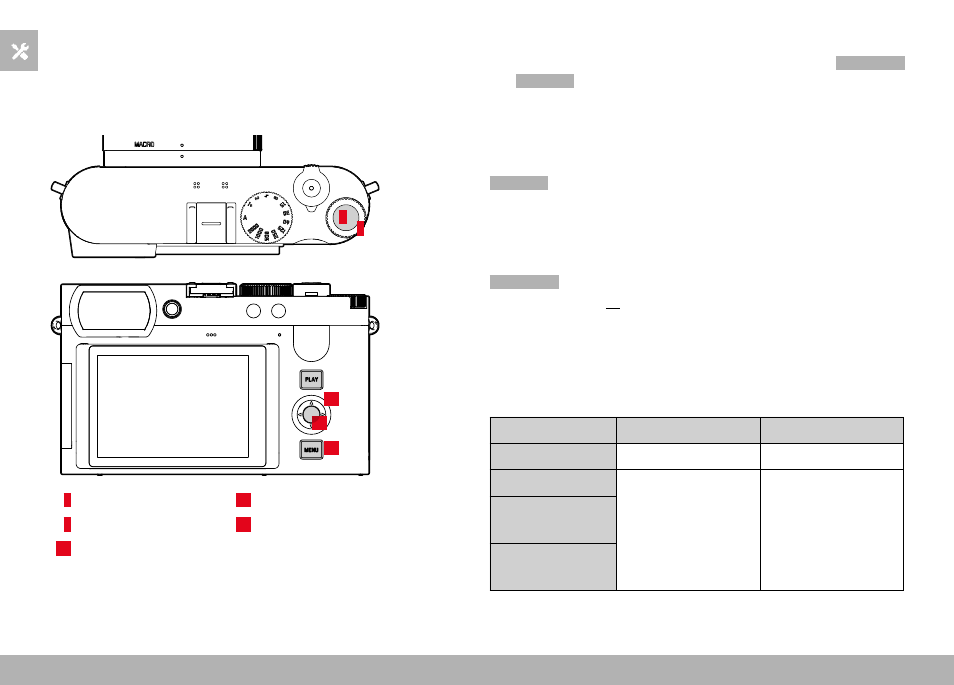
The following elements are used for menu control.
5
19
20
21
4
4
Thumbwheel
20
Directional pad
5
Thumbwheel button
21
MENU
button
19
Center button
MENU SECTIONS
The following menu sections are available: Status Screen,
Main Menu
and
Favorites
.
Status screen:
– quick access to the most important settings
Favorites
:
– your custom list (see p. 58 for details on how to manage this list)
• The favorites menu can only be displayed if it has at least one
menu item assigned.
Main Menu
:
– offers access to all menu items
– contains various submenus
The currently active operating mode (Photo or Video) is highlighted
in color in all menu areas.
Section
PHOTO
VIDEO
Status screen
Dark background
Bright background
Favorites
Dark header line
Bright header line
Main menu
(top level)
Main menu
(Submenus)