Af quick setting, Accessing af quick setting, Adjusting the af frame size – LEICA Q3 Digital Camera User Manual
Page 189: Mf assist functions, 189) c
RECORDING VIDEO ▸ FOCUSING
189
AF QUICK SETTING
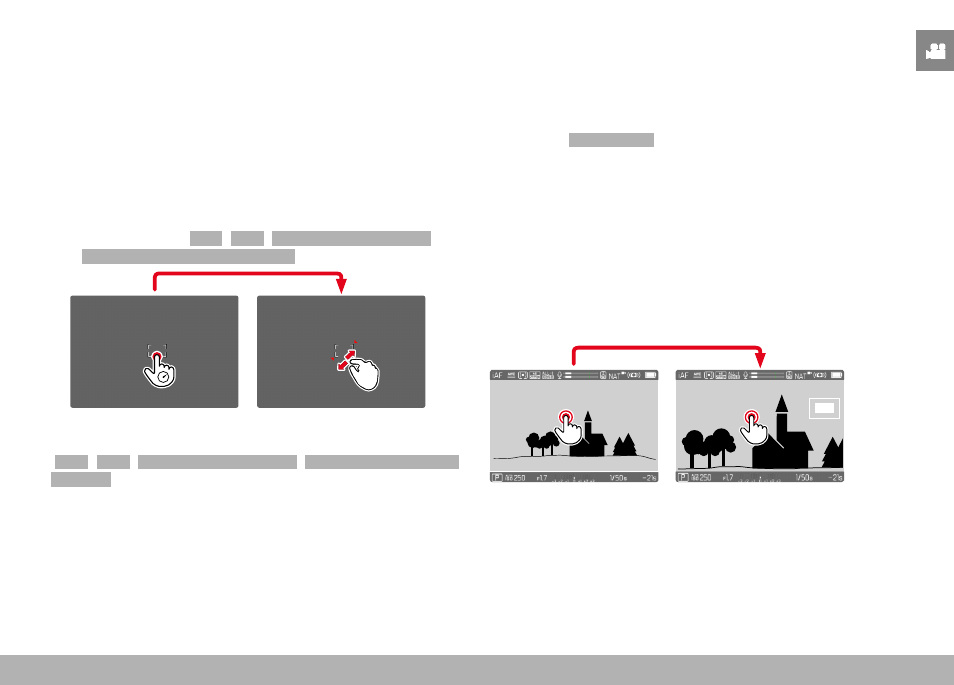
The AF Quick Setting allows quick changes to the focus frame size
in some AF metering methods.
The screen image will remains visible continuously while settings
are being adjusted.
ACCESSING AF QUICK SETTING
▸
Tap and hold the LCD panel
• All auxiliary displays are hidden.
• Red triangles appear at two corners of the focus frame if the
metering method
Field
/
Zone
/
Eye/Face/Body Detection
/
Eye/Face/Body + Animal Detection
is set.
ADJUSTING THE AF FRAME SIZE
(
Field
/
Zone
/
Eye/Face/Body Detection
/
Eye/Face/Body + Animal
Detection
only)
▸
Turn the thumbwheel
or
▸
Two-finger pinch/spread
• The size of the AF frame is adjustable in 3 increments.
MF ASSIST FUNCTIONS
ENLARGEMENT IN AF MODE
You can access the enlargement function independent of focusing
for a better assessment of the settings.
The function
Magnification
must be assigned to one of the function
buttons to use this feature (see p. 59). In factory settings, that
will be center button.
Accessing the enlargement function
▸
Press the function button
• An enlarged image section appears. The position of the enlarge-
ment depends on the position of the AF frame.
• The rectangle within the frame at the top right represents the
current magnification, as well as its position in the displayed
cropped section.