LEICA Q3 Digital Camera User Manual
Page 43
Advertising
CAMERA OPERATION ▸ CONTROL ELEMENTS
43
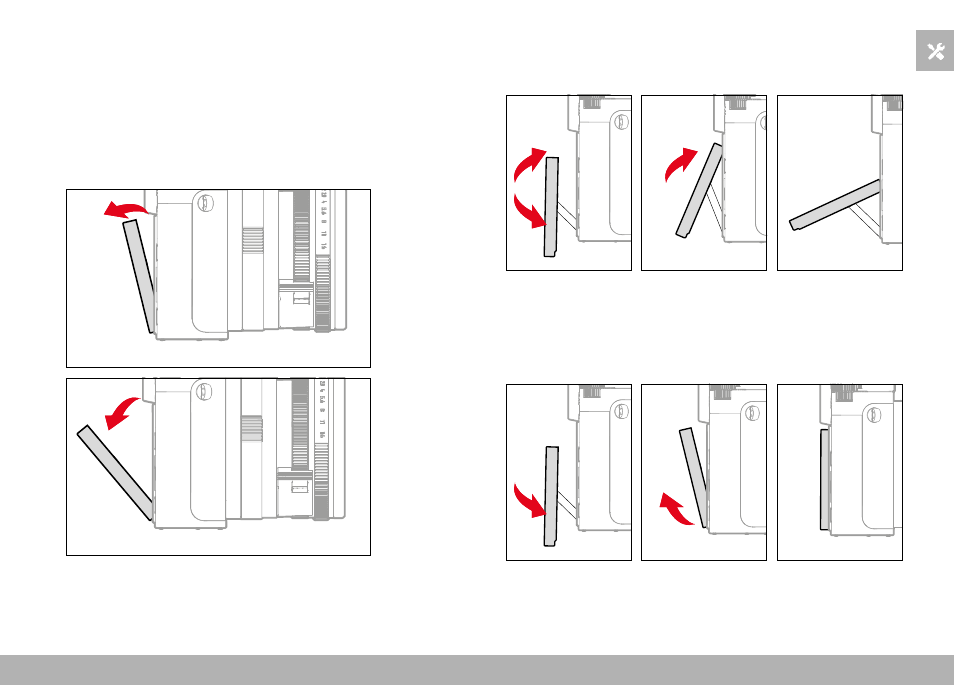
FOLDING OUT THE SCREEN
The screen can be folded out and up or out and down. A convenient
feature for taking pictures from a very low or very high perspective.
The screen folds out in two steps.
Folding out the screen
▸
Grasp the screen at the upper edge.
▸
Carefully fold out the screen along the hinge on the lower edge
Aligning the screen
▸
Once folded out, the screen can be rotated around its center axis
to se the desired angle
Folding the screen in
▸
Swivel the screen downward on its center axis as needed
▸
Once straight, fold the screen along its hinge on the bottom edge
to lie flat against the rear of the camera
Advertising