Exposure control, Exposure preview – LEICA Q3 Digital Camera User Manual
Page 116
PHOTOGRAPHY ▸ EXPOSURE
116
Under certain conditions, noise reduction will always be active as
long as the function is enabled. That includes shots taken with the T
function, as well as long-term exposure frames with shutter speeds
of ≥ +8 s.
In all other cases, noise reduction depends on a combination of fac-
tors (specifically ISO setting, exposure time, and sensor tempera-
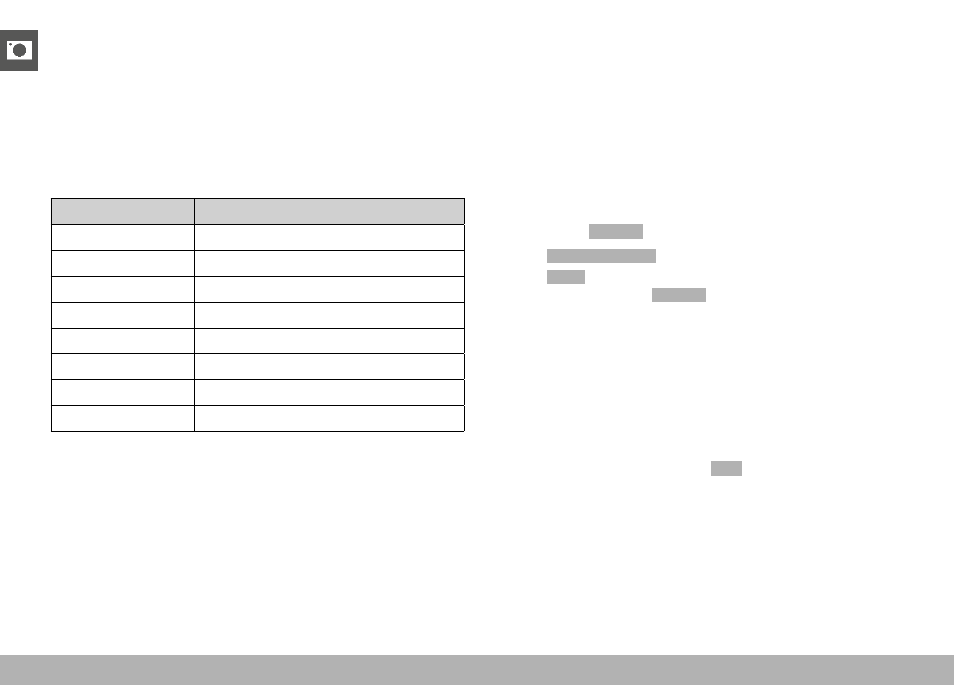
ture). The following table contains a list of shutter speeds typical for
a sensor temperature of 25°C, at which noise reduction would be
applied.
ISO
Shutter speed longer than
100
7 s
200
6.4 s
400
5.9 s
800
5.4 s
1600
4.9 s
3200
4.5 s
6400
4.2 s
≥ 12 500
3.8 s
Noise Reduction can be optionally deactivated (see p. 76).
EXPOSURE CONTROL
EXPOSURE PREVIEW
The brightness of the screen image mirrors the effects of the select-
ed exposure settings when pressing and holding the shutter button
on the first pressure point. That allows an assessment the effect of
the relevant exposure setting on the image before taking the photo.
This will apply as long as the subject brightness and the set expo-
sure don’t result in excessively low or high brightness values.
This function can be disabled for the manual exposure setting (
M
).
Factory setting:
P-A-S-M
▸
Select
Exposure Preview
in the main menu
▸
Select
P-A-S
(only in program AE, aperture-priority AE and shut-
ter-priority AE mode) or
P-A-S-M
(also for manual setting)
Notes
• Depending on ambient lighting conditions, the brightness of the
screen image may differ from that of the actual images, despite
the settings described above. The screen image will appear con-
siderably darker than the – correctly exposed – picture. That is
particularly the case in long-term exposures.
• The exposure preview will also be displayed if exposure metering
is done via another control element (e.g. using the function but-
ton, provided is was assigned the
AE-L
function).